AI Search KPIs: What to Report and What to Ignore

By Esteve Castells




Table of contents
Most AI visibility reports fall apart at the first follow-up question, because the numbers were never defined. “Visibility went from 18% to 24%” invites one obvious question, and if the answer is “we added twelve prompts in week three”, the report is finished and so is your credibility.
We have covered which GEO metrics matter for competitive analysis elsewhere. This is the layer above it: what goes into a monthly report for a marketing lead or a client, and how to define each number so it holds up.
Why an SEO KPI set does not transfer
Classic search reporting leans on things somebody else counted for you: a rank position, an impression count, a click. AI answers give you none of that. There is no position 3, no impression number you own or can audit, and the same prompt asked twice in an hour returns different text, sometimes naming different brands. A usable KPI here needs three properties:
- A stable denominator. Every percentage is a ratio, and the bottom half has to be something you fixed on purpose: answers collected, prompts tracked, competitors named. If it drifts, the trend line is fiction.
- A definition that survives the quarter. Whatever counts as a mention in January has to count that way in June. Improving a definition mid-quarter means restating history.
- Movement you can attribute. If a number moves and nobody can name a plausible cause, treat it as a reading until someone can.
The question that sinks most AI visibility reports is “what was the denominator last month?” Good work gets dismissed over that question all the time, because prompts were added mid-month and nobody wrote it down. My advice is boring on purpose: freeze the prompt set and the competitor list for a quarter, and put the definitions in writing before the first report goes out.
 Esteve Castells Co-founder, LLM Pulse
The KPIs worth reporting
Brand Visibility (mention rate)
Answers mentioning you, divided by answers collected, times 100. This is the headline. It moves when models start or stop naming you on prompts you already track, and it reacts to model updates unrelated to your marketing. Report it per model as well as blended: a blend hides the month where ChatGPT improved and Perplexity collapsed.
The easy way to game it is adding prompts you already win and dropping the ones you lose. The denominator shifts, the percentage rises, and nothing real has changed. Freeze the prompt set for the quarter and annotate any addition as a version change.
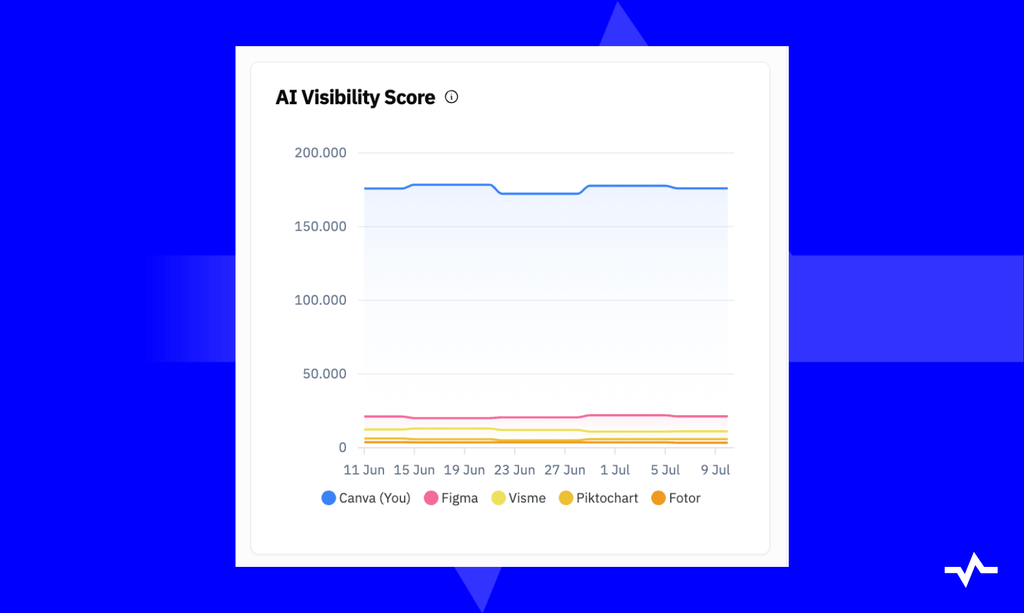
AI Visibility Score (position-weighted)
The same rate, except a mention near the top of an answer counts for more than one in a trailing list. In LLM Pulse this is the AI Visibility Score: first mention 100%, second 50%, third 33%, and down from there.
Report it beside Brand Visibility, because a brand that is always last in a list of eight has the same mention rate as one that is always named first. Flat visibility with a falling weighted number means you are being demoted inside answers you still appear in, worth catching before it becomes an absence. Pick one of the two as the headline and keep it there all year, because swapping to whichever reads better this month is the obvious cheat.
Can your AI visibility numbers survive a follow-up question?
Track Brand Visibility, AI Visibility Score, share of voice and citations on a fixed prompt set, per model.
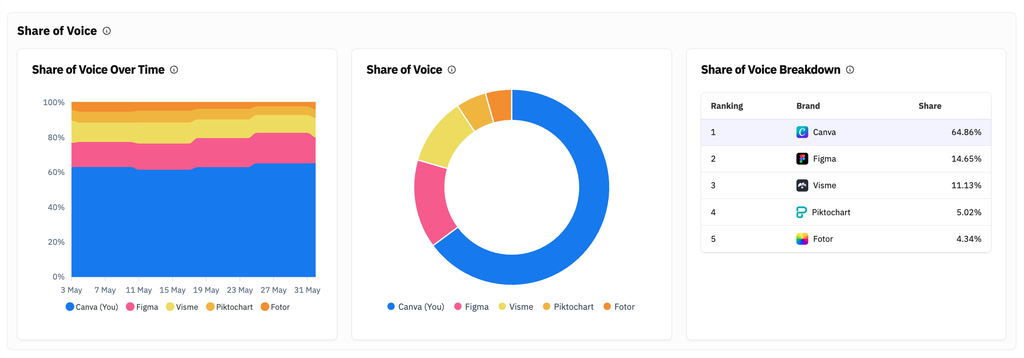
Share of voice against a fixed competitor set
Your mentions divided by the total mentions of you plus your named competitors, on the same prompts, times 100.
Executives understand this one fastest and it is the easiest to break. Both sets sit in the denominator, so adding a large competitor drops your share with no change in your performance. Write the competitor list into the report itself: six to ten names, the ones your sales team actually loses to. If it has to change, do it at a quarter boundary, restate the previous quarter under the new set, and show both. Share of voice tracking keeps that list explicit.
Citation share
Citations pointing at your domain, divided by all citations collected in your prompt set.
A different funnel from mentions, and it deserves its own row. A model can recommend you warmly while citing three review sites and never linking to you. Mentions are reputation, citations are whether your content is the source material, and the fixes differ. There is a fuller guide on tracking which sources AI answers cite. One footnote: not every model exposes its sources, so this denominator can be smaller than the mention one. Say so, and keep the two apart.
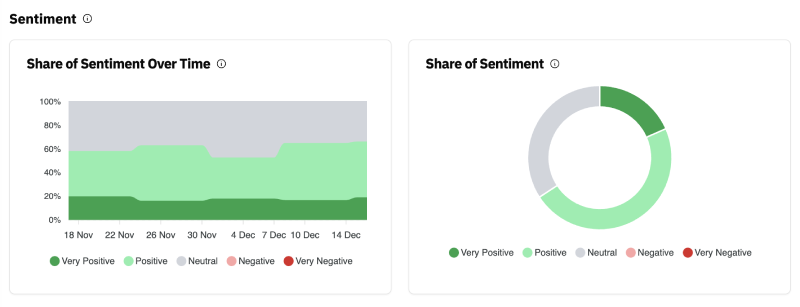
Net sentiment
Positive mentions minus negative mentions, as a share of the mentions that received a sentiment verdict. A positive count alone is a vanity number: “82 positive mentions this month” reads well until you learn there were 40 negative ones, up from 6. Net sentiment forces both halves into one figure and puts a bad month on the chart instead of in the appendix.
It is also the least precise thing in the report, a model reading another model, with borderline cases sorted inconsistently. Treat a large swing as a reason to read the answers.
Answer coverage
The share of your tracked prompts where any answer mentions anyone in your category, competitors included. Rarely reported, and it explains more than people expect. If coverage is 40%, then 60% of your prompts are answered generically, with no brand named. Nobody is winning those, which makes them an opening or a sign that you track prompts real buyers never ask.
AI referral visits and their engagement
This number lives in your analytics platform, which counts the sessions AI assistants send you and what those visitors do next.
GA4 has an AI Assistant default channel, which Google defines as the channel by which users arrive at your site from sources like ChatGPT, Gemini, Deepseek, Copilot or Grok. A session lands there when its medium is exactly ai-assistant, or when its referrer matches Google’s list of AI assistants. The same documentation puts Google’s AI Overviews and AI Mode under Organic Search, so those clicks never reach the AI Assistant row.
ChatGPT has tagged the links it cites with utm_source=chatgpt.com, which is how much of its traffic gets attributed at all. Since October 9, 2026, a large share of ChatGPT visits arrive with neither the tag nor a referrer and land in Direct, as we covered in the ChatGPT referral drop. Annotate that date, or your before-and-after comparison is broken. Putting referral visits beside visibility takes an analytics connection feeding the same report.
Write the caveat into the report: this counts clicks, so an answer that names you and earns no click leaves no row. Someone who read your name and then typed your domain never appears here either. Referral visits are a floor on AI impact.
Search Console generative AI impressions
Search Console’s Generative AI performance report counts how many times links to your site were shown in AI Overviews and AI Mode on Google Search. Impressions only: no clicks, no CTR, no position. You can group by pages, countries, dates and devices, the usual 1,000 row limit applies, and a site without enough impressions in these features may not see the report at all. Google documents it in its Search Console help, and we walk through it in our guide to the generative AI report. Report the trend, and do not divide it by anything to manufacture a rate.
Metrics to demote or drop
- The single prompt screenshot. One draw from a distribution, and the next may read differently. It belongs in the evidence appendix.
- “Rank” in an AI answer. Mention order is real and worth weighting, which is what the AI Visibility Score does. Calling it a rank implies a stable ordered result set that does not exist, and trains people to expect a number that jumps for no reason.
- Raw mention counts. “We got 1,400 mentions” means nothing without the answer count underneath. Double the collection frequency and it doubles while visibility is unchanged.
- Vanity totals across mixed prompt sets. Blending branded, competitor and generic prompts gives a number that responds to the mix rather than to performance.
- Any metric whose definition changed since last month. Improving a definition is fine, but the old series is now incomparable, so mark the break or restate history. Doing it silently loses clients.
- Brand-name prompts used as proof of visibility. “What is [your brand]?” mentions you almost every time. They are useful for watching what models say about you, but they cannot support a claim about market visibility. Keep them in their own bucket with their own numbers, out of anything competitive. LLM Pulse classifies every prompt as own brand, competitor brand or non-brand, so you can split them out with a filter.
Sampling, for people who are not statisticians
The same prompt asked twice does not return the same answer, so every reading carries a margin of error you cannot see. The smaller the sample, the wider it is.
- Repeat the prompt on a schedule. One reading is an anecdote. LLM Pulse runs tracked prompts weekly by default, with daily and monthly available, so every figure comes from repeated collection.
- Aggregate over a period. Four-week figures for the report, weekly for the working view. Never report a day.
- Compare like periods. With weekly tracking, a calendar month can hold four runs or five, a 25% difference in collection before anything real happens. Four-week periods avoid it.
- Treat small movements on small prompt sets as noise. With 50 prompts, one flipping moves your rate by two points. Decide up front what counts as a real change.
The same logic decides the decimal place. Reporting “18.4%” with a handful of prompts underneath implies precision your sample cannot support. Round to whole numbers unless the prompt set is large.
The report itself
The one-page monthly view
Six numbers, each shown with the current period, the previous period and its denominator.
| Metric | Reported as | Always shown with |
|---|---|---|
| Brand Visibility | % of answers mentioning you | Answers collected, per model |
| AI Visibility Score | Position-weighted score | The same answer base |
| Share of voice | % of category mentions | The named competitor set |
| Citation share | % of citations pointing to you | Total citations, models included |
| Net sentiment | Positive minus negative, over classified mentions | Mention count |
| AI referral visits | Sessions plus one engagement measure | Which channels are counted |
Below it, a section headed “what changed and why” with at most three items, each naming a cause: a content push that went live, a competitor that started appearing, a model update, or an honest “we do not know yet”. The last one beats a fabricated narrative.
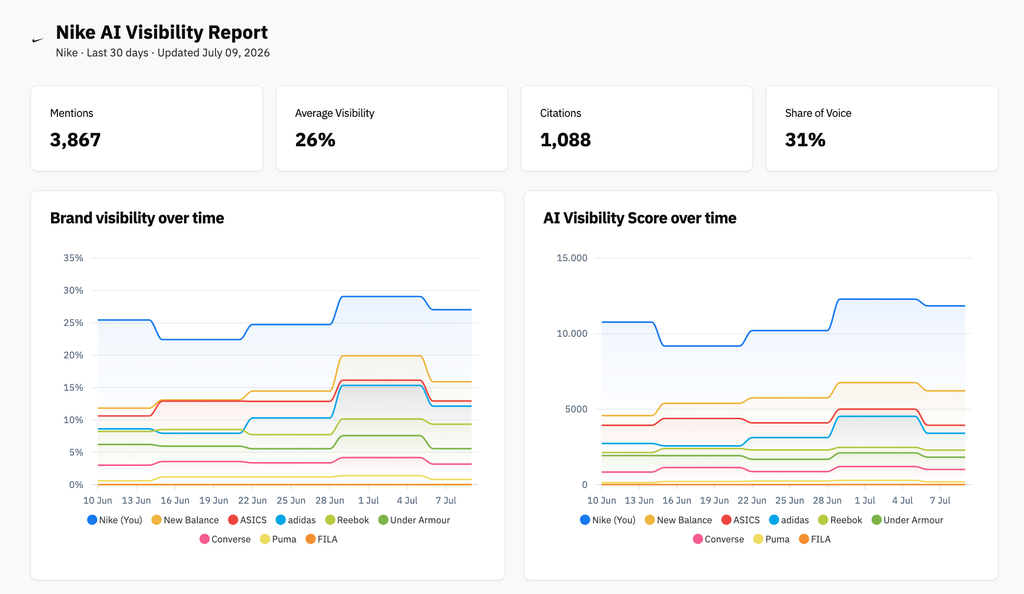
The weekly working view
For the team doing the work: prompt-level movement, new domains in the citation list, competitors appearing in answers you used to own. Nobody outside the team needs it, and showing weekly volatility to a client teaches them to react to noise.
What to annotate
Annotations turn a chart into an explanation. Log every content push, site migration, PR placement, product launch, pricing change, prompt set change and competitor move. Three months later, when visibility jumped in week six, the annotation is all that stands between you and a guess. LLM Pulse has annotations built in and records prompt set and model changes automatically, and custom reports plus the Data Studio (formerly Looker Studio) connector put the annotated chart wherever the client already reads.
Month one: the baseline
The first month produces no trend, and saying so beats dressing a partial reading up as a result. What it should deliver: the prompt set, written down and agreed, with branded prompts kept separate. The competitor set, named. The first period’s numbers, labelled a baseline. Which models are covered. And every metric definition, in writing.
Be careful what you promise on timelines. Content has to be crawled, indexed and then picked up by the models before it can affect an answer, and none of those steps runs on a schedule you control. Commit to what you do control: prompts covered, content shipped, citations earned, and a reading that gets more reliable as the series lengthens. Two or three collection periods is the earliest a trend line means anything.
Frequently asked questions
How many prompts do I need before the percentages mean anything?
No threshold flips noise into signal. The useful question is how far one prompt moves your rate: with 50 prompts it is two points, with 500 a fifth of a point. Track enough that a single flip cannot change the story, and remember each prompt is collected repeatedly, so the answer count is a multiple of the prompt count.
What is the difference between Brand Visibility and the AI Visibility Score?
Brand Visibility is the share of answers that mention you at all. The AI Visibility Score weights each mention by its position: first mention 100%, second 50%, third 33%. Report both, because a brand always named last has the same mention rate as one always named first.
Should I report per model or a blended number?
Both, with the blend as the headline and the breakdown below it. A blended figure that hides one platform halving is worse than no figure. Keep the model mix constant, since adding a model changes the blend on its own.
Visibility dropped and nothing changed on our side. What do I say?
Say that. Check first that the prompt set, competitor set and model mix were untouched, then whether competitors moved the same way. A category-wide move usually points at a model update and not at your marketing, and an unexplained drop plus the checks you ran is more credible than an invented cause.
Can Search Console generative AI impressions be my main KPI?
No. The report covers Google’s AI Overviews and AI Mode only, shows impressions with no clicks or position, and says nothing about ChatGPT, Perplexity or any assistant outside Google. Treat it as a supporting trend.
Share of voice or visibility as the headline?
Visibility answers “are we present”, share of voice answers “are we winning”. Most reports lead with visibility because it depends only on your own denominator and is harder to break by accident. Share of voice sits underneath it and moves when a competitor gets active.
Should branded prompts count toward visibility?
Not in anything competitive. A prompt that names your brand mentions you almost every time, so it inflates visibility and share of voice. Track branded prompts in their own bucket to watch what models say about you.
The client wants weekly reporting. Now what?
Give them the weekly working view with the volatility explained once, up front, or keep formal reporting on a four-week cycle and send a short note in between. Weekly percentages on a small prompt set bounce, and a client trained to read those bounces as performance will ask you to explain random variation every Monday.






Discover your brand's visibility in AI search effortlessly
Esteve Castells
Co-Founder of LLM Pulse and AI search expert. With extensive experience working as an SEO for global brands and large enterprises, he's the subject matter expert building the product to deliver value to our users.