Organize prompts with custom tags for focused analysis
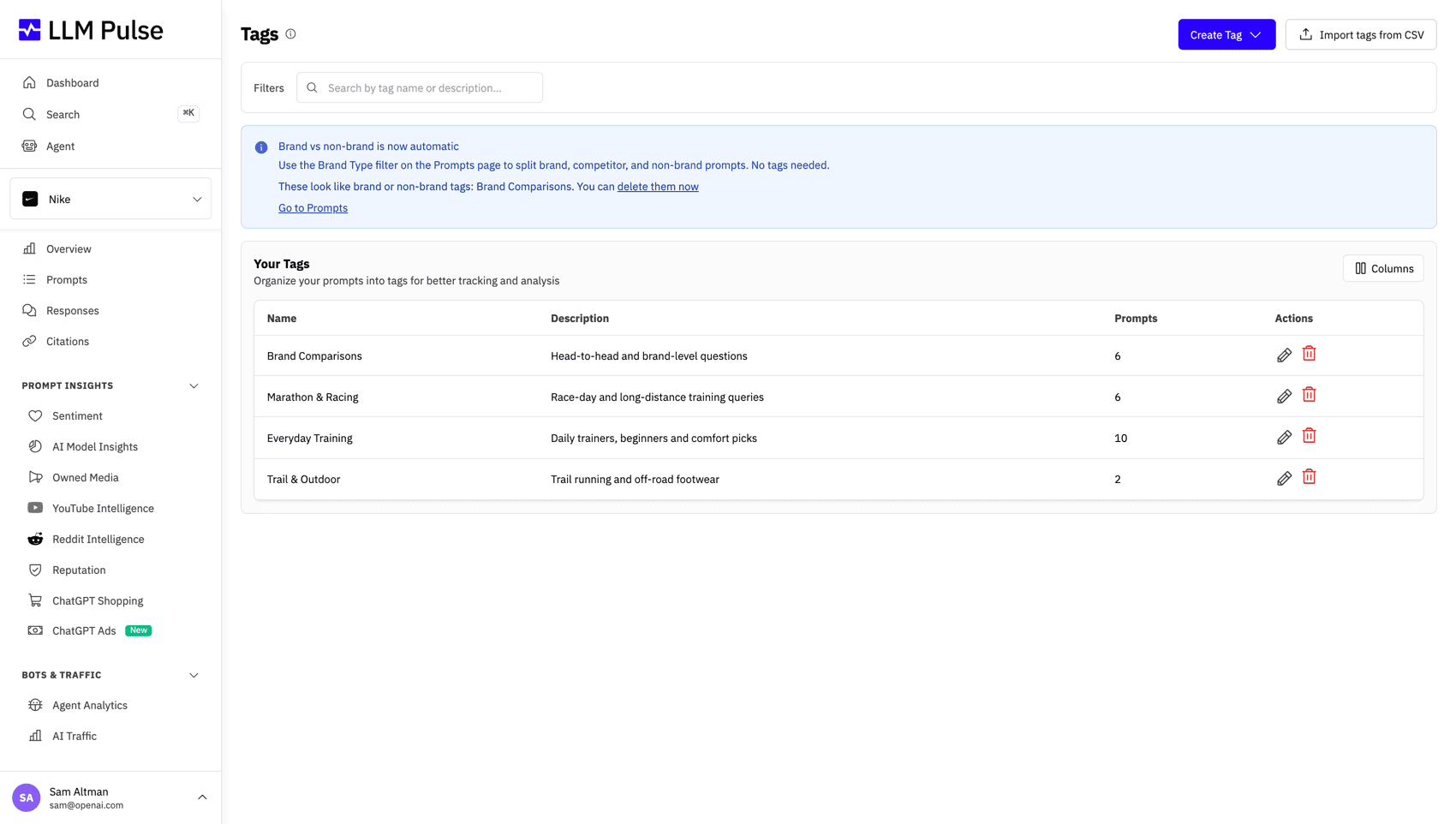
Apply custom tags to organize prompts by product, topic, campaign, or team. Filter all dashboards by tag to focus your analysis and generate targeted reports.
Features
Organize Prompts With Tags
As your prompt library grows, tags become essential. They let you slice and dice your visibility data in meaningful ways, by product, topic, campaign, or any dimension you need.
Create Custom Tags
Apply tags to prompts to organize by product, topic, funnel stage, campaign, or any taxonomy that fits your business structure.
Filter All Dashboards by Tag
Every dashboard supports tag filtering. See visibility scores, citations, sources, and trends for just the prompts with a specific tag.
Compare Tag Performance
Compare visibility metrics across tags. See which product line or topic has the highest AI visibility and where gaps exist.
Multiple Tags Per Prompt
Each prompt can have multiple tags. Tag a prompt as both "Enterprise" and "Pricing" for flexible multi-dimensional analysis.
Report by Tag
Export reports filtered by tag. Share product-specific or campaign-specific AI visibility reports with stakeholders.
Tags Per Project
Each project has its own set of tags. Tag names are unique within a project, allowing consistent organization across your team.
How Tags Work
Apply tags to prompts for organized analysis
-
1
Create Tags
Create tags that match your business structure, product lines, topics, campaigns, teams, or any taxonomy you need.
-
2
Apply to Prompts
Tag prompts when creating them or in bulk for existing prompts. Each prompt can have multiple tags.
-
3
Filter Dashboards
Use the tag filter on any dashboard. All metrics recalculate to show only data from prompts with that tag.
-
4
Export & Share
Generate tag-filtered reports for stakeholders. Share product or campaign visibility reports with relevant teams.
Tag Use Cases
How teams use Tags to organize prompt tracking
Product Lines
Tag prompts by product or service. Compare AI visibility across your product portfolio.
Funnel Stages
Tag by buyer journey, Awareness, Consideration, Decision. Track how AI visibility varies at each stage.
Campaign Tracking
Create campaign-specific tags. Measure how marketing initiatives affect AI visibility over time.
Team Views
Create tags for different teams. Marketing, PR, Product, each team filters to see their relevant prompts.
"LLM Pulse has allowed us to better organize our work and prioritize the actions that matter most. It gives us much greater clarity when implementing new ideas, and it makes reporting far easier, with metrics that were previously complex and difficult to obtain. Today it is part of how we plan and measure our visibility in AI search."

Frequently Asked Questions
Learn how Tags help organize and filter your AI visibility data.
Ready to organize your prompts?
Create your first tags and start organizing prompts by product, topic, or campaign.
Trusted by 7,000+ users worldwide