Connect AI agents to your visibility data with MCP
Let ChatGPT, Claude, Gemini, Cursor and any other AI agent read your brand's AI visibility metrics and act on them through the Model Context Protocol. About 90 tools, free on every plan via OAuth, no API key required.
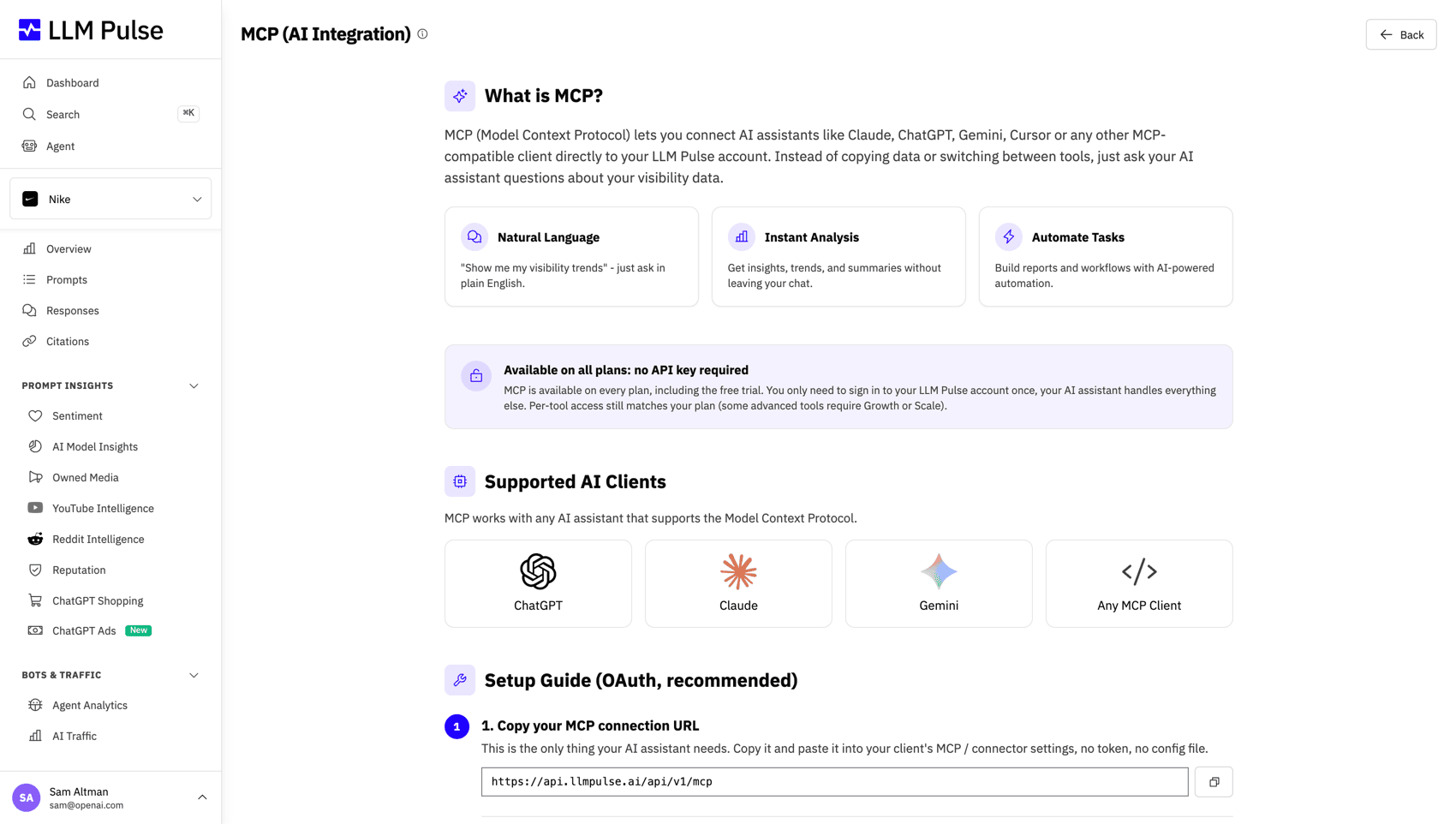
Connect your AI client
Paste this URL into your AI client's MCP or connectors settings. The client opens a browser window, you sign in to LLM Pulse, and you are connected. Tokens refresh automatically.
https://api.llmpulse.ai/api/v1/mcp
https://api.llmpulse.ai/api/v1/mcp
npx mcp-remote https://api.llmpulse.ai/api/v1/mcp --header "Authorization: Bearer YOUR_API_KEY"
Connect to
Features
Bring your AI visibility data into any AI workflow
MCP lets AI assistants read your LLM Pulse data and act on it in real time, with no manual exports. It is available on every plan, including the free trial.
Built for AI agents
MCP is the open standard for connecting AI applications to data and tools. LLM Pulse runs a native MCP server, so agents talk to it directly.
Ask in natural language
Query your visibility data by simply asking. Compare competitors, spot sentiment shifts or find your weakest model without opening a dashboard.
Always the latest numbers
Agents read the same fresh data as your dashboard. No stale CSV exports, no manual refresh, no copy and paste.
No API key required
Connect with OAuth 2.1. Sign in once and your assistant stays connected, tokens refresh on their own and you can revoke access anytime.
Read and write coverage
Query every metric in the platform and take action too, from adding prompts and competitors to drafting content and launching audits.
Works in every client
ChatGPT, Claude, Gemini, Cursor, Windsurf, Zed and custom agents all connect to the same endpoint with no special integration.
Data queries
Every metric your agents can read
These read tools expose the same data you see in the dashboard, structured so an AI assistant can pull exactly what it needs. Group by group, here is what an agent can ask for.
Projects and competitors
Discover what an account tracks before drilling into the numbers.
-
list_projectsEvery project the connected user can access.
-
get_project_detailsA project's industry, business model, primary products, audience, brand names, prompt counts per brand focus and data coverage (models and locales with data).
-
list_competitorsThe competitors tracked in a project, with name and domain.
-
get_competitor_detailsA competitor's matching names, mobile app IDs and icon URLs.
Tags, models and coverage
The dimensions you can slice any query by.
-
list_tags / list_collectionsThe tags (collections) you use to group prompts by topic or campaign.
-
list_modelsAI models with data for a project, such as ChatGPT, Perplexity and Gemini.
-
list_localesCountries and languages that have data, so a query can target the right market.
Visibility metrics over time
The core numbers that power your dashboard charts.
-
get_timeseriesMentions, visibility, citations and sentiment day by day, for you and competitors.
-
get_summaryTotal, min, max and latest value for any metric over a period.
-
get_sovShare of Voice, your share of mentions versus competitors.
-
get_prompt_summaryPer-prompt mention rate, citation rate and average position.
AI model breakdown
How you perform across each AI model, not just overall.
-
get_ai_model_summaryCompare mentions, citations, sentiment and visibility across every model in a single call.
-
get_ai_model_position_distributionWhere you rank, position one, two, three and beyond, per model.
-
get_ai_overview_resultsGoogle AI Overview availability over time, with a per-prompt breakdown.
Prompts and responses
The raw questions and the answers the models gave.
-
list_promptsEvery prompt with its type, locale and last run.
-
list_prompt_executionsEach run with model, timing, fan-out queries and whether it produced a mention.
-
list_answersAI responses with prompt text, model and basic metrics.
-
get_answerThe full response text with its mentions, citations, sentiment and sources.
Mentions
Where your brand and competitors are named in answers.
-
list_mentionsBrand mentions for a project.
-
list_competitor_mentionsCompetitor mentions, filterable by competitor and prompt.
-
list_all_mentionsBrand and competitor mentions together, each tagged with its actor.
Citations
The URLs the models cite in their answers.
-
list_citationsURLs cited in answers that mention your brand.
-
list_competitor_citationsURLs cited for your competitors.
-
list_all_citationsBrand and competitor citations together, each tagged with its actor.
Sources and citation intelligence
Deep analysis of which pages and domains the models trust.
-
list_sourcesEvery source URL the models cited, with domain and position.
-
get_top_sourcesDomains ranked by responses or by average mention rate.
-
list_citation_groupsCitations grouped by URL, domain or host, with model breakdowns.
-
get_cited_url_detailsURL-level citation intelligence with page-cache metadata.
-
list_cited_url_occurrencesEvery execution where a given URL appeared.
-
get_cited_url_contentThe cached page content plus the mention snippets for one URL.
Sentiment
How positively or negatively the models talk about you.
-
list_sentimentsThe sentiment categories and how the data is structured.
-
list_detailed_sentimentsSentiment records with comments, topics, scores and competitor context.
Recommendations
AI-generated actions to improve your visibility.
-
list_recommendationsRecommendation runs with type, status, summary and counts.
-
get_recommendationFull detail for one run, including items and source references.
GEO Writer tasks
The status and output of content tasks an agent created.
-
list_intelligence_tasksGEO Writer tasks for a project, filterable by type and status.
-
get_intelligence_taskOne task with its status and finished result data.
Agent Analytics
Scale and aboveHow AI crawlers and assistants hit your own website.
-
get_agent_trafficAI bot traffic per day, grouped by bot or by company.
-
list_agent_botsThe catalog of known AI bots and their parent companies.
AI traffic
Scale and aboveHuman visits arriving from AI assistants, measured from your connected web analytics.
-
get_ai_trafficUsers, sessions and conversions from ChatGPT, Perplexity, Gemini and more, grouped by AI source.
Actions
Actions your agents can take, not just data they read
MCP is not read-only. With the mcp:write scope an assistant can change your project the same way you would in the app, and the costly actions always ask before they run.
Add prompts in bulk
create_prompts
Add new tracked prompts to a project in one call. Respects your plan's prompt limit and skips duplicates automatically.
Add a competitor
create_competitor
Start tracking a new competitor across every model and locale. Validated against your plan's competitor limit.
Create a tag
create_collection
Create a tag to segment prompts by topic, funnel stage or campaign, and optionally attach prompts in the same call.
Tag prompts in bulk
assign_prompt_tags
Attach existing tags to many prompts at once, by id or by name. Idempotent, so re-running never creates duplicates.
Annotate the timeline
Growth and abovecreate_annotation
Mark a date on your visibility charts, a campaign launch, product update or news event, so the whole team sees the context behind a change.
Brief and draft content
create_intelligence_task
Kick off a GEO Writer task, a brief, a full draft, a rewrite, PR angle analysis or a custom output, then poll it until it is ready.
Regenerate recommendations
launch_recommendations
Re-run AI recommendations for a project. Returns a preview and a confirmation token, so nothing is spent until you approve it.
Run a technical GEO audit
create_technical_geo_report
Launch the full technical GEO bundle for a URL, covering crawlability, schema, content readiness, robots.txt, agent readiness, llms.txt, discoverability and AI visibility.
Actions are safe by design
Write tools require the mcp:write OAuth scope, so a read-only connection can never change your data. Costly actions like regenerating recommendations or launching a technical audit return a preview first and wait for your explicit confirmation inside LLM Pulse.
MCP for your analytics stack
Connect a data source and query it next to your AI visibility, all through the same MCP endpoint.


Connect in seconds, not minutes
Connect your AI client to LLM Pulse with a single OAuth flow. No token to copy, no config file to edit.
-
1
Copy your MCP URL
Your endpoint is https://api.llmpulse.ai/api/v1/mcp, the same for every customer. No API key to generate.
-
2
Add it to your AI client
Paste the URL into the connector or MCP settings of ChatGPT, Claude, Gemini, Cursor, Windsurf or any other MCP client.
-
3
Sign in once with OAuth
Your client opens a browser window. Sign in to LLM Pulse, approve access and you are connected. Tokens refresh automatically.
-
4
Query and act conversationally
Ask about visibility, competitors, sentiment, citations and recommendations, or have the agent add prompts and draft content for you.
What you can do with MCP
From a quick question to a fully automated workflow, MCP turns your AI visibility data into something any assistant can read and act on.
Ad-hoc analysis
Ask your assistant to analyze visibility trends, compare models or surface citation patterns, all without touching the dashboard.
Automated reporting
Have an agent assemble weekly visibility summaries, competitor breakdowns or an executive brief straight from your live data.
Intelligent monitoring
Build agents that watch your metrics and flag you when visibility drops, sentiment turns or a competitor gains ground.
Strategy and content
Let AI read your data and suggest content opportunities, then brief or draft the piece with GEO Writer in the same conversation.
Hands-free maintenance
Add prompts, competitors and tags, annotate launches and regenerate recommendations just by asking, instead of clicking through forms.
Custom agents and workflows
Wire LLM Pulse into your own agents, internal tools or orchestration so AI visibility data flows wherever your team works.
"LLM Pulse has allowed us to better organize our work and prioritize the actions that matter most. It gives us much greater clarity when implementing new ideas, and it makes reporting far easier, with metrics that were previously complex and difficult to obtain. Today it is part of how we plan and measure our visibility in AI search."

Frequently Asked Questions
Everything you need to know about connecting AI agents to LLM Pulse over MCP.
More ways to integrate LLM Pulse
The same data and actions exposed as a documented REST API.
Visualize AI visibility metrics with our ready-made Looker Studio template.
Blend AI visibility with your GA4, Plausible or PostHog data.
Detect the AI queries your audience asks, right in the browser.
Endpoints, auth and the full MCP tool catalog in one place.
From the blog
Agency solutions
How agencies wire LLM Pulse into AI agents and reporting workflows.
Read moreAPI and MCP reference
Full documentation for the REST API and Model Context Protocol server.
Read moreSee pricing and plans
API and MCP access across the LLM Pulse self-serve and Enterprise plans.
Read moreReady to connect your AI assistant?
MCP is included free on every plan. Start a 14-day trial and connect your AI assistant in minutes.
Trusted by 5,000+ users worldwide