How to Set Up Alerts for AI Brand Mentions

By Esteve Castells




Table of contents
- Your alert latency equals your tracking cadence
- Six events worth alerting on
- Why single-prompt alerts create noise and group thresholds do not
- How to keep the alerts readable in month three
- The plumbing
- Google Alerts and listening tools still earn their place
- The first hour when a model is wrong about you
- Frequently asked questions
Search for AI brand mention alerts and you will find promises of real-time notifications. Every one works the same way: prompts go to the assistants on a schedule, the answers are parsed, and you hear about it when the result changes. That is worth having, but it is not a feed from ChatGPT.
No assistant publishes one. ChatGPT, Gemini, Perplexity and Google AI Mode generate an answer per user, per session, and nobody outside those companies sees that stream. Your brand can be named thousands of times today and no counter increments anywhere you can read. Every tool in this category, ours included, samples: it asks the same questions repeatedly and treats the result as an estimate of what the models tend to say. So you alert on change in your own measurement. The work is making that measurement dense enough to trust and the alerts quiet enough that people still read them in month three.
Your alert latency equals your tracking cadence
A weekly prompt set gives a detection window of zero to seven days, and a daily one under a day. On a monthly set, a competitor can take over an answer on the second of the month and you hear about it weeks later. No alert configuration shortens that gap.
Cadence is also your statistics budget. A weekly prompt produces roughly 4.33 scheduled answers per model per month; a daily prompt produces about 30. For prompt tracking, weekly is the sensible default, and LLM Pulse also runs daily, or monthly on request. The case for daily is narrow: a launch, a live crisis, or twenty prompts that matter far more than the rest. A split works well, with the bulk weekly and a small daily set where a week’s delay would cost you something. Pick the questions first; the guide to tracking brand mentions in LLMs covers how.
Six events worth alerting on
Three of these map straight onto a webhook event. The other three are comparisons you compute from the run data. Each comes with a threshold that keeps the noise out.
A new mention where there was none
The easiest one to over-tune, because a single run can name you once and never again. The raw signal is the mention.created event. Fire when the brand appears in two of the last three runs on that prompt, or across two models in one run, and send it to a weekly digest. Good news can wait until Monday.
A competitor appearing on a prompt where you were alone
This matters more than the reverse, because it says something moved in the underlying sources. The raw signal is competitor_mention.created, which names the competitor. Threshold it at group level: fire when a competitor reaches 20% of the answers in a tagged group, having been under 5% the month before. One answer naming a rival is background noise. A rival across a fifth of a thirty-prompt group is an event you can go and investigate.
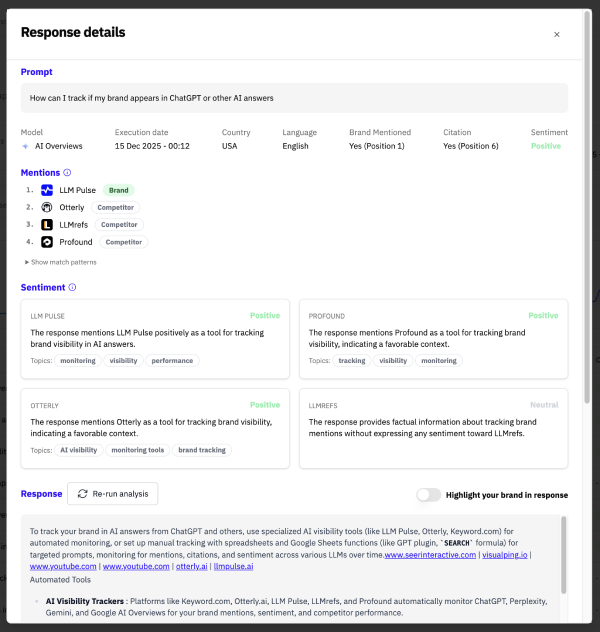
Negative sentiment in an answer
Alert on this one individually, because missing it costs far more than a false alarm does. The raw signal is sentiment.negative_detected, which fires on a negative or very negative reading. Severity decides the route. A mildly negative comparison goes to the digest. A negative answer carrying citations goes to a channel a human reads today, because a cited claim has a source behind it that other models can pick up. With sentiment tracking, read the cited pages that criticize you before you read the answer text.
A lost citation
A URL of yours that used to be cited and is not any more. There is no event for an absence, so you compute it from history: citation.created fires when your domain is cited, and prompt_execution.completed tells you whether each run cited you at all. It is noisy per run, because which page a model reaches for varies between answers that say almost the same thing. Require persistence on both sides, so the rule needs the URL cited in three of the prior four runs and absent in the last two. What survives is usually a page that was rewritten, redirected or beaten by something better, so it belongs in the content backlog. The guide to tracking sources goes deeper.
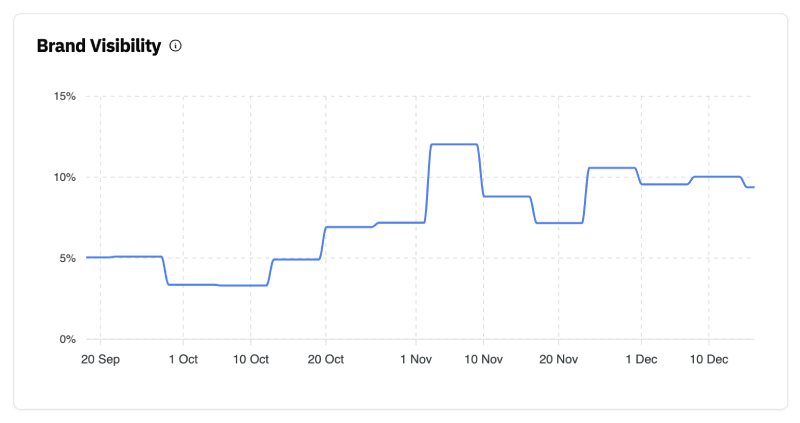
A large visibility swing on a prompt group
Define groups with tags, one per theme or product line, and alert on the group rather than its members. Fire when group visibility moves more than 10 percentage points against its trailing four-week average, with a floor of 30 answers so a small group cannot trip it. Route it to a channel read the same day.
A new third-party page cited about you
A domain that has never appeared in your citation set starts showing up in answers about your brand. This is how you find the review site, forum thread or roundup the models have just started trusting. Your own-domain citation event will not catch it, so pull the cited sources through the API after each run and diff the domain list. It fires rarely enough that no threshold is needed, so send first appearances straight to the digest.
Why single-prompt alerts create noise and group thresholds do not
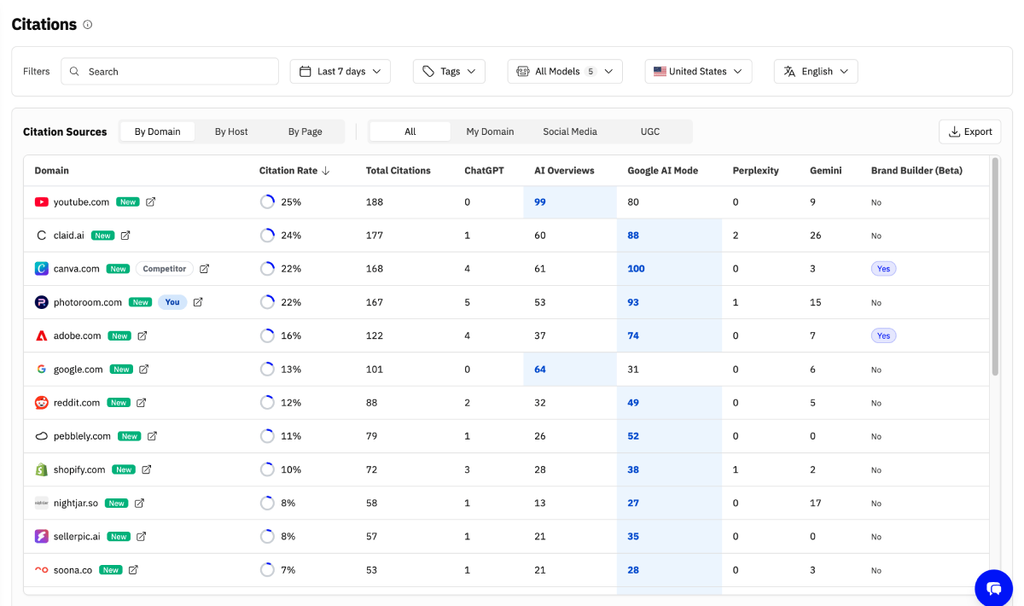
One prompt tracked weekly across five models produces five answers a week, so if one model changes its mind about one answer, that prompt moves 20 points while nothing happened in the world. Take 30 prompts across the same five models and you have 150 answers a week: the same flip moves the group 0.67 points, which a 10-point threshold ignores. For the group to move 10 points, roughly fifteen answers have to change direction, and that has a real cause you can look for.
The setup I see go wrong most often is a ping for every new mention, straight into Slack. It feels useful for about a week, then someone mutes the channel and the one negative answer that mattered scrolls past unread. I would much rather have three rules on tagged prompt groups that fire twice a month and get read every time.
 Esteve Castells Co-founder, LLM Pulse
How to keep the alerts readable in month three
Most AI brand mention alert setups fail the same way: they fire too often, people mute the channel, and a real problem slips past. Five habits prevent that.
- Alert on sustained change, never on one reading. Require two consecutive runs in the new state. You trade one cycle of latency for most of your false positives.
- Alert on groups, not prompts. Tag every prompt as you create it, because an untagged prompt can only produce per-prompt noise.
- Set a floor. No rule fires on a window with fewer than 30 answers. A new group in its first week is all noise.
- Route by severity, with three destinations and no more. A channel read within the hour for cited negative sentiment and large group swings, a ticket queue for content work, a weekly digest for everything else.
- Review the rules monthly. Mark each alert from the last month acted on or ignored. Delete any rule with a month of ignores, and tighten any that fired four times with no action.
The plumbing
Alerting in a dashboard only works if people open it. LLM Pulse sends a signed HTTP POST to a URL you choose each time one of these events happens in a project:
| Event | Fires when |
|---|---|
| mention.created | Your brand is mentioned in a new AI answer |
| competitor_mention.created | A tracked competitor is mentioned in a new AI answer |
| citation.created | Your domain is cited as a source in a new AI answer |
| prompt_execution.completed | A prompt finishes running against a model and is analyzed |
| sentiment.negative_detected | A negative or very negative brand sentiment is detected |
| recommendation.completed | A recommendations report finishes generating |
| intelligence_task.completed | A GEO Writer task finishes |
| intelligence_task.updated | A completed GEO Writer task is edited by hand or reverted |
| geo_audit_run.completed | A GEO audit run finishes |
| geo_audit_alert.triggered | A scheduled GEO audit raises an alert |
Each delivery carries an HMAC-SHA256 signature of the raw body in the X-LLMPulse-Signature header. If you run your own receiver, verify it before acting on a payload and drop anything unsigned. A failed delivery is retried, up to five attempts in total, and a subscription that fails 20 times in a row is disabled. Check your subscriptions now and then, because a disabled one looks exactly like a quiet week.
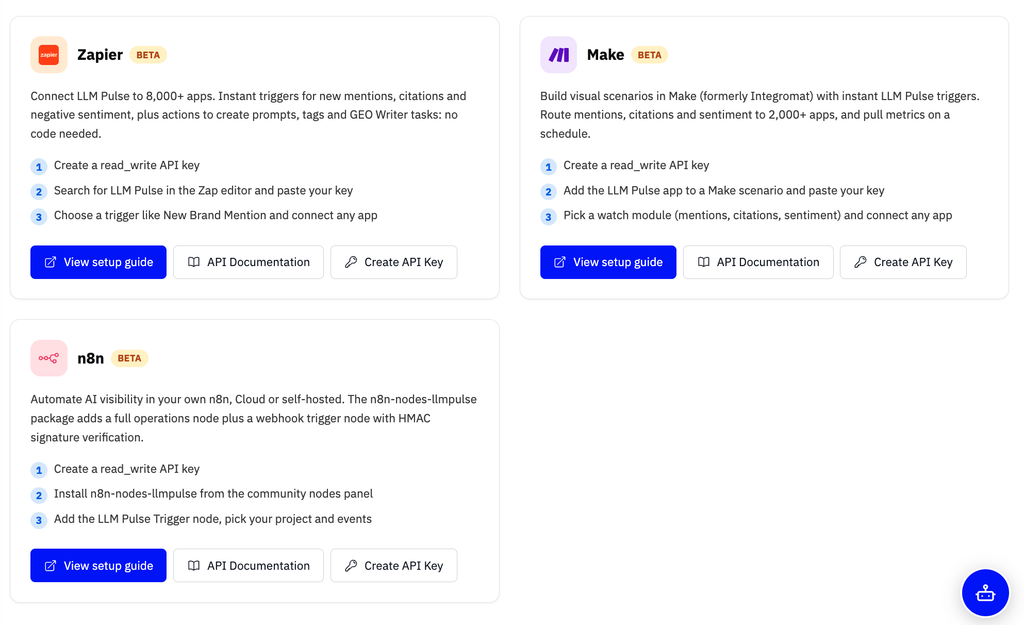
You do not have to write a receiver at all. The Zapier, Make and n8n connectors offer instant triggers for mentions, competitor mentions, citations, completed runs, negative sentiment, recommendations, GEO Writer tasks and GEO audits, and the n8n trigger node checks the signature by default. There is no built-in Slack app: Slack, email and ticket queues are one connector step away.
Want alerts that fire on your own prompts?
Track a fixed prompt set across ChatGPT, Perplexity, Gemini, Google AI Mode and AI Overviews, then send the changes wherever your team works.
Two recipes worth copying:
- Negative sentiment into the comms channel. Subscribe to sentiment.negative_detected. The payload carries the prompt ID and text, the model, the sentiment score and its comment, and the answer’s ID. Filter to the prompts you care about, fetch the full answer through the API by that ID to get the excerpt and its citations, and post to Slack. Branch on citations: with them, tag the comms owner; without them, append to the digest.
- Competitor mention into a task. Subscribe to competitor_mention.created, filter to one competitor (the payload names it), batch for seven days, and create one ticket listing the prompts where they appeared. One ticket per event produces a backlog nobody grooms.
For thresholds no tool offers natively, send prompt_execution.completed into your warehouse. Its payload says whether the brand was mentioned or cited and how many competitor mentions the answer had, which is enough to compute group visibility in SQL. The REST API and MCP server cover the rest of the data if you prefer to pull; our comparison of AI visibility APIs explains what to look for in one.
Alerts that need no setup
- Weekly negative sentiment email. Opt in per project. It covers negative AI answers from the last seven days and the cited pages whose own content criticizes the brand, and it is only sent when there is something to report.
- Weekly visibility summary email. Also opt-in per project, from the project settings or your email preferences.
- GEO audit alerts. Scheduled audits alert only on change: a critical check newly failing, a check failing again, a critical recovery, a score drop of 15 points or more, or the site no longer answering. The run is checked again 11 minutes later before anything fires, so a short outage stays quiet. Alerts appear in the app, as a chart annotation and by email.
Google Alerts and listening tools still earn their place
Set up Google Alerts for your brand and your executives. It is free and it catches newly published pages that mention you. Social listening tools go further, into forums, reviews and social posts. Both are worth having, and neither sees an AI answer: they index published web content, and an assistant’s reply to one user is never published.
They stay useful because of the causal chain. The pages they catch are often the pages that turn up in citation sets weeks later, so a hostile forum thread appears in listening first and in AI answers second. A manual spot check sits in between: ten questions in three assistants every Monday, pasted into a dated sheet, beats nothing. It loses to a fixed prompt set within a month, because you will rephrase questions without noticing, skip the week you are busiest, carry session personalization a clean run does not, and build no history you can trend.
The first hour when a model is wrong about you
An assistant says your product was discontinued, or blames you for a competitor’s outage, or repeats a claim from a dismissed lawsuit. The first hour is about evidence.
- Capture the answer properly. Full text, screenshot, exact prompt wording, model, date and time, locale. An answer without its prompt and date is useless a week later, and one without its model is useless immediately.
- Check whether it reproduces. Run the prompt again in a clean session, then across your other tracked models and locales. One model in one locale is a different problem from four models, and the second usually means a source problem.
- Find the sources behind the claim. Pull the citations from the answers containing it and look for the page it came from. There is usually one: an old press release, a stale directory entry, a forum thread.
- Fix at the source, then keep measuring. Update your own page, request a correction where the source belongs to someone else, and publish a clear factual statement on a page you control. Then watch the claim’s frequency fall, on whatever schedule the models pick it up.
Our guide to managing AI brand reputation covers the correction workflow in more depth.
Frequently asked questions
Can I get a real-time notification from ChatGPT when it mentions my brand?
No, and no tool can give you one. OpenAI does not publish a stream of what its model says to users, and the same holds for Google, Perplexity and Anthropic. Anything sold as a live AI mention alert is a change notification on that vendor’s own sampling.
How fast can we detect a change?
As fast as you sample, plus processing. Daily tracking means about a day; weekly means zero to seven days, depending on when the change landed. If a vendor quotes a detection speed faster than its own cadence, ask which number is wrong.
Do we need daily tracking?
Most teams do not, at least not for the whole prompt set. Weekly gives about 4.33 answers per prompt per model per month, which is enough for a group-level trend. Daily earns its price during a crisis, a launch, or on the prompts carrying most of your commercial value.
Should we alert on every new brand mention?
Only while you are calibrating. In the first month, seeing every mention teaches you what normal variance looks like in your category, which you need before you can set thresholds. After that, move mentions to the digest and keep the fast channel for negative sentiment and group swings.
Which webhook events does LLM Pulse send?
Ten: mention.created, competitor_mention.created, citation.created, prompt_execution.completed, sentiment.negative_detected, recommendation.completed, intelligence_task.completed, intelligence_task.updated, geo_audit_run.completed and geo_audit_alert.triggered. Each delivery is an HTTP POST signed with HMAC-SHA256.
Can I send AI mention alerts to Slack?
Yes, through the Zapier, Make or n8n connectors, or your own webhook receiver. There is no built-in Slack app, so the connector is the usual route: an instant trigger on the event, a filter, then a Slack message.
Can we build our own alerting on top of the data?
Yes, and for unusual thresholds it is the better route. Send every completed run to your warehouse and compare it against your own history in SQL. The REST API and MCP server cover the same data if you prefer to pull.
Do Google Alerts catch mentions in AI answers?
No. Google Alerts and social listening tools index published web pages and posts, and an assistant’s reply to one user is never published. They are still worth running, because the pages they catch often become the sources AI answers cite later.






Discover your brand's visibility in AI search effortlessly
Esteve Castells
Co-Founder of LLM Pulse and AI search expert. With extensive experience working as an SEO for global brands and large enterprises, he's the subject matter expert building the product to deliver value to our users.
- How to Set Up Alerts for AI Brand Mentions
- Prompt Tracking Explained: How to Choose the Prompts You Track
- Claude Rarely Gives the Same Answer Twice: We Asked It 400 Buying Questions 18 Times
- How Reddit shapes what AI says about your brand (and what to do about it)
- Guten Tag: LLM Pulse is now available in German