Prompt Tracking Explained: How to Choose the Prompts You Track

By Esteve Castells




Table of contents
- What prompt tracking actually measures
- Where prompts come from, in priority order
- Three buckets, reported separately
- How many prompts you actually need
- Writing a prompt that measures something
- Maintaining the set without breaking the trend
- Tags beat one big average
- Read the answers, not only the metrics
- Frequently asked questions
Every AI visibility tool sells you prompts. Plans are priced by them, and the percentage that ends up in your slide is an average across them. Very little of that software tells you which questions belong in the set, so the number often measures the imagination of whoever filled in the onboarding form.
What prompt tracking actually measures
A prompt set is a fixed list of questions, run against a set of AI assistants on a schedule. Each answer is parsed: was your brand mentioned, where, which competitors appeared alongside it, in what tone, which URLs were cited. Roll those up and you get visibility, share of voice, sentiment and a source list (the prompt tracking glossary entry has the short definition).
That makes it a sampling design. A keyword has one result page you can screenshot. A prompt has a distribution of answers: ask ChatGPT the same question twice in an hour and you can get two different brand lists citing different pages. You are sampling a generator, which is why spot checks in a chat window disagree with a tracker (more in AI rank tracking myths).
Because you are sampling, the questionnaire has to stay stable. Swap prompts in and out every few weeks and your line moves for two reasons at once: the models changed their answers, and you changed the exam. Afterwards you cannot separate the two.
Where prompts come from, in priority order
1. Real search queries
Google Search Console is the best starting point because it records demand you actually received. Sort by impressions and set aside the navigational queries carrying your brand name. Then fix the shape. Search queries are keyword shaped and prompts are sentence shaped. “crm small business” was typed into a search box; nobody types that into ChatGPT, they type “what CRM should a 10 person company use”. LLM Pulse imports your top Search Console queries, sorted by impressions, as candidate prompts, with a minimum-words filter to drop the very short ones. Read what comes back before you commit it.
Search Console’s own Generative AI performance report, covering AI Overviews and AI Mode, shows impressions only: no clicks, no CTR and no position. You learn that you appeared, and nothing about what the answer said. Our walkthrough of that report covers what you can still get out of it.
2. Sales and support questions
The questions people ask a human before they buy are the ones they now ask an assistant, often word for word, including the awkward ones about pricing and migration. The pool is biased toward people who already found you, so it is strong on consideration and thin on discovery.
3. Competitor comparison questions
“Alternatives to X”, “X vs Y”, “is X worth it for a small team”. The answers show which consideration set the model puts you in, often not the one your sales team thinks they compete in. They are also easy to overproduce. Ten minutes gets you fifty, and then half your set describes one corner of the market.
4. Category questions asked before anyone knows a brand
“How do I stop my bank charging me FX fees”. No brand in the question, so the assistant chooses who to name. This is the honest measure of whether you get recommended, and the hardest bucket to source, because nobody phrased it that way in a search box. Support transcripts and discovery calls are the raw material. Google’s People Also Ask questions and Reddit threads are two more places where people phrase things the way they would to an assistant.
5. Query fan-out
Ask an assistant one question and it often runs several internal searches, then answers from what those return. Those searches show what the model thinks your question is about, which makes them candidates for the next round: read them as query fan-out. Fan-out comes out of the set you already have, so it widens that set without surfacing a topic you never asked about.
Inventing prompts in a workshop is the most common mistake here. A set written from imagination measures the vocabulary of the four people in the room. It reads more fluently than real user language, frames things more kindly, and leaves out the questions customers were embarrassed to ask.
The first thing I look at in a new account is the prompt list, before any chart. Quite often a big chunk of it names the brand, and the team is pleased with a visibility number that was never in doubt. That’s why our prompt suggestions hide branded prompts by default. You can still add them, but you have to choose to.
 Esteve Castells Co-founder, LLM Pulse
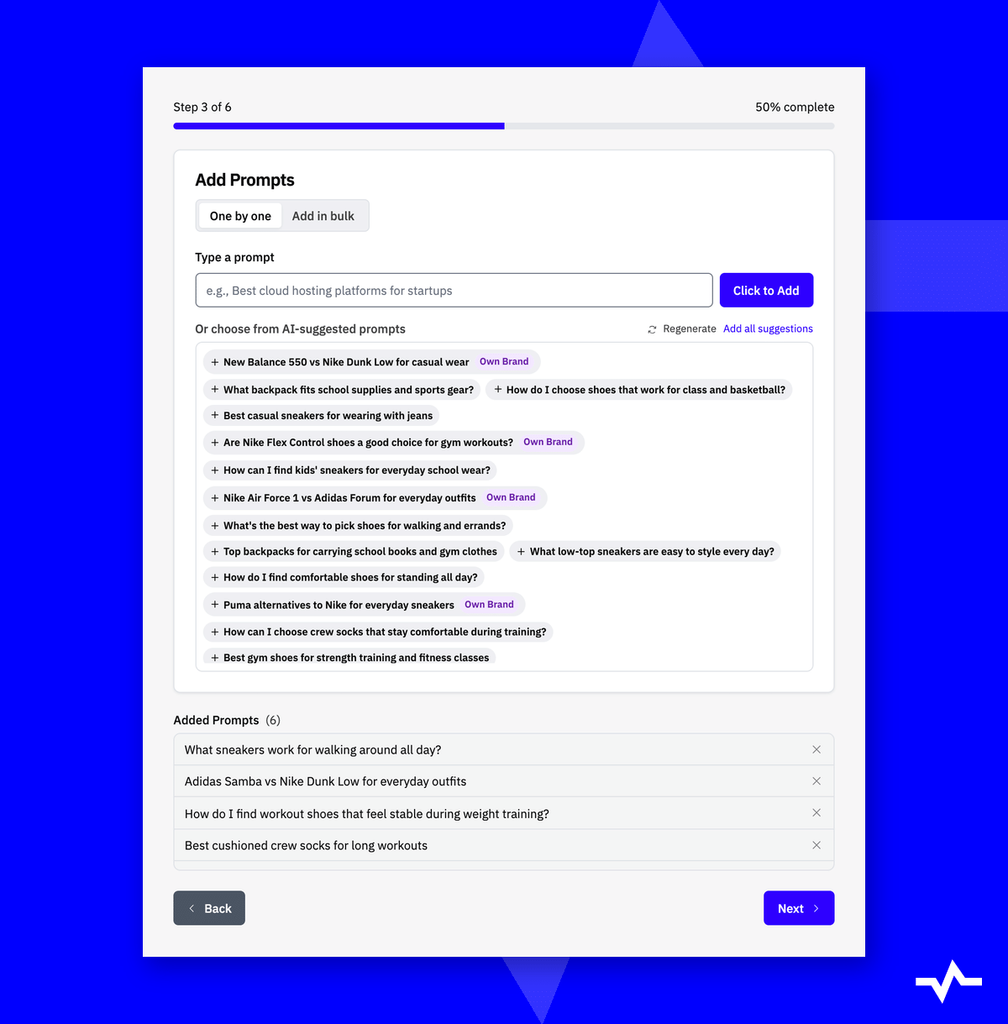
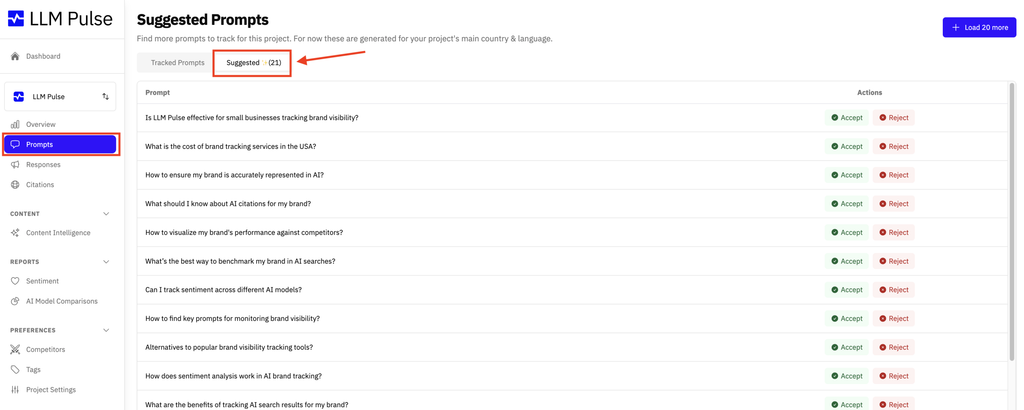
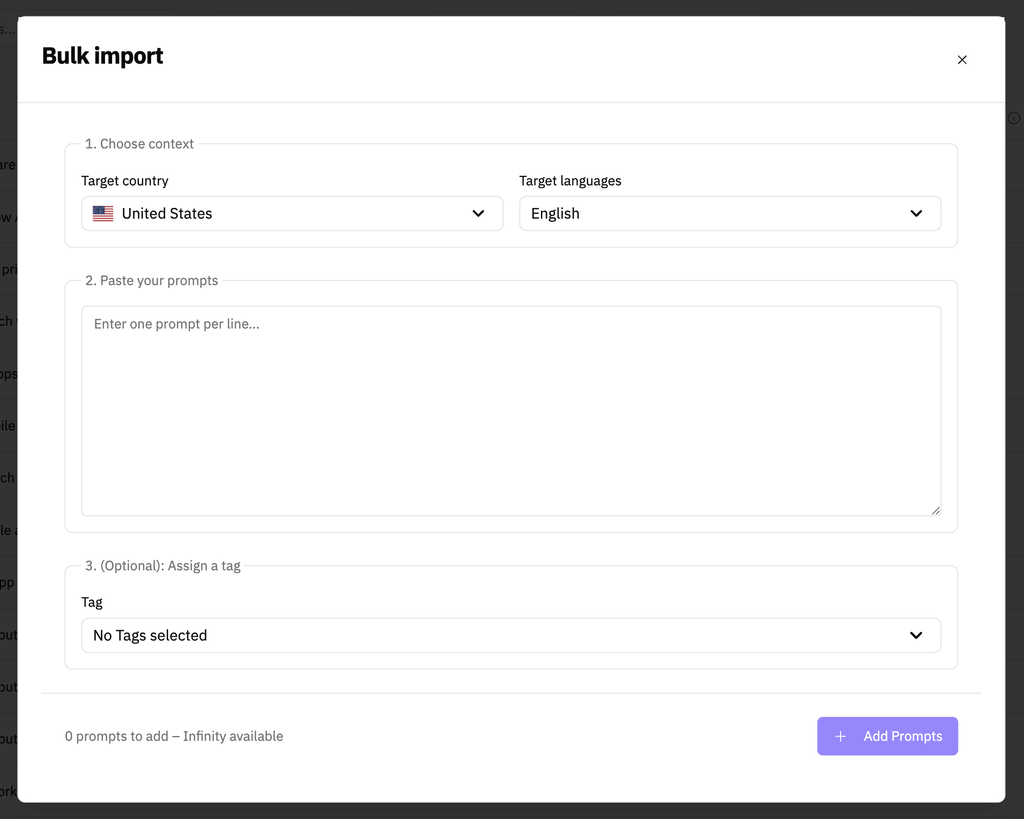
In LLM Pulse, the Add Prompts button and Prompt Research cover most of these sources: Search Console queries, People Also Ask questions for a seed keyword, Reddit discussions about a brand or topic, prompts written from a topic, and a Keyword to Prompts agent that starts from your domain or a competitor’s. Every method ends with a review step where you select the prompts you want before anything is saved, and the suggestion-based ones hide branded prompts unless you tick “Include branded prompts”. Suggestions you have not acted on wait in the Suggested Prompts tab, where you accept or reject each one.
Is your prompt set measuring the right questions?
Build it from Search Console, People Also Ask and Reddit, then track it across every major AI assistant.
Three buckets, reported separately
| Bucket | Example | What it tells you |
|---|---|---|
| Branded | “Is Acme good for invoicing?” | How the model describes you when asked directly: sentiment and accuracy, not demand. |
| Competitor branded | “Acme vs Northwind” | Which set you are compared against, and who wins. |
| Non-branded category | “Best invoicing tool for freelancers” | Whether you get recommended when nobody prompted your name. |
Branded prompts flatter you. An assistant asked about Acme will mention Acme, so visibility there sits near the ceiling and stays there. Average the buckets together and the headline inflates, then moves every time the mix changes, for reasons that have nothing to do with the market.
LLM Pulse sorts every prompt into these buckets automatically, a few seconds after you add it, as its Brand Type: Own Brand, Other Competitors, or Non-Brand / Generic. You can override the label on any prompt, and the Brand Type filter slices visibility, citations, share of voice and sentiment by bucket.
Put non-branded at the top of the report, with branded beside it as an accuracy check. It is also the bucket to use when you measure share of voice, since a prompt naming your brand hands you a share you did not earn.
How many prompts you actually need
There is no statistical rule here, and anyone offering you one is selling something. What you need is coverage: enough questions that the things you care about are represented, spread from discovery to comparison, each market in its own language.
Locales multiply. 50 prompts in 3 markets is 150 prompts, because each country and language pair counts as its own prompt. Translating the English set word for word is the wrong move: different markets ask different questions, and answers can draw on different sources in each. A literal Spanish translation gives clean data about a question nobody in Spain asks. LLM Pulse can translate an existing set into a new market as a starting point, and the edit afterwards is where the localization happens.
Volume adds up faster than people expect. Tracking runs weekly by default; daily is available on every plan, and monthly on request. A weekly prompt produces roughly 4.33 scheduled answers per model per month, so 50 prompts across five models weekly is over a thousand answers a month: a real sample at bucket level. Per prompt, per model, per week it is a handful, so read prompt-level movement monthly and keep weekly for the aggregate.
Writing a prompt that measures something
- Phrase it the way a person types it. Lowercase, imperfect, specific, not the polished version from a landing page.
- One intent per prompt. “Best project management tool and how much does it cost” half answers both, and you cannot tell which half moved.
- Do not plant your own brand. “Why is Acme the best CRM” guarantees a mention and measures nothing but your own wording.
- Avoid prompts broad enough to return an essay. “What is CRM software” returns a definition with no brands in it: a permanent zero that teaches you nothing.
- Keep locale and language explicit. Write in the language of the market and set the country and language on the prompt. Put geography in the text only when the question genuinely contains it (“best orthodontist in Barcelona”).
Maintaining the set without breaking the trend
Add a prompt when something real changes: a new product line, a question sales has heard three times this month, a competitor showing up in answers you track. Retire one when it has returned the same generic answer for months, when the question stopped being asked, or when it duplicates another row.
A reworded prompt is a new prompt, because the history before the edit answers a different question from the history after. LLM Pulse does not let you edit a tracked prompt’s text at all, so a rewording means retiring the old row and adding a new one, which keeps the break visible. Keep seasonal questions running all year in their own tag. A gifting prompt added in October and pulled in January spikes every year for reasons of your own making.
Record every change on the date it happened, on the same timeline as the chart. Six months from now someone will see a step and want to know whether the market moved or the set did. LLM Pulse annotates prompt additions and removals, model changes and tracking frequency changes on the charts automatically, and you can add your own notes for launches and content updates. Replacing half your prompts resets your baseline. Do it when you need to, say so, and compare from that date. A quarter of the new set against a quarter of the old is arithmetic on two different experiments.
Tags beat one big average
A single project-wide visibility percentage is the least useful number the system can produce. It mixes your strongest product line with your weakest, your home market with the one you launched last month, and branded questions with category ones.
Tag prompts as you create them: product line, funnel stage, market, campaign. In LLM Pulse every add-prompts method has a tag selector on its review step, a prompt can carry any number of tags, and a tag filters every page, which is what the ecommerce team wants when it asks about one category and not the other six. Prompts you forgot to tag can be grouped later with AI-generated tags or a CSV import, but tagging at the start saves that cleanup. Choosing which cuts to report is the same decision as choosing the right AI search metrics.
Read the answers, not only the metrics
The visibility percentage tells you that you lost; the answer text tells you who won and why, in the words of the thing you are trying to influence. Open a handful of answers where you were not mentioned. You will usually find a competitor named with a reason attached: cheaper for small teams, better support for some integration, easier to migrate to. That sentence is a competitive brief you did not have to commission.
Then look at what the answer cited: a comparison post, a forum thread, a review roundup. Those pages are the surface that is winning, and going after them is concrete work in a way that “improve our AI visibility” never is. Our guide on tracking cited sources covers that half of the job. Budget an hour a month for reading raw answers, and expect it to be the first thing dropped when the dashboard looks fine.
Frequently asked questions
How many prompts should I start with?
Start with what you can evidence: the queries Search Console shows impressions for, plus what sales and support hear repeatedly. If that produces thirty, start with thirty instead of padding to a round number. Each extra market multiplies the count, because every country and language pair is its own prompt.
Should I track branded prompts at all?
Yes, in their own bucket. They show how assistants describe you when asked directly, which is where outdated or wrong information turns up. Keep them out of the headline, which they will always flatter.
What is the difference between branded, competitor and non-branded prompts?
A branded prompt names your own brand, a competitor prompt names a competing brand or product, and a non-branded prompt names neither. LLM Pulse labels each prompt automatically as Own Brand, Other Competitors or Non-Brand / Generic, and you can override the label.
How often should prompts run?
Weekly suits most teams and is the default in LLM Pulse; daily tracking is available on every plan, and monthly on request. Daily helps when you are running a test or watching a launch. Monthly works for a slow category, though fewer data points make a change harder to spot.
Can I build the set from a keyword research tool?
You can seed it, and volume data helps decide which topics deserve coverage. The output still needs rewriting into the way people phrase things to an assistant: longer, more conversational, more specific. Prompt research and suggestions shorten that step, but you still choose what goes in.
Can I edit a prompt after I start tracking it?
Not in LLM Pulse: tracked prompt text cannot be edited. A reworded question is a different question anyway, so retire the old prompt and add the new one, which keeps the break visible in your history.
How should I track several countries or languages?
Add each market as its own country and language pair and tag prompts by market so you can compare them. Translating an existing set is a quick start, but rewrite it into what people in that market actually ask.
Why do my numbers move when nothing changed on my site?
The models change, sometimes weekly and without announcement, and the same question can produce different answers on different runs. That volatility is part of what you measure, and it is why a stable prompt set matters: it is the one fixed thing in the experiment.






Discover your brand's visibility in AI search effortlessly
Esteve Castells
Co-Founder of LLM Pulse and AI search expert. With extensive experience working as an SEO for global brands and large enterprises, he's the subject matter expert building the product to deliver value to our users.
- Prompt Tracking Explained: How to Choose the Prompts You Track
- Claude Rarely Gives the Same Answer Twice: We Asked It 400 Buying Questions 18 Times
- How Reddit shapes what AI says about your brand (and what to do about it)
- Guten Tag: LLM Pulse is now available in German
- AI Search KPIs: What to Report and What to Ignore