Manage Payment Methods and Invoices
Open the profile menu from your name or avatar at the bottom-left of the sidebar, choose Plans & Billing, then scroll to Billing and payments.
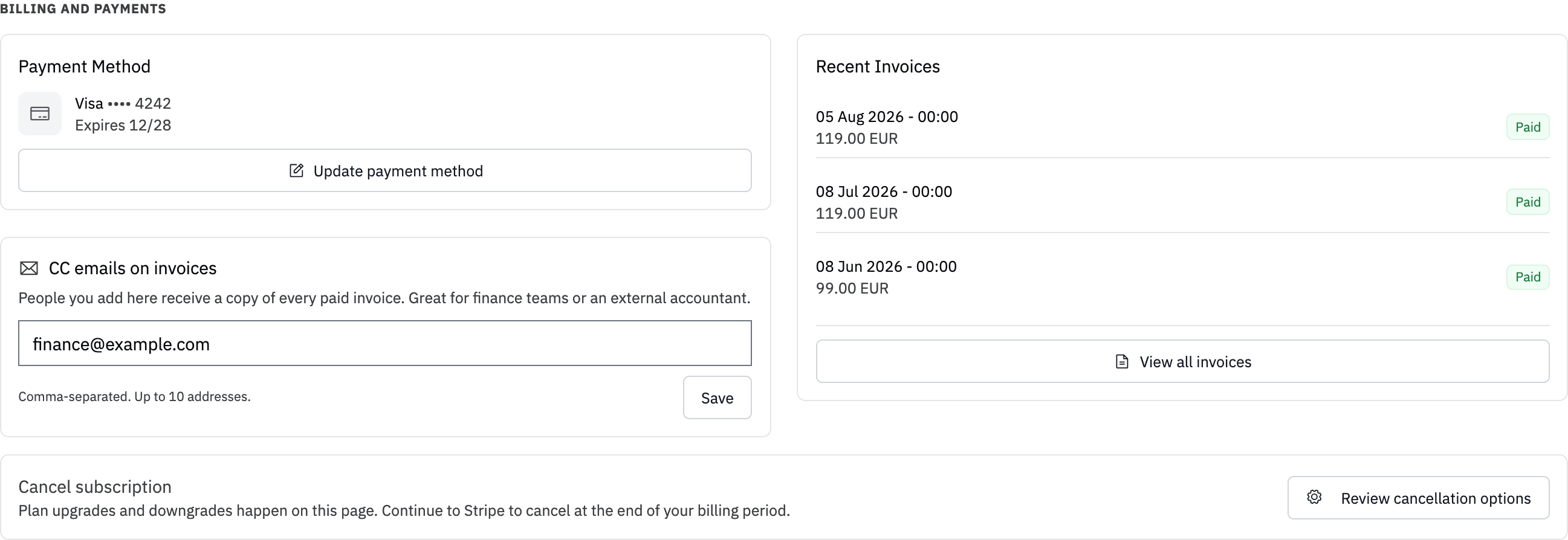
Update a payment method
The Payment Method card shows the saved card or payment method. It also warns you if a card has expired or will expire soon.
Click Update payment method to open the secure billing portal. If no payment method is saved, use Add payment method instead.
When a payment fails, the page shows a red warning with the date we will try the charge again. Update the payment method from that warning. If no further attempt is scheduled, the warning says the account will be suspended soon. If the payment still does not complete, open a support ticket.
Download invoices
The page lists your three most recent invoices. Click the download icon beside an invoice to get its PDF. Use View all invoices to open the full history in the billing portal.
Send invoice copies to finance
The CC emails on invoices card can send a copy of every future paid invoice to a finance team or external accountant. Enter up to 10 addresses separated by commas, spaces, or semicolons, then click Save.
Remove an address from the field and save again to stop sending it copies. These recipients receive invoice copies only. They do not receive account access.
Change company, address, or tax details
Open Manage Subscription, then edit the billing information in the billing portal. Changes to the company name, billing address, or VAT/tax ID apply to future invoices.
An invoice that has already been issued cannot be edited or reissued with different details. If you need help with a past invoice, contact support with the company legal name, billing address, VAT/tax ID, and affected invoice number. Do not cancel and subscribe again before the team reviews the case.
What the billing portal is for
Use the billing portal for payment methods, billing details, the full invoice history, and subscription cancellation. Use LLM Pulse Plans & Billing for plan, tracking cadence, billing interval, and add-on changes.
Account owners and members with Billing & Plans access can open these controls. See Billing & Plans for the full subscription guide.