Plans & Billing
Plans & Billing brings your plan, usage, AI models, invoices, and payment controls together in one page.
Open Plans & Billing
- Click your name/avatar at the bottom-left of the sidebar.
- Click Plans & Billing.
Account owners and members who have been given Billing & Plans access can open this page. Account admins do not receive billing access automatically.
Review your subscription and usage
The top of the page shows your current plan, subscription status, billing interval, and next renewal date. The Usage section shows how much of each allowance your account is using, including prompts, projects, team members, LLM Pulse Agent messages, GEO Writer tasks, Custom AI Studies, and AI model runs.
The upgrade comparison shows the total allowance on both the current and recommended next plan for prompts, projects, competitors, GEO Writer tasks, Agent messages, and Custom AI Study waves. These are side-by-side plan limits, not additional amounts added on top of the current plan. It also lists every higher plan available to your account, and the plan selector lets you choose any eligible option without moving up one tier at a time.
If your prompt or project limit includes extra capacity, open the information tooltip beside the limit to see how it is split between your plan allowance, account grants, and purchased add-ons.
If you canceled renewal but still have paid time remaining, the page keeps the subscription marked Active and adds a Renewal canceled badge. A larger notice shows the exact date your access ends. The upgrade comparison shows Manage renewal, which opens Stripe directly. Plan changes and self-serve model purchases become available again after you reactivate.
Change your plan, tracking, or billing interval
Paid self-serve subscriptions have a Change plan section. Choose:
- Any plan available to your account
- Weekly or daily tracking
- Monthly or yearly billing
After making your selection, click Review change. A confirmation window explains when the change will apply and what you will pay. It separates the base plan, each paid AI model by name and price, extra prompt or project capacity, discounts, subtotal, applicable tax, and renewal total. For immediate changes, it also separates the new subscription charge from any credit for unused time on your old price, then shows the subtotal, tax, and total charge today. If tax is zero, the tax line is omitted. The final confirmation is only enabled after Stripe returns the price preview.
Changes that increase your subscription apply immediately. This includes moving to a higher plan, switching from weekly to daily tracking, or moving from monthly to yearly billing. The preview shows the estimated prorated charge today and your new renewal total.
Changes that reduce the plan or tracking cadence wait until your next renewal. This includes moving to a lower plan or switching from daily to weekly tracking. If one selection combines an increase with either reduction, the whole change waits until renewal. You keep your current plan, cadence, capacity, and price until the date shown.
Switching from yearly to monthly billing is self-service. If your current yearly invoice has been paid, the change is scheduled for your next renewal. You keep yearly billing until the date shown, and paid annual time is not refunded.
If your yearly renewal invoice is open and unpaid, the review explains that it will be voided and replaced. When you confirm, Stripe voids that invoice and attempts the monthly charge shown in the preview. If your bank requests 3D Secure, complete it on the secure invoice page.
Some accounts still need support, including partially paid or manually collected invoices, custom subscription items, and changes scheduled outside LLM Pulse. The app will show Contact support instead of applying the change when it cannot handle the account safely.
The app will stop a change that would leave you with more prompts or projects than the new allowance supports. Remove enough prompts or projects first, or choose a plan with a larger allowance.
If your account still ends up with more projects than your plan includes, for example because you created projects after scheduling a lower plan or a project removal, only your oldest projects up to the plan limit keep being tracked. The others keep their history but stop collecting new answers, including for prompts you add to them, and stop getting a monthly reputation report. A banner names them: delete the projects you no longer need or upgrade to track them all.
The amount you confirm is the amount we charge. The confirmation is tied to the exact figures you reviewed, so if your billing period rolls over, a price or discount changes, or you leave the confirmation open for more than fifteen minutes, we refuse the change and charge nothing. Open Review change again and confirm the new figures.
Scheduled changes
Only one subscription change can be scheduled at a time. While a change is pending, the page shows what will change and the date it will take effect. Plan and add-on controls remain locked until then.
Use Cancel scheduled change in the banner if you want to keep your current plan and price or make a different change. If the banner says the change was created outside the app and does not show a cancel button, open a support ticket.
If a payment is outstanding
While an invoice on your subscription is unpaid, or your subscription is paused, plan changes and add-on purchases are locked. The billing page shows a banner with the action that unlocks them: pay the outstanding invoice, or resume the subscription. Changing the plan first would rewrite the amount we are still collecting, which is why the order matters.
Switching a yearly plan to monthly billing is the exception. If your yearly renewal invoice is open and unpaid, that switch stays available, because it replaces the invoice.
If your very first payment did not go through, your subscription never started. While that invoice can still be paid, the billing page shows a banner with a link to it. Once it expires, the plan picker comes back and you can simply buy again.
Trials and daily tracking
Eligible new customers can start a 14-day free trial on weekly Starter, Growth, or Scale. A previous trial or another eligibility restriction can make one of these plans start paid instead. Weekly Scale+ and Scale++ plans start paid. All daily plans also start paid and do not include a free trial.
During a trial, you can move to any higher self-serve plan from Change plan, with monthly or annual billing. The review shows the full amount due today. After you confirm, Stripe attempts to charge your saved payment method. If additional payment authentication is required, the upgrade stays pending while you complete it. Your trial and any scheduled switch to monthly billing stay in place while it is pending. When the payment succeeds and the upgrade applies, your trial ends, the paid plan starts, and the upgrade replaces any scheduled switch to monthly billing. Your tracking cadence stays the same.
During an annual trial, you can also keep your current plan and switch only the billing interval to monthly. Monthly billing then starts when the trial ends, so this interval-only change does not end the trial early. Lower plans, tracking-cadence changes, and paid add-ons remain unavailable while you are trialing. If you need one of those changes, open a support ticket. Do not cancel and subscribe again just to change plans.
Prices
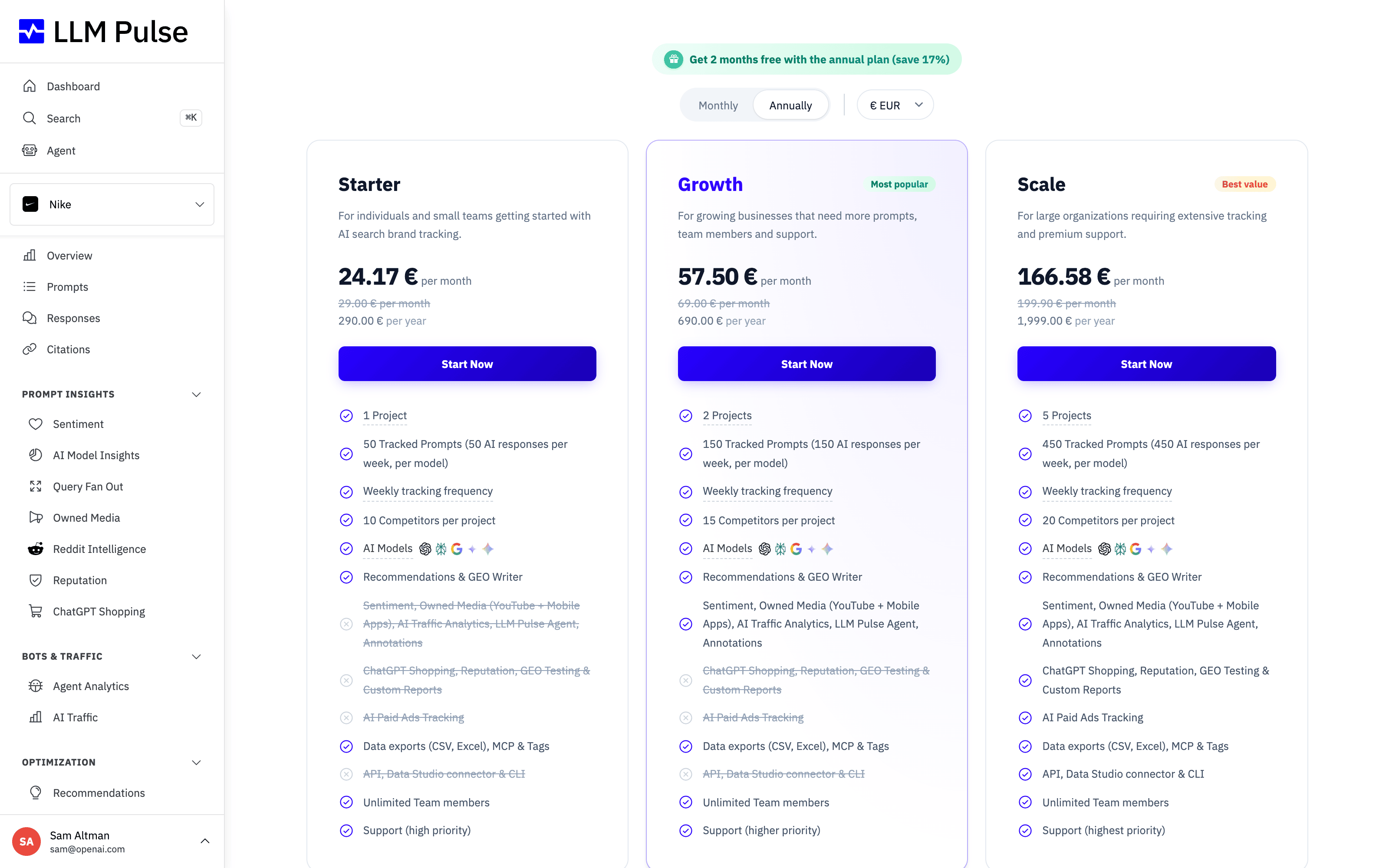
These are the monthly prices before VAT or other applicable taxes:
| Plan | Weekly tracking | Daily tracking | Prompts |
|---|---|---|---|
| Starter | EUR49 | EUR79 | 50 |
| Growth | EUR99 | EUR149 | 150 |
| Scale | EUR299 | EUR449 | 450 |
| Scale+ | EUR599 | EUR899 | 1,200 |
| Scale++ | EUR1,199 | EUR1,899 | 2,400 |
Yearly billing costs ten times the monthly price, which is equivalent to two months free. The page shows the exact price before you confirm. Enterprise plans use custom pricing.
After your second successful monthly subscription payment, we may send you a one-time reminder about yearly billing. Free trials, zero-value invoices, prorations, and add-on purchases do not count. The email does not change your plan, and you can stay on monthly billing without taking any action.
Annual bank transfer payments are available on Scale plans and above. Contact the team to arrange one.
Tracking set by our team
If our team set your tracking to daily or more often, the page shows that frequency and you cannot change it here. Your granted frequency stays in place when you change plan or billing interval. Contact support to change it.
Accounts paid by invoice
Accounts marked Invoice / Paid must contact support for purchases, plan changes, cancellation, and billing management. Self-serve purchases and the Stripe billing portal are unavailable, even if the account previously paid through Stripe. This status does not automatically cancel an existing Stripe subscription or renewal. The controls below apply to self-serve subscriptions.
Accounts billed by Shopify
If you bought LLM Pulse inside the LLM Pulse app for Shopify, Shopify bills your plan. Plans & Billing shows Billed by Shopify with your plan, and Manage plan in Shopify opens Shopify's plan page, where you change or cancel it. Invoices and refunds for that plan come from Shopify. A Shopify development store pays nothing, so it gets one 14-day trial per email address instead (see How to Use LLM Pulse for Shopify).
Payments, invoices, and cancellation
The Billing and payments section shows your saved payment method and three recent invoices. You can download an invoice PDF directly and add up to 10 finance or accountant email addresses to receive future paid invoices.
Manage Subscription opens the secure billing portal for payment methods, billing details, full invoice history, and cancellation. Plan changes and add-on changes are handled in LLM Pulse, not in the billing portal.
If a plan or add-on purchase needs extra payment confirmation (3D Secure), Plans & Billing shows a pending payment notice naming exactly what is waiting, the amount, and a Complete payment button that reopens the secure payment page. The affected AI model card also shows Payment pending instead of a buy button. The change does not apply and nothing is charged until payment succeeds. If you do not complete it in time, the pending change expires on its own, nothing is charged, and you can simply buy again.
Cancellation takes effect at the end of the current billing period. You keep access until then. The page shows Active and Renewal canceled together, highlights the end date, and provides a Manage renewal button. Self-serve model cards say Reactivate to add during this period; only models that genuinely need a quote continue to say Talk to sales. Support can guide you to these controls but cannot cancel on your behalf.
For more detail, see:
- Buy extra prompts or projects
- Add more AI models
- Manage payment methods and invoices
- Should I track daily, weekly, or monthly?
Need more than Scale++ offers? Book a call with the team.









