Add More AI Models
Every LLM Pulse plan includes ChatGPT, Perplexity, Gemini, Google AI Mode, and Google AI Overviews.
Paid accounts can buy any combination of these models from Starter upwards:
- Claude
- Copilot
- Grok
- DeepSeek
- Naver AI Briefing
- Baidu AI
Alexa for Shopping (formerly Amazon Rufus), Meta AI, Qwen, MiniMax, Mistral, Walmart Sparky, and Brave AI are available through Talk to sales instead of a self-serve price. They cannot be purchased self-serve. Tell the LLM Pulse team which brands, competitors, markets, topics, and prompts you want to monitor. The team will configure the requested model for an approved paid account. Once set up, it follows the account's weekly or daily tracking cadence.
Claude, Grok, DeepSeek, Naver AI Briefing, and Baidu AI show an API label in Plans & Billing because their responses are collected through an API rather than a browser session.
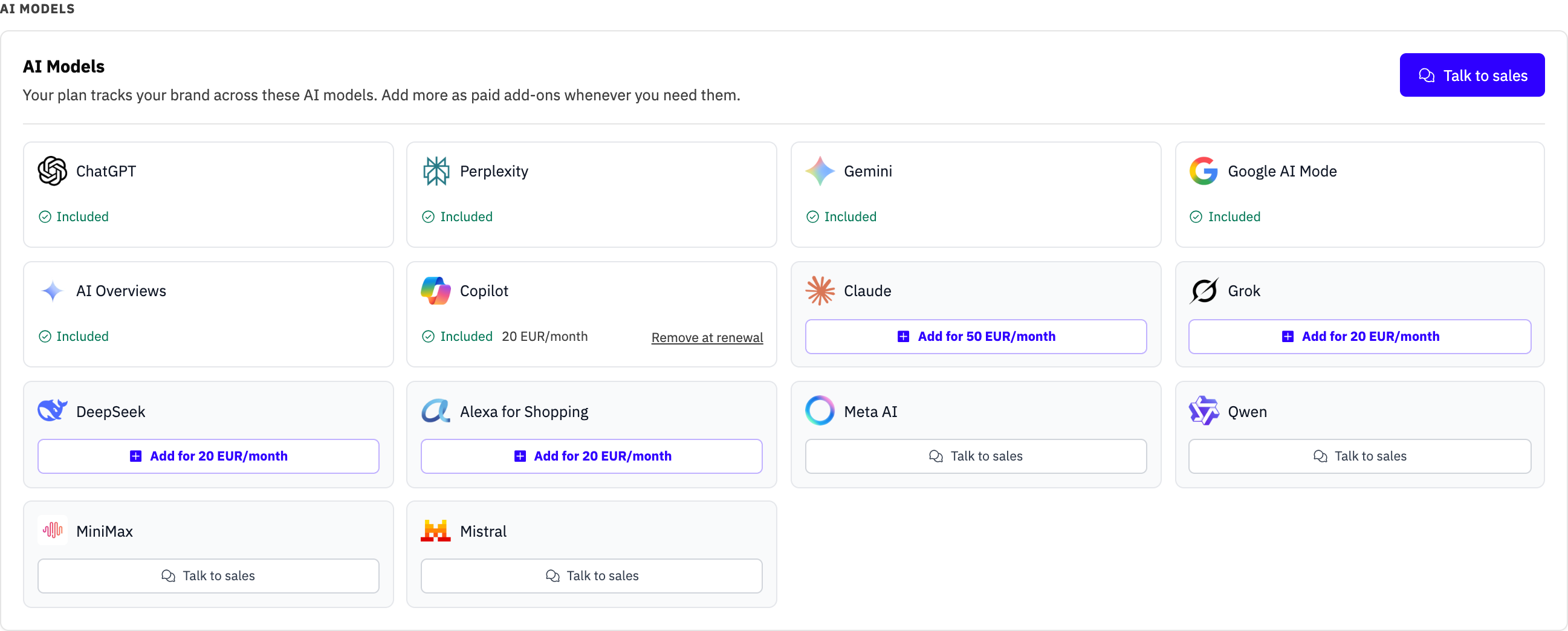
Add a model
- Open the profile menu from your name or avatar at the bottom-left of the sidebar, then choose Plans & Billing.
- Find the AI models section.
- Click Add on the model you want.
- Review the recurring price and today's charge.
- Confirm the purchase.
The exact price depends on your plan, tracking cadence, and monthly or yearly billing. The model card shows the recurring price for your account. The confirmation separates today's prorated subtotal, applicable tax, and total charge. If tax is zero, the tax line is omitted. The purchase button stays disabled until Stripe returns this preview. Yearly pricing is ten times the monthly price.
Claude and Grok tracking prices vary by plan and cadence because they cover running every included prompt and reflect each provider's execution cost.
The model is added to your account after payment succeeds, and your current prompts run on it right away instead of waiting for the next scheduled run. Answers usually start appearing within the hour, and from then on the model follows your regular tracking cadence. If your payment needs extra confirmation (3D Secure), finish it on the secure payment page that opens first: until then the model shows Payment pending in Plans & Billing with a Complete payment link, you also receive an email with the same link, and nothing is charged. If the confirmation is not completed in time, the purchase expires on its own and you can buy again.
When you later change plan, cadence, or billing interval, the model add-on moves to the matching price for the new subscription. The plan-change preview includes every paid model in its renewal total.
Remove a paid model
Click Remove at renewal on the model card. The model keeps running until the end of the current billing period, then stops and drops off the next renewal.
Only one subscription change can be scheduled at a time. If another plan or add-on change is already scheduled, cancel it from the banner before choosing a different change.
Models granted directly to your account do not have a self-serve removal button. Contact the team if you no longer need one.
During a free trial
During a free trial, self-service model cards show Available after your trial instead of contacting sales. You can purchase them after the trial converts to a paid subscription. Models that genuinely need a quote still show Talk to sales.
Models that need a quote
Some models show Talk to sales instead of a price. These models are available through the team, which will confirm the setup and pricing for your requirements. Manual and invoice-billed subscriptions also use this route because their add-ons are managed outside self-serve billing.
Naver AI Briefing scope
The Naver AI Briefing add-on tracks AI Briefing in NAVER Search. AI Tab is a separate Naver product and is not included. It does not add Naver Blog or Kakao Channel as Owned Media connectors. Those sources are outside this add-on.
Coverage notes
DeepSeek reports answers, brand mentions, visibility, share of voice, and sentiment. It does not report sources or citations because its API does not provide web search. An empty Citations view for DeepSeek is expected.
Alexa for Shopping, Meta AI, Qwen, MiniMax, Mistral, Walmart Sparky, and Brave AI are listed in Plans & Billing with Talk to sales and cannot be purchased self-serve. The team configures the requested model for approved paid accounts. Once set up, it supports weekly or daily recurring tracking.
Model add-ons are unavailable during a free trial or after subscription cancellation has been scheduled. During a pending cancellation, self-serve models show Reactivate to add and open renewal management; they do not change to Talk to sales. Account owners and members with Billing & Plans access can manage them. See Billing & Plans for plan changes, invoices, and cancellation.