Buy Extra Prompts or Projects
You can add prompt or project capacity without changing plans:
- Extra prompts add 100 prompts per unit. Each unit costs EUR100 per month or EUR1,000 per year.
- Extra projects add 1 project per unit. Each unit costs EUR50 per month or EUR500 per year.
You can buy several units in one purchase.
Buy capacity
- Open the profile menu from your name or avatar at the bottom-left of the sidebar, then choose Plans & Billing.
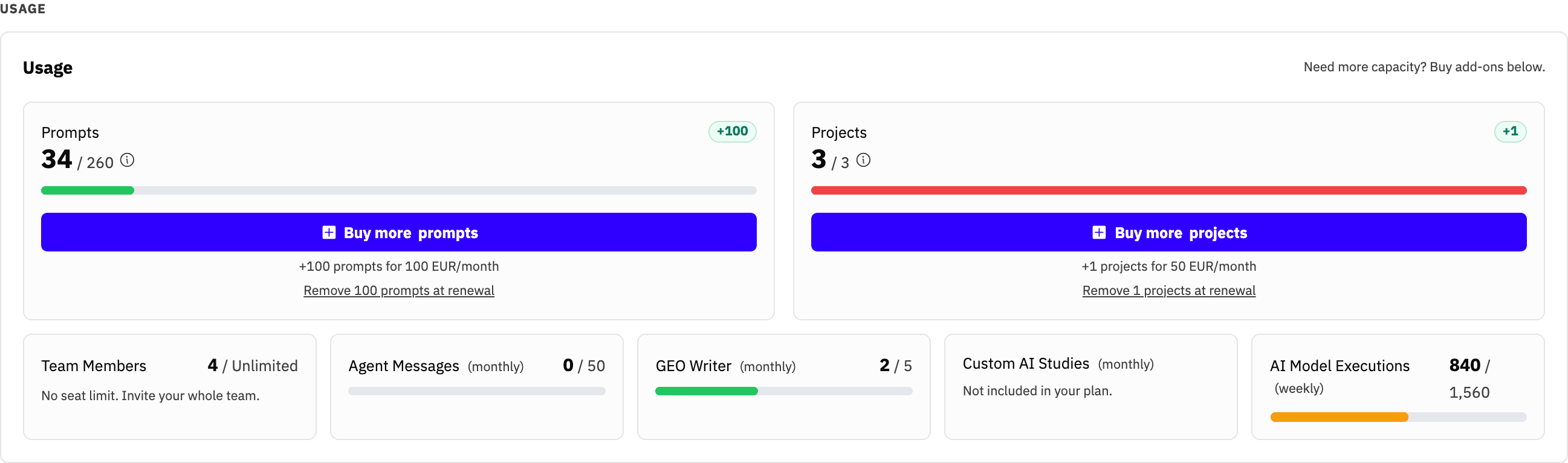
- In the Usage section, find Prompts or Projects and click Buy more.
- Choose the number of units, up to 99 in a single purchase. Buy again if you need more.
- Review the recurring unit price, quantity, recurring total, and today's charge.
- Confirm the purchase.
The confirmation separates today's prorated subtotal, applicable tax, and total charge. If tax is zero, the tax line is omitted. The purchase button stays disabled until Stripe returns this preview. After the first charge, the add-on renews with your subscription. Yearly subscriptions use yearly add-on pricing, so their first prorated charge can be larger than a monthly charge.
If your payment needs extra confirmation, finish it on the payment page that opens. The new capacity does not apply until payment succeeds.
How the allowance changes
Purchased capacity sits on top of the plan allowance and any capacity granted directly to your account. The Usage section shows the purchased amount as a green badge, and its information tooltip shows the full breakdown.
The new limit applies after payment confirmation. Everyone on the account shares it.
Remove capacity at renewal
Use Remove 100 prompts at renewal or Remove 1 project at renewal below the matching usage card. This schedules one unit for removal at the end of your current billing period. You keep the capacity until the date shown and are not charged for it at the next renewal.
The app will not schedule a removal if your current usage would exceed the resulting allowance. Remove enough prompts or projects first.
Only one subscription change can be scheduled at a time. If you already have a plan or add-on change scheduled, cancel that change from the banner before choosing another. Contact support if you need to remove several units together.
Availability and access
Capacity add-ons are available on paid self-serve subscriptions from Starter through Scale++. They are not available during a free trial, after cancellation has been scheduled, or on invoice-billed plans. Contact the team to adjust capacity on a custom or invoice-billed plan.
Account owners and members with Billing & Plans access can manage add-ons. For the rest of the subscription controls, see Billing & Plans.