How to Track ChatGPT and AI Search Traffic in GA4

By Daniel Peris




Table of contents
- Start here: GA4 already has an AI Assistant channel
- The trap that ruins most AI traffic reports
- Where the data comes from, and why ChatGPT is harder to see than it was
- Step by step
- What GA4 will never tell you
- Human visits and crawler hits are different things
- Troubleshooting
- Frequently asked questions
Start here: GA4 already has an AI Assistant channel
Most guides on this topic were written in 2025, and nearly all of them open the same way: build a custom channel group, paste in a regex matching chatgpt.com, perplexity.ai and gemini.google.com, then wait a week. That was correct when it was published. For most properties it is now the long way round.
Since May 2026, GA4 has had an AI Assistant channel in the default channel group (Google announced it on May 13). Google defines it as “the channel by which users arrive at your site from sources like ChatGPT, Gemini, Deepseek, Copilot, or Grok”. The match is mechanical: the session medium is exactly ai-assistant, or the referrer matches Google’s own list of recognised AI assistants, in which case GA4 assigns that medium itself. The definition lives in Google’s default channel group documentation.
Google does not publish that list of assistants, so a newer assistant can send you traffic for weeks before it is recognised. And because ai-assistant is an exact medium match, any link you tag that way drops straight into the channel.
The trap that ruins most AI traffic reports
In the same documentation, GA4’s Organic Search channel is defined as including “Google’s AI Overviews and AI Mode”, and the AI Assistant channel explicitly excludes them. Clicks from both Google surfaces are filed under Organic Search and never appear in the AI Assistant row.
If you pull the AI Assistant row and present it as “our AI traffic”, Google’s AI surfaces count as zero in that number and ChatGPT looks bigger than it is. Teams then conclude that AI Overviews sends them nothing, when Google is filing its own AI referrals under the channel it has always used. Say the caveat out loud whenever you share the number, because nobody reading a slide will infer it.
The question I hear most from SEO leads is why their AI Assistant row looks so small next to everything they read about AI search. Usually part of the answer is sitting in Organic Search and another part is sitting in Direct. I would much rather see a team report a modest number with its caveats written next to it than a big one nobody in the room can defend.
 Esteve Castells Co-founder, LLM Pulse
Where the data comes from, and why ChatGPT is harder to see than it was
GA4 takes the session source from utm_source when the link carries one and falls back to the document referrer when it does not. For a long time ChatGPT added utm_source=chatgpt.com to the links in its answers, which is why it showed up in almost every property, even small ones. Most other assistants rely on the referrer arriving intact.
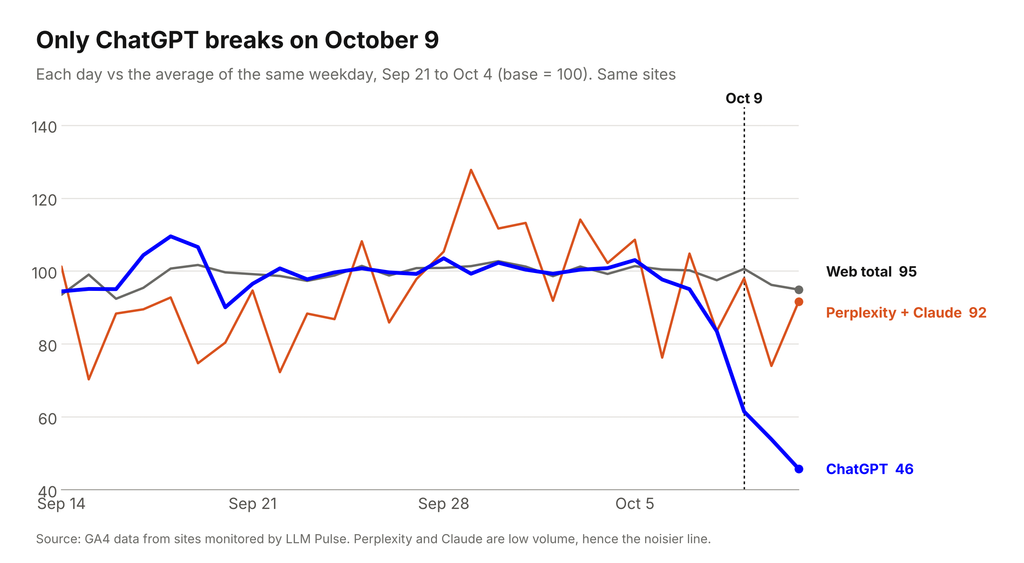
That changed in October 2026. After a new answer format reached ChatGPT users, many links in ChatGPT answers stopped carrying either the parameter or a referrer, and GA4 now files those visits as Direct. Across the sites we monitor, ChatGPT sessions fell by about 46% from October 9 while total traffic stayed roughly flat. We covered the evidence in our analysis of the October 9 ChatGPT referral drop.
Referrers also go missing for ordinary reasons. An in-app browser loses the handoff, some mobile paths and privacy settings strip the referrer, and a URL someone copies out of an answer and pastes into a new tab is a direct visit by definition. None of this is a GA4 bug, and you cannot fix it from your side.
So every AI traffic number in GA4 is a floor, not a total. You are looking at the visits that kept their attribution. Nobody has a reliable figure for how much is lost, so be wary of anyone who quotes one. Treat the shape of the trend as the signal and the absolute count as a minimum, and annotate October 9 so nobody compares the periods either side of it as if they were the same.
Step by step
1. Read the AI Assistant channel
Open Reports, then Acquisition, then Traffic acquisition. The table is grouped by the default channel group, so AI Assistant appears as its own row once you have qualifying sessions. Use a date range long enough to be stable, compare it against the previous period, and keep the Organic Search row in view so the Google caveat stays visible. If the row is missing entirely, see the troubleshooting section below.
2. Break the channel apart by source and medium
A single row for every assistant gives you a total and nothing you can act on. Build an exploration with session source / medium as the row dimension and sessions, engaged sessions and conversions as the values, then segment it down to the assistant traffic you care about.
Now you can see chatgpt.com separately from perplexity.ai and watch each move independently. That tells you whether a drop is an industry-wide referrer change or one assistant sending you less, and it is where an unfamiliar new assistant shows up before Google’s list catches up.
3. Decide whether you need a custom channel group
If you want AI Overviews and AI Mode pulled out of Organic Search, or an assistant Google has not listed yet, a custom channel group is the way to do it. Custom channel groups apply retroactively, so your history is re-read under the new rules. The costs are elsewhere: a standard property allows two custom groups (five on a 360 property), each with up to 50 channels, they are not available in the BigQuery export, and once the split exists every historical comparison your team is used to reads differently. If you do build one, our free GA4 AI traffic regex generator writes the source pattern for the assistants you pick. Do it only if someone will use the split to make a decision. Otherwise the exploration in step 2 gives you the same insight without changing how the property reports.
4. Tag the links you control
Where you place the links yourself and an AI surface is involved (a partner placement, documentation you syndicate, an assistant integration you built), tag them. Because the channel matches the medium ai-assistant exactly, a link tagged that way lands in the AI Assistant row. Keep the source values consistent and written down. If two people invent their own spellings, you lose more of the report to that than to referrer loss.
5. Build the landing page view
Take the same exploration, swap the row dimension for landing page, and keep the assistant filter. You now have the list of pages AI assistants send people to.
It is usually short, and usually not the homepage you have been optimising: a comparison page, a glossary entry, one documentation page. Strengthen those first, because something about them is already being surfaced in answers.
6. Judge behaviour, not session count
Assistant sessions tend to arrive later in the journey: the person already asked the question, read a synthesised answer, and clicked through to verify a claim or to buy. Compare engagement and conversion rate against organic search. A channel with a fraction of the sessions and a better conversion rate deserves attention. If your AI traffic converts worse than organic, that is useful too, and usually means assistants cite you for a definition and not for a decision.
What GA4 will never tell you
GA4 sees visits. It can show you what happened after a click and nothing about what happened before one.
It cannot tell you whether you were mentioned in the answers nobody clicked, which prompts produced those answers, whether a competitor was recommended above you in the same response, or which sources the assistant cited when describing your category. A large share of AI answers are read without any click at all (the same zero-click search pattern SEO has dealt with for years), so much of what decides your position happens where GA4 has no access. Two data sources close part of that gap.
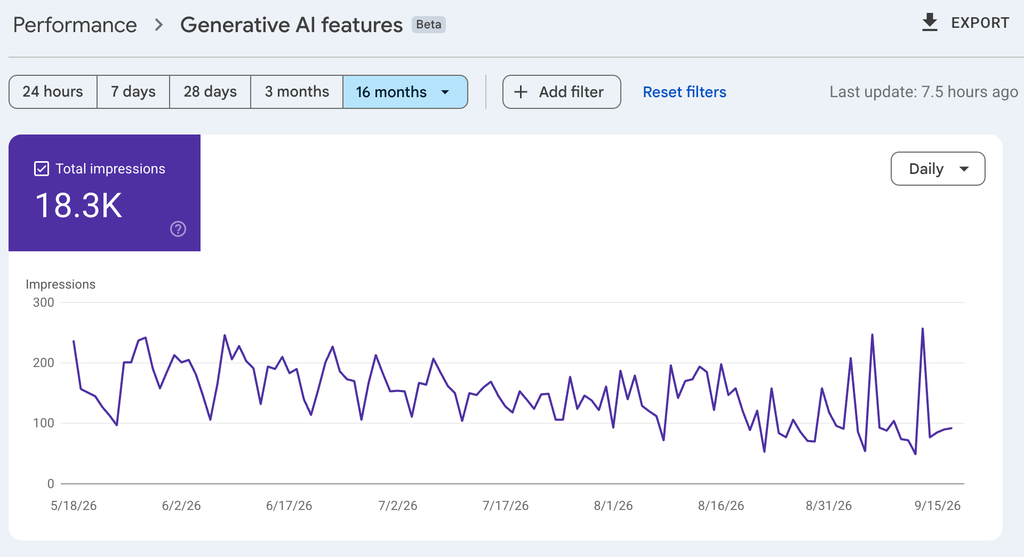
The first is Search Console’s generative AI performance report, rolled out to all websites on August 31, 2026, which covers Google’s own AI surfaces. It reports impressions only: how many times links to your site were shown to a user in a generative AI feature on Google Search, across AI Overviews and AI Mode combined. There are no clicks, no CTR and no position. Dimensions are pages, countries, dates and devices, the usual Search Console limits apply including the 1,000 row cap, Search Labs experiments are excluded, and sites without enough impressions in these features may not see the report at all. Those impressions are also part of the Web search type in the main Performance report. Details are in Google’s documentation for the report, and we walk through reading it in our guide to the Search Console generative AI report. Impressions without clicks is an odd metric to work with, and it is still the only first-party measure of Google AI visibility there is.
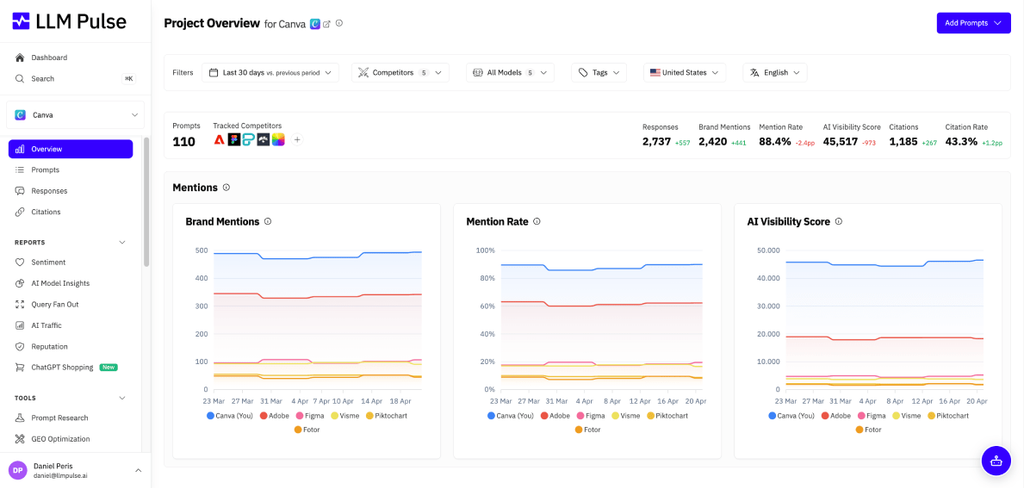
The second is prompt-level tracking: running the questions your buyers ask, on a schedule, across the assistants, and recording what comes back. That is where mentions, competitor comparisons and cited sources live, and it explains the numbers GA4 shows you. We have written separately about how to monitor brand mentions in LLM answers and about which GEO metrics are worth reporting.
Every week someone shows me a GA4 report and asks why their AI traffic looks so small. My first question is always: where are you looking? Part of it is sitting in Direct and Google’s part is in Organic Search. IMO, GA4 is the last place to judge AI visibility, not the first: it tells you who arrived, not who saw you in the answer.
 Daniel Peris Co-founder, LLM Pulse
Human visits and crawler hits are different things
People confuse the two constantly, and mixing them produces numbers that cannot be reconciled with anything.
A human referral visit is a person who read an AI answer, clicked a link and loaded your page in a browser. That is what GA4 measures, and what the AI Assistant channel counts.
A crawler hit is a bot fetching your page: an indexing crawler building a corpus, or a live retrieval fetch made while an assistant answers a question. No human is present, no analytics tag fires, and the hit exists only in your server or CDN logs. It is normal for a page to be fetched thousands of times and send almost no sessions. If you are deciding what to allow, we covered AI bot access rules separately.
In LLM Pulse these are two separate features, on purpose. AI Traffic connects GA4, Matomo, Plausible, Piano Analytics, PostHog, Adobe Analytics or Adobe CJA and reports the users, sessions and conversions arriving from AI assistants next to your visibility data, including what share of your organic and total traffic they represent. It reads the same attributed sessions your analytics tool does, so it cannot recover visits already filed as Direct, but it puts the click side and the answer side in one view. Agent Analytics reads your own server or CDN logs and reports which AI bots and crawlers hit your site and which pages they fetch. You can also connect Search Console to bring its query and performance data into the same project.
Want to see the answers behind your AI traffic?
Track how ChatGPT, Perplexity, Gemini and Google’s AI surfaces mention your brand, next to the visits they send.
Troubleshooting
I see zero AI traffic
Check the date range, then property filters, then whether the site is large enough to produce a visible row. Next, look in the source / medium table for assistant domains sitting in Referral instead of AI Assistant: a newer assistant may not be on Google’s list yet. And remember AI Overviews and AI Mode clicks are in Organic Search, so “zero AI traffic” is often “zero non-Google AI traffic”.
My ChatGPT sessions show as direct
The link arrived with neither a referrer nor a campaign parameter. Since October 2026 that is the case for many ChatGPT links, on top of the usual copy-and-paste visits and in-app browsers. The historical sessions cannot be recovered. Direct traffic rising on the deep pages ChatGPT used to send you (product, comparison or guide pages) while the ChatGPT row falls is a strong hint that this is what is happening.
My numbers do not match my log files
They are not supposed to match. Logs record every fetch including bots; GA4 records tagged page views by humans with JavaScript enabled. Logs will be far larger, and the difference is mostly crawlers. Compare log-derived bot hits against log-derived bot hits, and GA4 sessions against GA4 sessions.
AI traffic dropped sharply overnight
A clean cliff is almost always a measurement change: a tagging or consent deployment, a channel group edit, a filter applied to the property, or an assistant changing how it builds outbound links, as ChatGPT did on October 9, 2026. Check whether total sessions held steady while the channel collapsed. If they did, the visitors are probably still arriving and only the attribution moved.
Frequently asked questions
Does GA4 track ChatGPT traffic automatically?
Partly. Visits whose link carries utm_source=chatgpt.com or a chatgpt.com referrer are attributed with no setup. Since October 9, 2026 many ChatGPT links carry neither, and GA4 files those visits as Direct, so the ChatGPT row now under-counts more than it used to.
When did GA4 add the AI Assistant channel?
Google announced the AI Assistant channel in the default channel group on May 13, 2026. It matches sessions whose medium is exactly ai-assistant, or whose referrer is on Google's list of recognised AI assistants.
Why is AI Overviews traffic not in the AI Assistant channel?
Google's own definition of the Organic Search channel includes AI Overviews and AI Mode, and the AI Assistant channel explicitly excludes them. It is a deliberate classification, not a misconfiguration, and you need a custom channel group if you want those clicks reported separately.
Do I still need a custom regex channel group?
Only for what the default channel does not cover: splitting Google's AI surfaces out of Organic Search, or catching an assistant Google has not listed yet. To separate ChatGPT from Perplexity, an exploration on session source / medium is lighter and leaves your existing reports intact.
Can GA4 tell me which prompts sent the traffic?
No. The prompt stays inside the assistant and is never passed to your site. To know what produced the click you need prompt-level tracking, which runs the questions on a schedule and records the answers.
Is AI traffic in GA4 accurate?
It is accurate about the sessions it captured and incomplete about the rest. Referrer loss and untagged links mean the true number is higher than what you see, by an amount nobody can measure reliably. Use it as a floor and watch the trend.
Does Search Console show clicks from AI Overviews and AI Mode?
No. Its generative AI performance report shows impressions only, for AI Overviews and AI Mode combined, with page, country, date and device dimensions. It has no clicks, CTR or position.
What should I do with the landing page report once I have it?
Treat those pages as evidence of what assistants already find citable about you and improve them first: sharpen the claims, keep the facts current, and make comparison and definition sections easy to quote. Then check whether competitors appear on the same questions, which GA4 cannot answer.






Discover your brand's visibility in AI search effortlessly
Daniel Peris
Daniel Peris is a serial entrepreneur and one of the Co-Founders of LLM Pulse. With a strong background in SEO and ASO, he has spent over 15 years building and scaling digital businesses. He brings extensive experience in SaaS, both in product and growth, focusing on refining the product and executing growth strategies.