ChatGPT Ads: track sponsored ads in your category
ChatGPT surfaces sponsored ads inside its answers, and those ads compete with your organic AI visibility. LLM Pulse captures ads confirmed as rendered for your tracked prompts: who the advertiser is, what the creative says, and where it ranks.
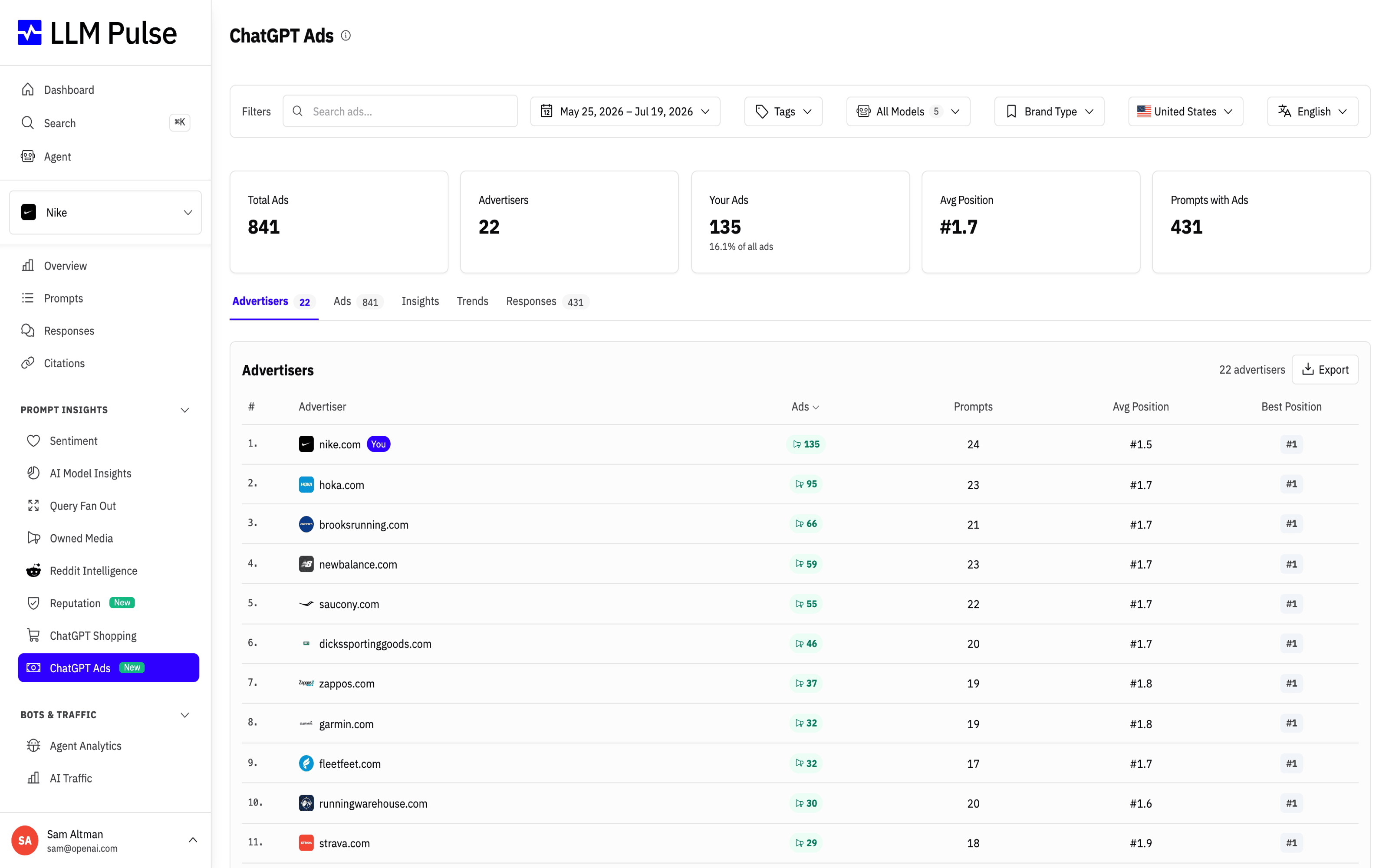
With ChatGPT Ads tracking, you can:
- See which advertisers are paying to appear in ChatGPT answers for your prompts
- Track your own ads: their share of all ads, average position, and best position
- Compare your ad presence against competitors with share-of-voice and position charts
- Watch weekly trends to see when a competitor ramps up ChatGPT ad spend in your category
Find it under Prompt Insights > ChatGPT Ads in the sidebar. For a project on the Scale tier or higher in a supported ads country, this item opens the project report even before the first ad is captured. Otherwise, the same sidebar item opens the global Ads Library. Ads are also visible inside individual response detail views, marked with a "Sponsored" badge, on the Scale tier or higher.
What it does
- Stat cards: total ads, unique advertisers, your ads (with your share of all ads), average position, and prompts with ads
- Advertisers tab: a table grouped by advertising domain showing ads count, prompts covered, average position, and best position, with a "You" badge on your own domain. Use Export to download the filtered table as CSV or Excel.
- Ads tab: the actual ad creatives (image, title, snippet, domain, position, AI model), with an "All / Your ads only" toggle. Each ad links to the response that contained it.
- Insights tab: donut charts for advertiser share of voice, you vs competitors, and ads by AI model, plus a position distribution chart
- Trends tab: weekly time series for ads, advertisers, your ads, and the top 5 advertisers stacked
- Responses tab: the prompts and responses that returned sponsored ads, with a CSV or Excel export for the filtered table
How to use it
- Open Prompt Insights > ChatGPT Ads
- Start on the Advertisers tab to see who is paying to appear for your category prompts
- Use the Insights tab to compare your ad share against competitors
- Filter by tag, AI model, country, language, or free-text search (matches ad title, domain, or snippet)
- Check Trends to see whether ad pressure in your category is growing
Tips & notes
- Competitor ads are detected by domain and brand keywords, using the same matching logic as Mentions
- Candidates marked as not rendered, or returned without positive render confirmation, are excluded from every count, table, chart, export, and response detail
- If ChatGPT re-emits the same sponsored creative while generating one answer, LLM Pulse counts it once. Different advertisers or genuinely different copy, destinations, or images remain separate ads.
- If a competitor advertises heavily on prompts where you rank organically, that is a signal they value those queries; consider strengthening your citable content there
- When the project report has no results, it shows a collection notice. Data checks since August 27, 2026, have found ChatGPT ads only in logged-in sessions. Data for the report is collected from logged-out sessions to avoid personalization, so new results may be unavailable. This notice does not apply to the separate Ads Library.