AI Traffic: measure the visits AI search sends to your site
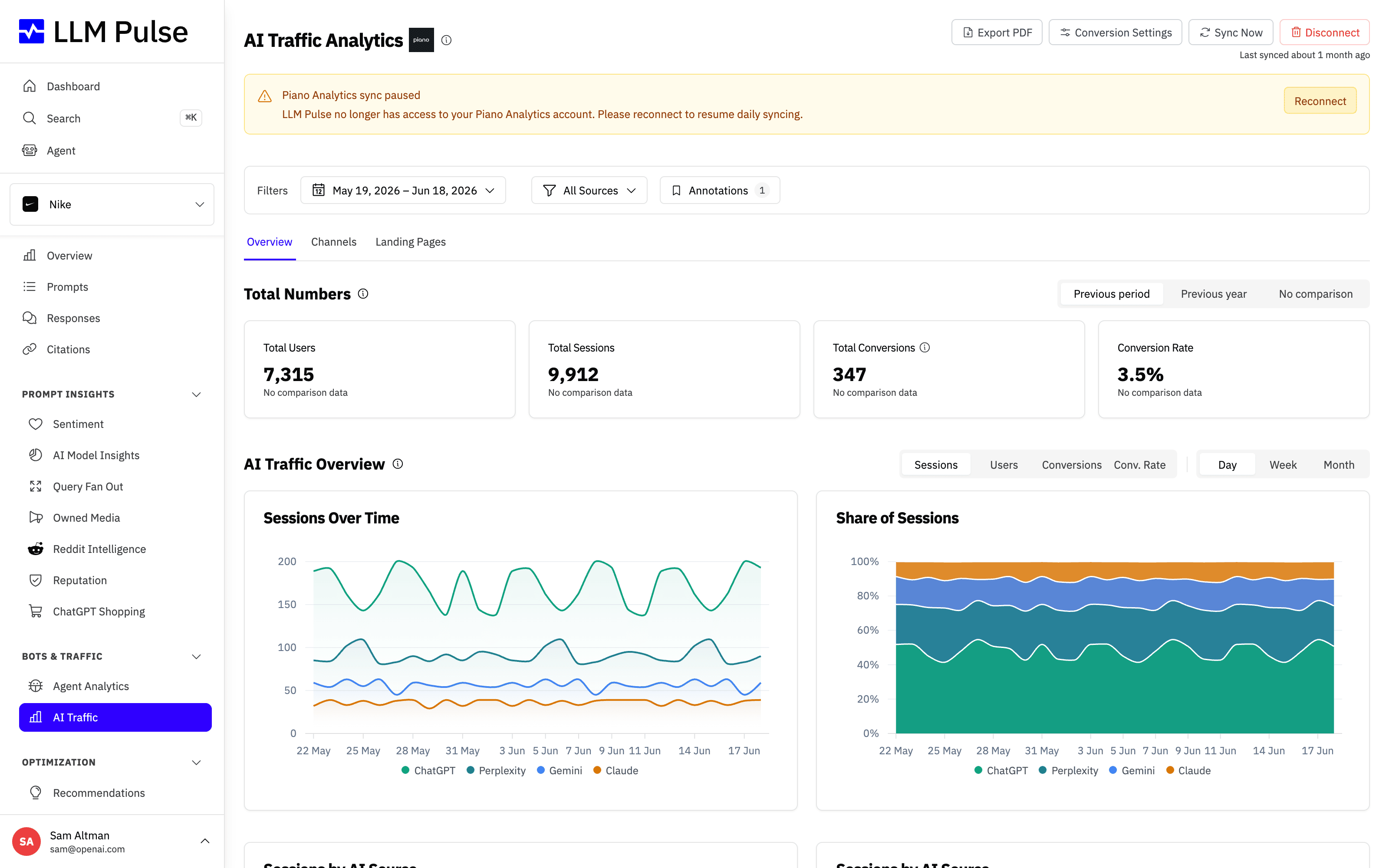
AI Traffic connects your web analytics to LLM Pulse, showing how much traffic AI search engines send to your website. See daily visitors, sessions, and conversions from AI sources. Available on Growth plans and above.
With AI Traffic, you can:
- Measure how many real visitors ChatGPT, Perplexity, Gemini, and Google AI send to your site
- Connect Google Analytics 4, Piano Analytics, Adobe Analytics, Plausible, PostHog, and Matomo to bring data into AI Traffic
- See the top landing pages AI assistants send traffic to, so you know which content is converting AI readers
- Track conversions from AI-referred visitors, closing the loop from visibility to business impact
What it does
- Connects to Google Analytics 4, Piano Analytics, Adobe Analytics, Plausible, PostHog, and Matomo to bring traffic data into AI Traffic
- Filters and displays traffic specifically from AI referrers (ChatGPT, Perplexity, Gemini, Google AI Mode, etc.)
- Shows daily traffic trends with interactive charts and date range filtering
- Identifies top landing pages receiving the most AI-referred traffic
- Breaks down traffic by AI source so you can see which models drive the most visits
- Displays conversion counts when the connected provider supplies them
- Supports requesting additional analytics integrations beyond GA4
How to use it
- Open Bots & Traffic > AI Traffic
- To connect GA4, click Connect Google Analytics and authorize LLM Pulse via Google OAuth
- Select your GA4 property from the dropdown
- Once connected, traffic data syncs automatically
- Use date range and granularity filters to analyze specific periods
- Check the Top Pages section to see which pages receive the most AI traffic
- For providers that support conversion-event filtering, configure the events in Project Settings
To connect Matomo, enter your instance's public HTTPS URL, the numeric site ID, and an auth token for a Matomo user with View access to that site. Matomo's unique visitors map to Users, and visits map to Sessions. Conversions count visits that complete at least one configured goal. Individual goal selection is unavailable. The Top Pages report uses Matomo's entry pages, the first URL in each visit. The initial sync can request up to 395 days, subject to the archived data Matomo still retains. The Matomo instance must allow archived reports for filtered data. If verification fails for this reason, ask your Matomo administrator to enable on-demand archiving or pre-archive the requested dates.
Supported analytics providers
Available integrations:
- Google Analytics 4 (GA4)
- Piano Analytics
- Adobe Analytics (Classic and Customer Journey Analytics)
- Plausible
- PostHog
- Matomo
Conversion tracking is available for GA4, Piano Analytics, and Adobe Analytics (Classic and Customer Journey Analytics). Plausible and PostHog provide visitor and session data. Matomo reports visits that complete at least one configured goal as conversions.
Requestable integrations:
- Fathom
- Mixpanel
- Amplitude
- Heap
- Simple Analytics
- Cloudflare Web Analytics
- Umami
- Microsoft Clarity
You can request any of these from the AI Traffic page. Requests help us prioritize future integrations.
Tips & notes
- Available on Growth plans and above
- For GA4, the initial sync pulls up to 395 days of historical data
- If the connection shows "on hold", it means LLM Pulse lost access to your GA property, reconnect via the OAuth flow
- AI traffic is identified by referrer domain matching (chatgpt.com, perplexity.ai, gemini.google.com, etc.)
- Available in embed and full-whitelabel portals, where the client connects and manages Matomo, Plausible, Piano Analytics, PostHog and Adobe themselves. A full-whitelabel portal also connects Google Analytics itself, through a Google app that does not carry our brand, while disconnecting it stays in the main workspace and an embed portal cannot start the Google flow at all. Once a Google Analytics property is connected, a portal also cannot connect another provider in its place, because that would remove the property and its history. A portal user whose permissions do not allow connecting still sees the report and is told to contact their account manager.
- For providers that support conversion-event filtering, configure events in Project Settings before expecting event-specific conversion data in AI Traffic
- You can also query this data from any AI assistant over MCP with the
get_ai_traffictool (users, sessions and conversions per AI source). It needs a connected provider and the Growth plan or above. Connect your AI client from Utilities > Integrations > MCP (/app/api_keys/mcp) - To ask your analytics tool about anything else, live and not only about AI referrals, use the MCP tools
get_web_analytics_schema(which provider is connected and how to write a query for it) andquery_web_analytics(runs one read-only query on the connected property and returns the rows). Queries that are not cached count against your analytics provider's own API quota. Available on the Growth plan or above









