AI Model Insights: visibility across ChatGPT, Gemini & Perplexity
AI Model Insights is a matrix view that compares brands and competitors across every AI model you track: ChatGPT, Perplexity, Gemini, Google AI Mode and Google AI Overviews. It helps you identify which models favor which brands and where your optimization efforts should focus.
With AI Model Insights, you can:
- See which AI models mention your brand most, and which ones ignore you
- Compare your Mention Rate, Citation Rate, sentiment, and position side by side against competitors, per model
- Find the specific model where a competitor out-ranks you, so you know where to concentrate GEO work
- Spot a model that cites your URLs but never names your brand, or vice versa
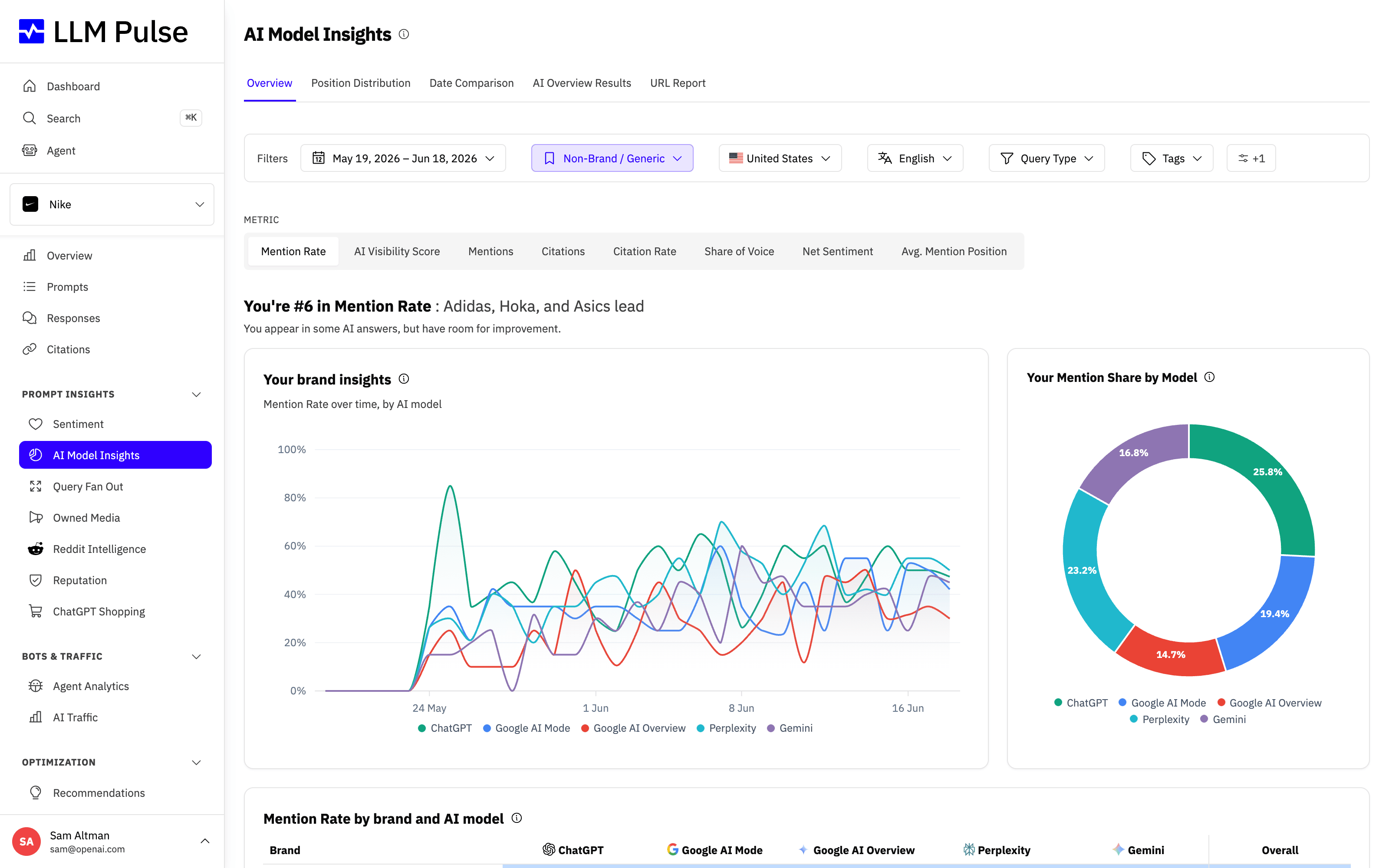
On the Overview tab, the main chart shows the selected metric over time for each AI model.
What it does
- Displays a comparison table with brands as rows and AI models as columns
- Shows four main tabs: Overview, Position Distribution, Date Comparison, and AI Overview Results. Accounts on the Growth tier or higher also see URL Report.
- On Overview, select a metric to compare brands across AI models. The selector includes Mention Rate, Mentions, Citations, Citation Rate, Net Sentiment, AI Visibility Score, Share of Voice, and Avg. Mention Position.
- The accompanying chart summarizes your brand's result by AI model, except for Share of Voice, which compares your brand's mentions with competitors. It uses a donut for some metrics and a column chart for others.
- Lets you compare two specific dates to track how rankings changed over time
How to use it
- Open Prompt Insights > AI Model Insights in the sidebar
- Use the report tabs to switch views. On Overview, use the metric selector to choose what to compare.
- Filter by date range, tags, country, or language
- In the Date Comparison tab, select two dates to see metric changes side by side
- The table highlights which models give you the strongest visibility
Exporting the table
On the Overview tab, the Export table menu above the brand-by-model table exports it as CSV or Excel. The file follows the metric, date range, filters and competitors you have selected: one row per brand, one column per AI model, plus the summary column. Percentage metrics carry (%) in the column headers. Rows you hid on the page are still included. Like the other exports, the file is prepared in the background and then appears on the Exports page, where you can download it for 7 days.
Tips & notes
- Different AI models may perceive your brand very differently, a strong position in ChatGPT doesn't guarantee the same in Gemini
- Use this to identify which models need optimization and which are already performing well
- The AI Overview Results tab is specific to Google AI Overviews and shows how your brand appears in that context
- Position Distribution shows the distribution of your mention positions (1st, 2nd, 3rd+), higher Position 1 rates indicate stronger brand authority in that model, and it now also shows the average mention position headline for your brand next to a competitor
- Average Mention Position is the single number behind Position Distribution: select it as a metric on the Overview tab to compare your average rank against competitors across every model, and it also appears in the Overview dashboard KPI bar. Lower is better
- In the AI Visibility Score table, the Average column is the arithmetic mean of the enabled AI model columns. It does not add the model scores together









