Sentiment Analysis: how positively AI describes your brand
Sentiment Analysis classifies how positively or negatively AI models discuss your brand. The analyzer uses the main brand name and the matching names configured for your project or competitor. The page shows classification coverage so you can compare detected mentions with completed sentiment results. Available on Growth plans and above.
With Sentiment Analysis, you can:
- See whether ChatGPT, Perplexity, and Gemini describe your brand positively, negatively, or neutrally
- Track your Net Sentiment Score against competitors over time
- Find the topics and prompts where AI sentiment turns negative, so you know what to address
- Measure how sentiment shifts after a launch, a campaign, or a reputation fix
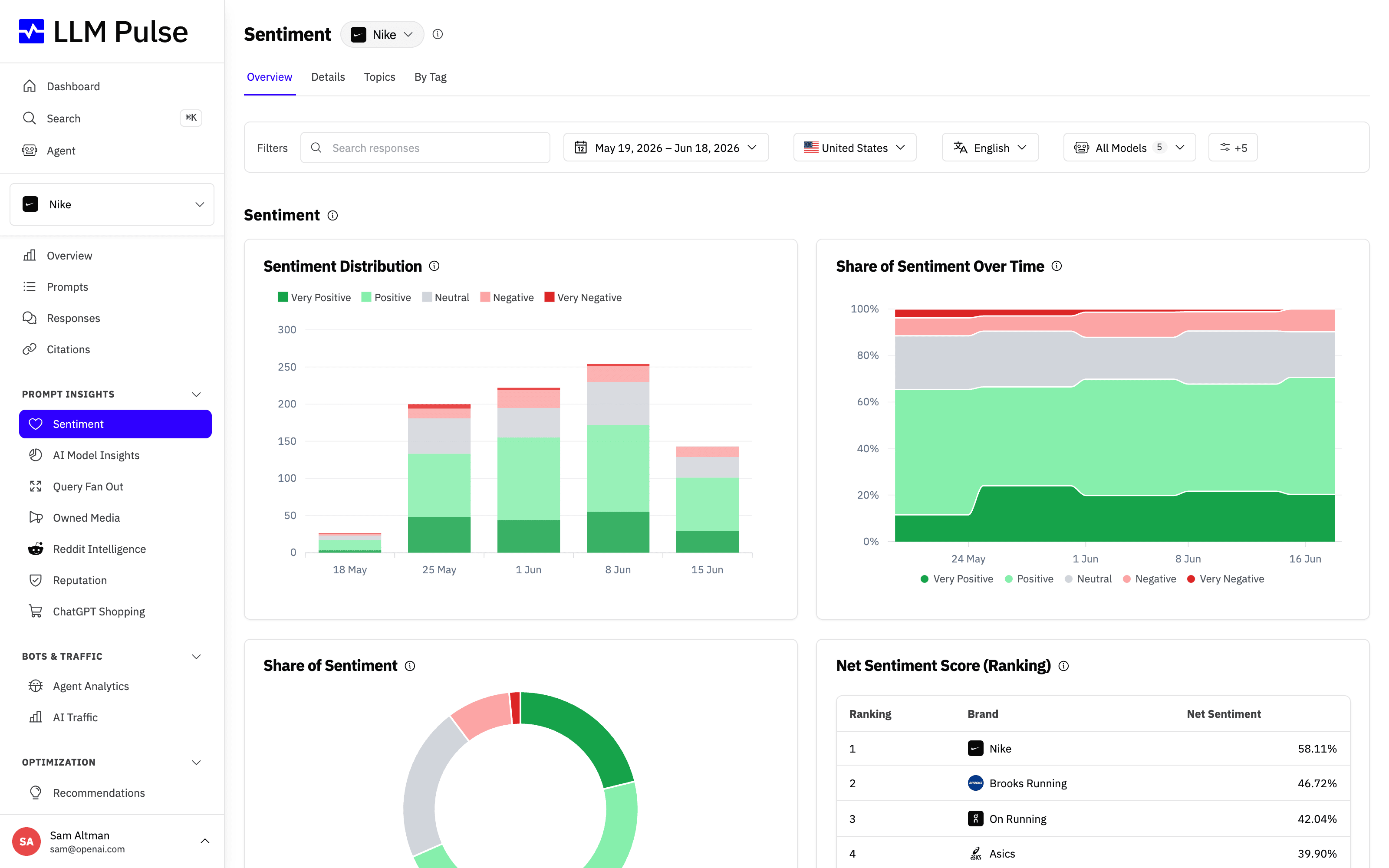
The Sentiment dashboard brings these signals together in one place: the sentiment distribution, how share of sentiment shifts over time, an at-a-glance donut, and a Net Sentiment Score ranking that puts you next to your competitors.
The Overview tab below is where you read all of this at once.
What it does
- Classifies detected mentions as very positive, positive, neutral, negative, or very negative
- Shows how many detected mentions have a sentiment classification
- Calculates a Net Sentiment Score ranging from -100% (all negative) to +100% (all positive)
- Identifies sentiment topics: the themes AI discusses about your brand (shown as a treemap)
- Compares sentiment across your brand and all competitors
- Offers 4 analysis tabs: Overview (charts + rankings, ending with a per-tag breakdown), Details (individual records), Topics (treemap), Pages (sentiment of the content of cited pages, showing negatives by default)
- Shows, for each page in the Pages table, which AI models cited it in the selected date range and how many times (for example ChatGPT 12, Perplexity 4). Sort by that column to see the most cited pages first, or pick models in the AI models filter to keep only the pages they cited
- Shows three trends below the Pages table: negative citations, unique negative URLs, and negative URLs cited for the first time in the project's full history. The charts follow the account's tracking cadence, so weekly and monthly totals span their full cadence window instead of appearing as one-day spikes.
- Every tab's table can be exported to CSV or XLSX with the Export table button, respecting the active filters
- Creates a branded PDF report with the current filters, including the sentiment snapshot, trend, competitor benchmark, classification coverage, topics, tags and detailed findings
How to use it
- Open Prompt Insights > Sentiment in the sidebar
- Select a brand from the dropdown: "All Brands" for aggregated view, your brand, or a specific competitor
- Use the country, language, sentiment, and tag filters to narrow the data. Each filter accepts several values. Values inside one filter are combined with OR, while different filters are combined with AND.
- Use the Overview tab for charts showing sentiment trends over time
- Switch to Topics to see a treemap of what AI says about the selected brand
- Scroll to the end of Overview and use the Sentiment by Tag table to compare sentiment across different prompt groups
- Use Details for individual sentiment records with comments and topic labels
- Use Pages to review cited-page sentiment and the negative citation and URL trends for your selected date range
- Select Download report (PDF) in the page header to create a shareable report. LLM Pulse generates it in the background and adds it to Exports in the profile menu.
Add context that is specific to your brand
Words can sound positive or neutral while still being harmful to a particular brand. For example, a person may not want AI responses to frame them as a former politician. You can add a rule that treats that framing as negative, even when the response uses neutral language.
Open Preferences > Project Settings > Sentiment Rules, or use the Sentiment rules button at the top of the Sentiment page. You can save up to 5 plain-text rules, with a maximum of 200 characters each. Keep each rule focused on one situation and state the sentiment you expect.
These rules override the general scoring guidance only when they apply to your own brand. They do not change mention detection or sentiment for competitors. A saved rule applies to new and re-run analysis; it does not rewrite existing results automatically.
Tips & notes
- Available on Growth plans and above
- The Pages trends use citation dates, not page-analysis dates. They follow the account's tracking cadence on each date, including historical weekly data before a switch to daily tracking.
- A new negative URL is counted only when its first citation in the project's complete history falls inside the selected period. Each URL can be new only once.
- Weekly negative sentiment email: turn it on in your project settings to get an alert covering both the negative AI responses of the last 7 days and the cited pages whose content criticizes your brand. A page is included when an AI model cited it during that week, so the list reflects what the models are pointing at right now.
- Sentiment processing can take up to 24 hours after prompt execution (uses OpenAI Batch API)
- Matching names are used for sentiment analysis as well as mention detection
- Custom sentiment rules can adjust how new and re-run analysis interprets business context for your own brand
- CSV, XLSX, and PDF exports keep the active country, language, sentiment, and tag selections
- Sentiment percentages and Net Sentiment Score use classified mentions only
- A detected mention can be absent from sentiment totals while analysis is processing or if no classification is available
- Net Sentiment Score = (positive + verypositive - negative - verynegative) / classified mentions
- Each sentiment record includes a comment explaining the AI's reasoning
- Sentiment analysis covers your brand AND all tracked competitors









