Reputation Reports: how AI models perceive your brand
Reputation Reports provide a comprehensive AI-generated analysis of how your brand is perceived across multiple dimensions. Each report scores your brand (0-100) and compares it against competitors with radar charts. Available on Scale plans and above.
With Reputation Reports, you can:
- Get a 0-100 score for how AI models perceive your brand across multiple reputation dimensions
- Benchmark your AI reputation against competitors on a single radar chart
- Read the written analysis behind each dimension to see why AI rates you the way it does
- Track your reputation month over month as you work to change the narrative
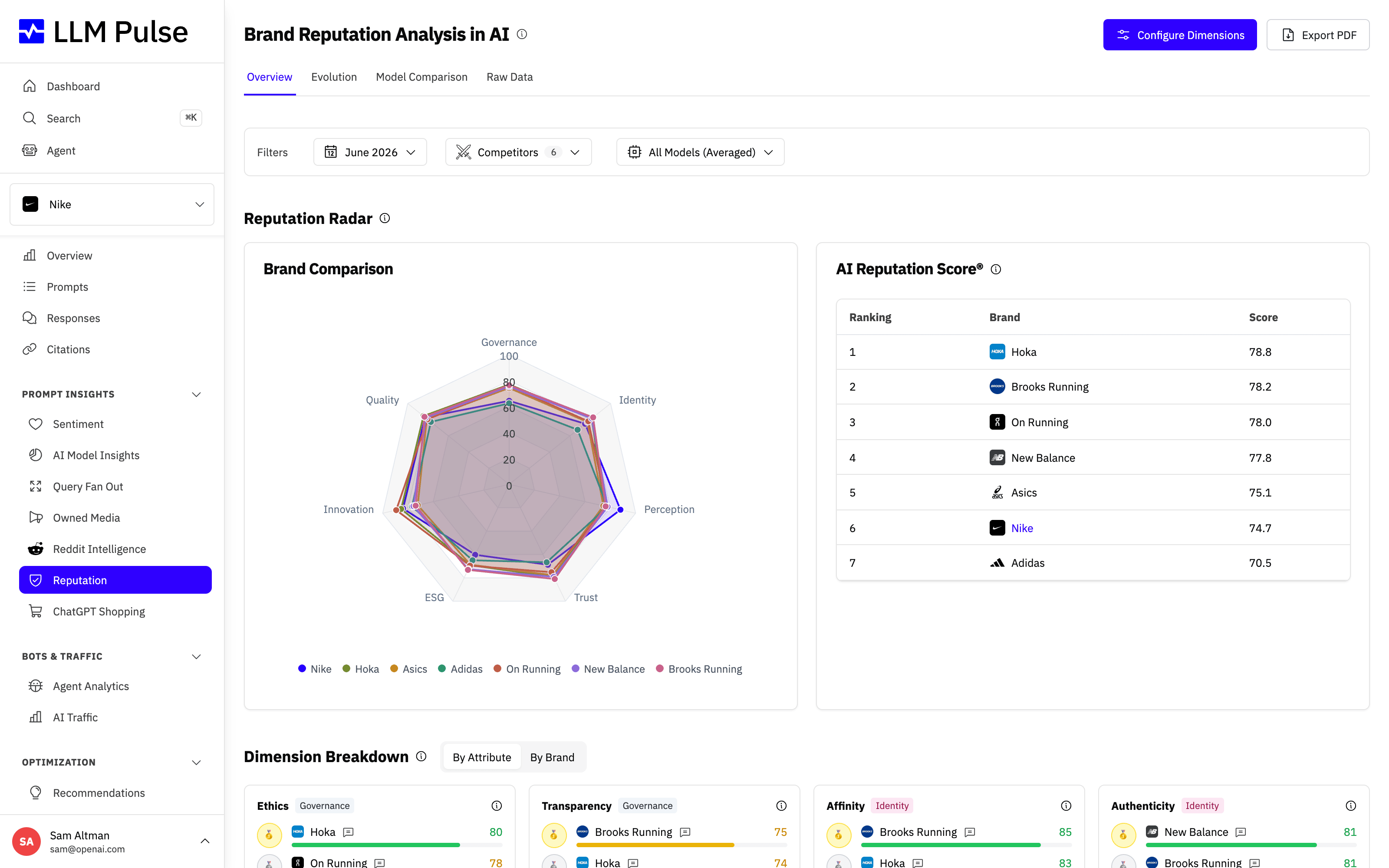
The report opens on the Overview tab, where the reputation radar plots your scores across every dimension, the AI Reputation Score ranking shows where you sit against competitors, and the per-dimension breakdown lists each score with its written analysis.
What it does
- Analyzes your brand across 7 default dimensions with attribute-level scoring (0-100)
- Generates detailed written analysis explaining each dimension score
- Compares your brand against competitors with radar charts and ranking tables
- Lets you choose which competitors are analyzed: disable any competitor under Preferences > Project Settings > Reputation Dimensions to exclude it from the reports and the reputation view. Every competitor is included by default, and new competitors stay included unless you disable them
- Supports custom dimensions: configure up to 3 custom dimensions with up to 3 attributes each under Preferences > Project Settings > Reputation Dimensions. Disabling or removing a dimension hides it from existing report views immediately and excludes it from future analysis. New dimensions receive scores starting with the next report
- Opens Reputation reports and Custom AI Study waves after the first selected model finishes. A Partial results notice stays above every tab, identifies the models still processing and refreshes the page when the report is complete. If generation ends without every expected model, the notice remains and identifies the unavailable results
- Can be generated from ChatGPT, Perplexity, Gemini, DeepSeek, Grok or Claude perspectives
- Produces shareable reports with unique public URLs and downloadable PDFs
- Provides 5 analysis tabs:
- Overview: radar chart, dimension breakdown, key insights, competitor comparison
- Evolution: track how dimension scores change across multiple reports (requires 2+ completed reports)
- Model Comparison: compare how different AI models perceive your brand (requires reports with 2+ models)
- Moodboard: the attributes the report scored highest and lowest, turned into six generated images (see below)
- Raw Data: detailed attribute-level scores with AI-generated reasoning for each score
How to use it
- Navigate to Reputation in the sidebar (under Prompt Insights)
- Click Generate Report: the system will analyze your brand across all configured dimensions
- Select the AI model perspective (or generate for multiple models)
- Wait for the report to complete (typically 2-5 minutes per model)
- Review the Overview tab for the overall picture and radar chart
- Use the Evolution tab (after 2+ reports) to track changes over time
- Share the report via its public URL or download as PDF
The Moodboard tab
The report has a tab that turns the attributes it scored into pictures. Six images, in two rows of three: the top row is the three attributes your report scored highest, the bottom row the three it scored lowest. Each image is captioned with the attribute, its score and the line of reasoning the analysis wrote for it, and under each row is a strip of the colours those images actually use.
The point is the contrast. Reading that a brand scores 84 on craftsmanship and 31 on innovation is one thing. Seeing the two side by side, in the visual language each one suggests, is what makes a brand team argue about whether that is the brand they meant to build.
A few things worth knowing:
- The images are a visual interpretation of the written attributes, generated from the analysis text. They are not a measurement of how AI models picture your brand, and they never show real products, campaigns, logos or people.
- The board is generated automatically once the monthly report finishes, so it follows the same monthly rhythm as the rest of the report.
- You can also create one yourself for any finished report: open the Moodboard tab and click Generate moodboard. The images take a few minutes, so reload the page to see them.
- Occasionally one image cannot be generated. The tab shows the ones that did work, a short note about the rest, and offers to generate just the missing ones.
- Under each image, Regenerate draws a new picture for the same attribute and Hide takes the image off the board, including in the PDF. Hidden images are listed under the board so you can put one back.
- To change how the pictures look, go to Preferences > Project Settings > Reputation Dimensions and write what you want in Visual direction. It replaces the default photographic style for that project's future boards. Leave it empty to keep the default.
- When an attribute holds roughly the same score from one month to the next, the new board keeps last month's picture for it, so two reports in a row read as the same brand rather than as two unrelated sets of images.
The Moodboard is part of the reputation report, so it is there on every plan that includes Reputation, with nothing to switch on. Inside an embedded portal the board can be viewed but not generated.
Custom AI Studies
Next to Brand Reputation, the Reputation page has a second mode: Custom AI Studies. It runs the same multi-model scoring engine on any set of subjects you define, not just your brand and its competitors. Available on Scale plans and above.
Typical studies:
- Sector rankings: rank the players of an industry (banks, airlines, universities) on the criteria that matter to you
- Geo studies: compare countries, regions or destinations, for example tourism reputation across Europe
- Product face-offs: compare specific product lines (sneaker models, EV ranges) beyond your tracked competitor list
- Topic stances: ask every AI model where it stands on a topic and compare their answers side by side (these studies can have a single subject)
How it works:
- Click New study and describe what you want to compare in plain words
- Structure with AI turns your brief into a title, subjects and evaluation criteria, all editable before launching
- Optionally mark one subject as focus to highlight it and center the insights on it
- Choose the AI models, the report language and the cadence: one-shot or monthly (a new wave runs automatically on the 1st of each month)
- Launch. Results arrive in a few minutes with the same radar, ranking, model comparison, evolution and raw data views as Reputation, plus PDF export
The Raw data tab also exports to CSV or XLSX: one row per subject, AI model, criterion and attribute, with the score and the reasoning behind it. The export follows whatever filters you have applied on the tab (wave, subjects, AI model, criterion), and the file appears in Export History. With no wave selected, it covers the 24 most recent waves that have available results.
Each generated report is a wave. Your plan includes a number of waves per calendar month across all studies (5 on Scale, more on higher tiers); a monthly study consumes one wave per month. Editing a study only affects future waves, so past results stay exactly as they ran.
Tips & notes
- Available on Scale plans and above
- Reports can be generated monthly; the system stores up to 12 recent reports for trend tracking
- The 7 default dimensions cover: visibility, trust, authority, sentiment, content quality, competitive positioning, and recommendation likelihood
- Custom dimensions are configured under Preferences > Project Settings > Reputation Dimensions. Tailor them to your industry (e.g., "sustainability" for a green brand)
- Disable a default dimension or remove a custom dimension to hide it immediately from the Overview, Evolution, Model Comparison, Raw Data, exports, and PDF views. Future reports stop generating scores for it. Existing scores remain stored and can appear again if the same dimension is re-enabled
- Dimension and competitor changes normally apply from the next monthly report. To apply them right away, use Recalculate This Month on the Reputation page. This creates a fresh report for the current month and can be used one time per calendar month, so make sure your settings are final before you use it
- Disable irrelevant competitors under Preferences > Project Settings > Reputation Dimensions so they stop appearing in the reputation view (including on reports already generated) and are left out of future report analysis, which also saves on analysis cost
- Each AI model may score your brand differently based on its training data and perspective
- The AI Models filter on the report tabs is multi-select: pick one model to see its perspective alone, or several to see their scores averaged together. It applies to the Overview radar, Evolution, Raw Data and the PDF export
- Force-generate a new report anytime from the admin dropdown (replaces the current month's report)









