Shopping: track your products in AI shopping results
Shopping tracks products returned by ChatGPT and Alexa for Shopping in response to your prompts, and keeps the Copilot listings collected before October 7, 2026. The report shows product appearances and the details each model returns. Available on Scale plans and above.
With Shopping, you can:
- See products returned by ChatGPT and Alexa for Shopping in response to your prompts, and which listings are matched to your brand
- Compare products using appearances and the price or rating details available for each listing
- Review merchant or domain details when they are available
- Use Price Insights to compare the product prices returned in your tracked responses
You will find Shopping in the sidebar under Prompt Insights after the project captures shopping product data. The item stays hidden before then. Opening the report requires the Scale tier or higher; lower plans see a locked entry once data exists.
Shopping is also available in embedded portals when the embedded project has shopping data. The page, filters, and exports remain restricted to that project.
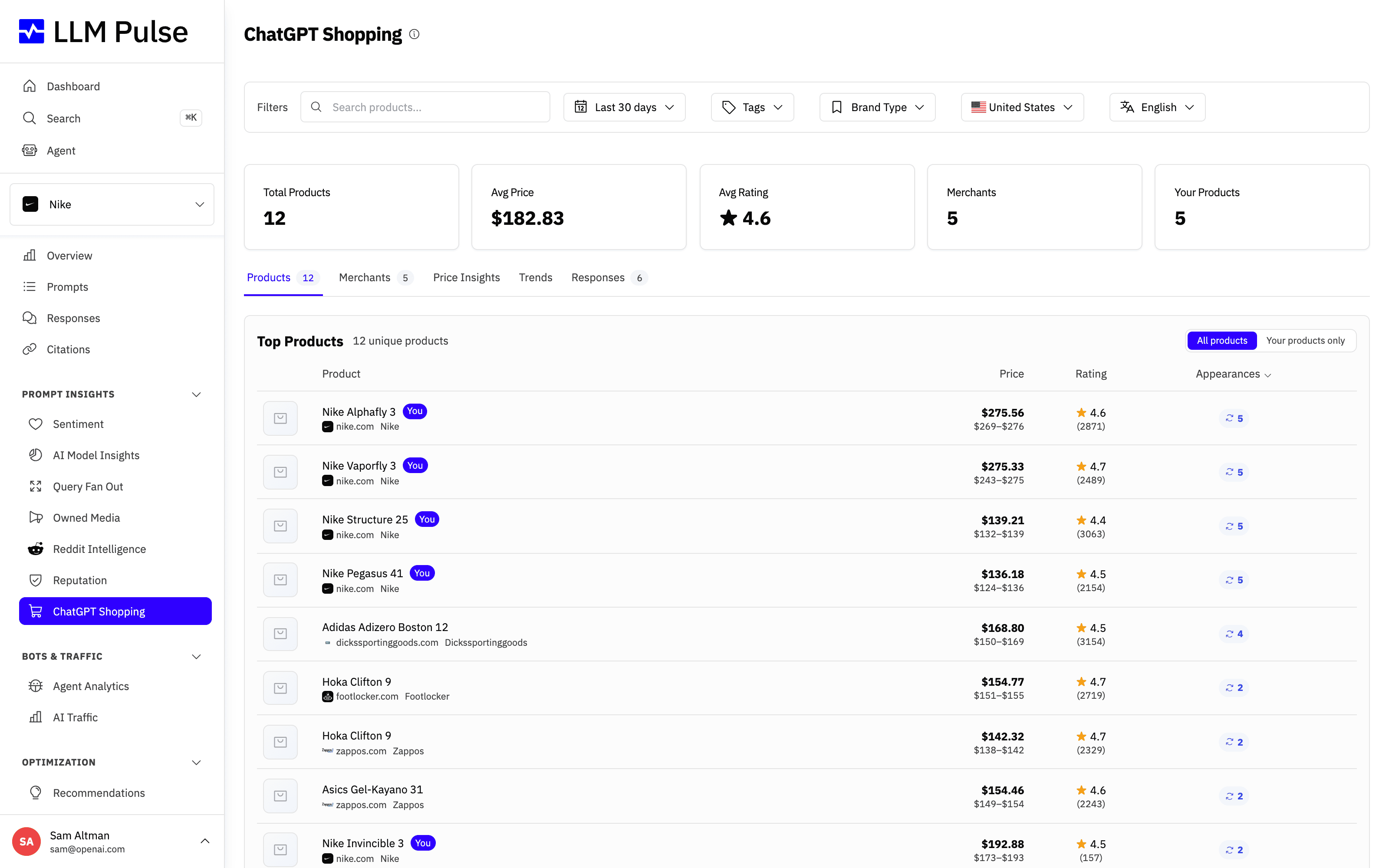
What it does
- Collects structured product listings returned by ChatGPT and Alexa for Shopping (and by Copilot before October 7, 2026). Available product fields vary by model
- When current results contain product data from more than one model, the model filter appears first and product rows show badges for the models that returned them. The filter stays visible while a model selection is active so you can clear it
- Stat cards above the tabs: total products, average price, average rating, unique domains, and your products
- Products tab: every product ranked by appearances, with an "All products / Your products only" toggle and CSV or Excel export
- Merchants tab: results grouped by merchant domain, with product count, appearances, price range, average price, average rating, and CSV or Excel export
- Price Insights tab: a price distribution histogram plus per-merchant minimum, median, average, and maximum prices, with export for the merchant table
- Trends tab: weekly charts for unique products, total appearances, top 5 merchants, and average price
- Responses tab: the prompts and responses that returned shopping products, with CSV or Excel export
- Identifies listings matched to your project's brand from the available product data with a "You" badge
How to use it
- Open Prompt Insights > Shopping
- Browse the Products tab, sort by appearances or the available price and rating data, and use the search bar to find specific products
- Switch to Merchants to review available merchant or domain details
- Use Price Insights to compare available product prices
- When current results contain data from more than one model, choose a model in the first filter. Then refine by date range, tags, country, or language
- Use the "You" badge to find the listings the report matches to your project's brand
Tips & notes
- Available on the Scale tier or higher
- Shopping data comes from ChatGPT and Alexa for Shopping, plus Copilot listings collected before October 7, 2026. The model filter appears first when current results contain product data from multiple models, and remains visible while a selection is active so you can clear it. Product rows show model badges in this multi-model context. Available fields vary by model. Copilot listings do not include product images or merchant names. A merchant domain may be available, and currency is present only when the response provides it. Alexa for Shopping listings identify Amazon as the merchant and may include an image, price, currency, rating, review count, and category when those fields are available. Other AI models do not currently return structured product data
- Brand Entities (companies, people, and products mentioned by ChatGPT) are also shown in the response detail modal
- Price tracking can show a min-max range when the same product appears at different prices across executions. If more than one currency is recorded for that product, the range is hidden
- This feature is especially valuable for e-commerce brands tracking product visibility in AI recommendations









