Track which sources AI models cite for your brand
Citations are the URLs that AI models reference when generating responses. Tracking citations helps you understand which websites influence AI answers in your industry and whether your own site gets cited.
With Citation Sources, you can:
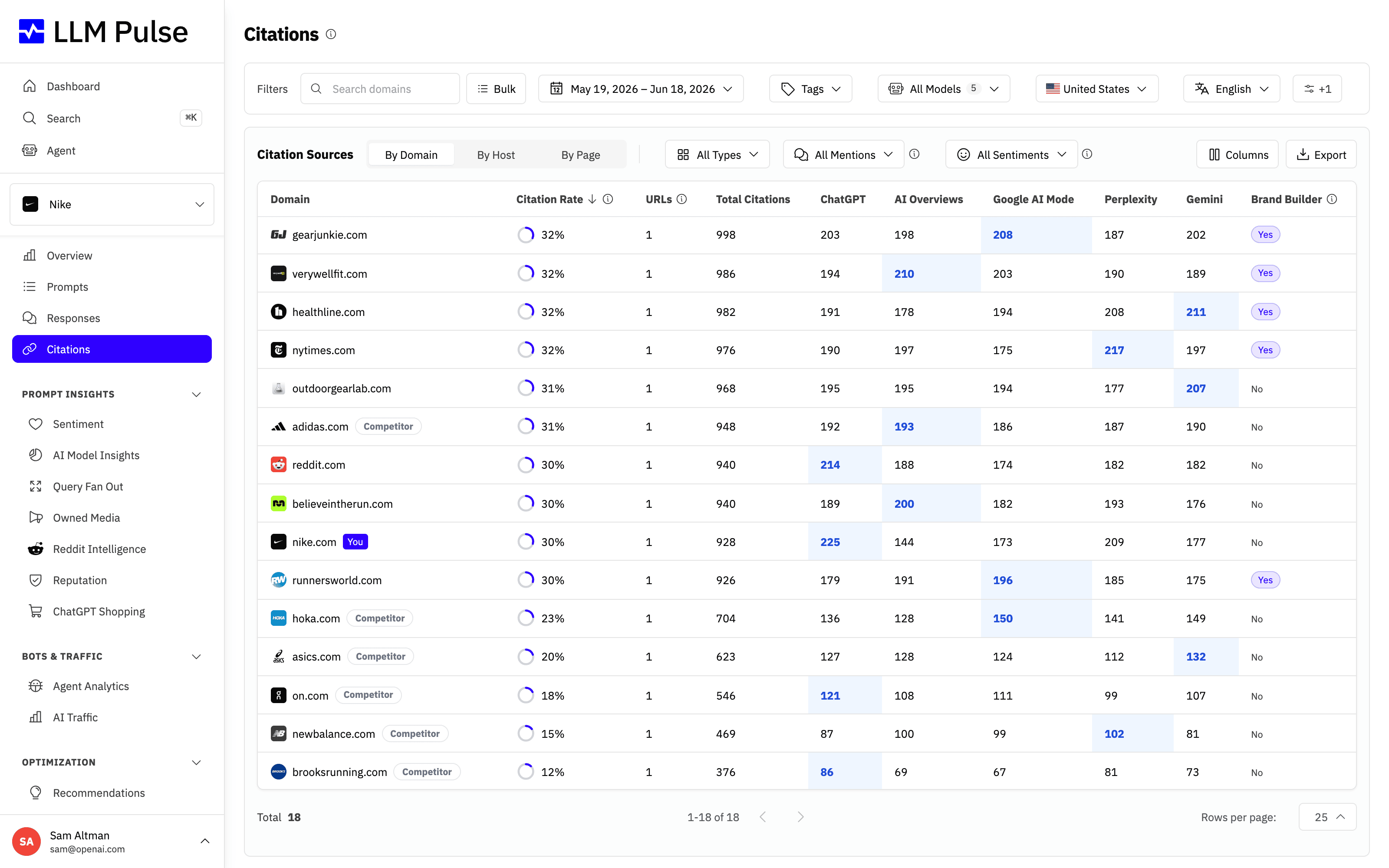
- See exactly which domains, hosts, and pages ChatGPT, Perplexity, and Gemini cite when answering about your category
- Find the third-party sites you need coverage on to earn more AI citations
- Check whether a cited page actually mentions your brand in its content
- Spot pages that AI links to but that never talk about you, so you know where to pitch or publish
The page has four tabs: Overview, By Domain, By Host and By Page. Overview is the tab you land on, and it summarizes your citation data in KPI cards and charts. The other three are the Citation Sources table, which groups cited URLs by domain, by host, or by page. Each table row shows citation rate, citing responses (the AI responses that cite that source at least once), URL count, and a per-model breakdown.
What it does
- Extracts all URLs from AI model responses (sources) and identifies which belong to your brand (citations)
- Scrapes cited pages to detect if they mention your brand in their content
- Shows a "By Page" view with cached content and brand mention detection
- Filters sources as Potentially Negative when the citing AI response is negative, or Confirmed Negative when the cited page's latest content analysis is Negative or Very negative for your brand
- Tracks citation rate, including visible and background sources
The Overview tab
Overview answers "how am I doing on citations?" before you open a single table. It shows five KPI cards, each compared against the previous period of the same length when a date range is selected:
- Total Citations: every citation in the filtered AI answers, repeated pages included
- Unique Domains: how many different domains were cited
- Unique Pages: how many different page URLs were cited
- Answer Coverage: the share of the filtered AI answers that cite at least one source
- Your Share: the share of all citations in range that point to your own domain
Below the cards there are four charts:
- Citations by AI model over time: stacked areas on a date axis, one color per AI model. Periods match your tracking frequency (daily, weekly or monthly), and daily projects group by week on ranges over 60 days
- Share of citations: two donuts. The first splits every citation between your domain, your tracked competitors and all other sites. The second hides third-party sites, so you see you against your competitors alone
- Tracked domain citations over time: one line per tracked domain, with citations to your domain and to each tracked competitor domain
- Top domains by citation rate: the ten most cited domains, each as the share of the filtered AI answers that cite it at least once
A citation points at a URL, so every chart names its owner by the cited domain rather than by the brand behind it.
All of it follows the filters at the top of the page, so you can read the same summary for one AI model, one country, one tag, or generic prompts only.
How to use it
- Navigate to Citations in the sidebar
- Read the Overview tab for the headline numbers: how many citations you got, how many answers carried a source, and how much of that goes to your own domain
- Switch to By Domain, By Host or By Page to see the table of cited URLs with position, domain, and meta title
- Use the "Mentions you" column to see which cited pages mention your brand
- Open a cited page, then select View Page Cache to inspect the latest stored content. The page heading also includes its favicon and an external-link button for opening the live URL
- Select View in the Details column to open a cited page's details. Its Citations of this URL section shows a donut with each AI model's share of the answers that cited the page, and a chart of those citations per period. Periods match your tracking frequency (daily, weekly or monthly), and daily projects group by week on ranges over 60 days. Both charts follow the date range, tag, AI model, country, language and Brand Type filters, plus the table's type and sentiment filters, and show a message instead when no answer cited the page with those filters
- Filter by AI model, date range, tags, country, or language. The filters carry over when you move between tabs
Citations of one domain, host or page
Click a row in By Domain, By Host or By Page to open that source's own page. At the top, above its tables, two charts show the AI answers that cited it:
- Citations by AI model: a donut with each AI model's share of those answers
- Citations over time: how many answers cited it in each period. Periods match your tracking frequency (daily, weekly or monthly), and daily projects group by week on ranges over 60 days
For a domain or a host, an answer counts once however many of its pages it cites, so the total matches the number of answers in the Prompts & Responses table. The charts follow the date range, tag, AI model, country and language filters at the top of the page, but not the search box, which only narrows the tables below them. When no answer cited the source with those filters, a message replaces the charts.
When page content is unavailable
A cited URL remains in the table and still counts towards citation metrics even when we cannot read its page content.
“Page content unavailable” means there is no usable saved copy to display. Page metadata, word counts and mention results are unavailable in this state. Missing content or incomplete analysis does not count as “No” or zero competitor mentions. Mention filters, including content-gap filters, exclude these pages.
A failed refresh preserves an older usable copy when one exists. “Saved copy” shows when that content was saved.
A 404 (Not Found) or 410 (Gone) remains visible as a page status. Other failed crawl responses, such as access blocks and rate limits, are hidden from page data.
When pages are re-crawled
For general web pages, each successful crawl starts a 28-day refresh interval. Repeated citations use cached content during that time, and the page is not routinely crawled again until 28 full days have passed.
Failed crawl attempts may be retried sooner. A narrowly scoped repair for corrupted crawl metadata may also refresh a page before the routine interval ends.
Tips & notes
- A citation means your URL appeared in the AI's sources. A mention means your brand name appeared in the response text. You can be mentioned without being cited, and vice versa
- Citation processing (scraping and analyzing cited URLs) can take up to 24 hours
- The "BG" badge marks a background source from the AI model's response metadata. It counts as a citation but has no visible citation position
- Google AI Mode and AI Overviews sometimes link a name to Google's own entity viewer instead of a website. Those links appear as "Google (entity)", apart from real google.com pages. They still count as citations, but never as your brand's or a competitor's
- By Domain combines the registrable domain and all subdomains. For an exact-host rule, use By Host. For a path-prefix rule, use By Page. Citation ownership is configured separately for the project brand and each competitor. The Current Competitors table pins the project's main brand as the first highlighted row; its pencil opens the same Website and Citation scope controls used for competitors, those controls remain available from Project Settings, and changes to the main brand's Website or scope share the existing 7-day cooldown. Each competitor has its own 7-day cooldown for Website and Citation scope; changing either locks both until the date shown in the editor, while other competitor details remain editable
- High citation rate + low mention rate means AI links to your site but doesn't talk about your brand directly









