Recommendations: an action plan to improve AI visibility
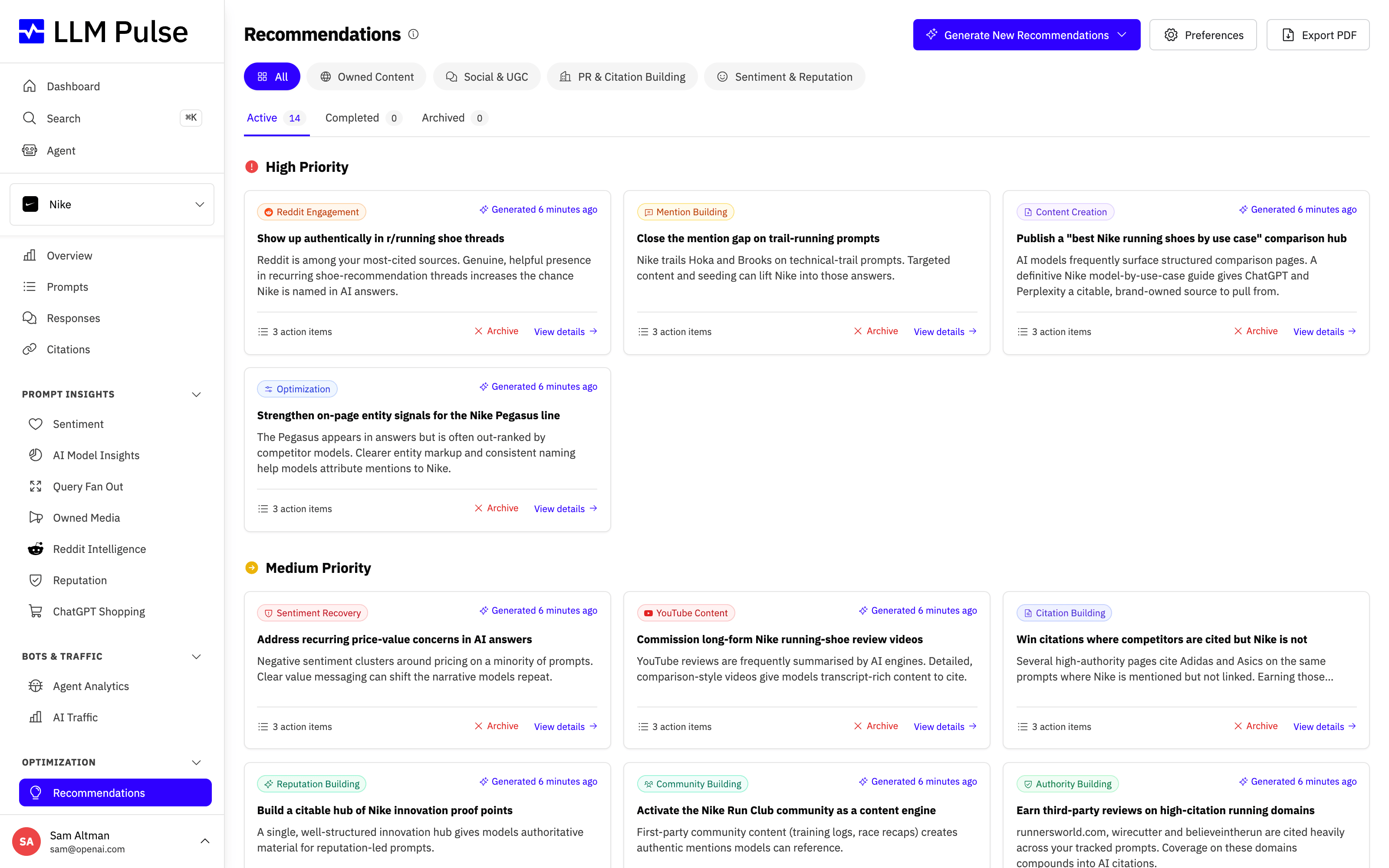
Recommendations provides AI-generated, evidence-based suggestions to improve your brand's visibility in AI search. It analyzes your prompt data and generates actionable recommendations across four focus areas.
Each recommendation is prioritized and grouped by category so you can see at a glance which actions will move the needle most.
With Recommendations, you can:
- Get a prioritized, evidence-based action plan built from your own prompt and citation data
- See exactly which moves will improve your AI visibility fastest, and why
- Turn raw analytics into concrete next steps instead of guessing what to do
- Hand your team or client a clear to-do list grounded in real AI search data
What it does
- Generates recommendations in four categories:
- Owned Content: Improve how often and how prominently AI models mention your brand
- Social & UGC: Strengthen your presence on Reddit, YouTube, TikTok, Facebook, and Instagram (the platforms covered depend on which channels you have connected) to influence what AI models read and cite
- PR & Citation Building: Earn brand mentions and citations on the external domains AI models trust through PR and outreach
- Sentiment & Reputation: Repair negative sentiment and win narratives where competitors are praised (Scale plan and above)
- Each recommendation includes priority level (high, medium, low), estimated impact, and specific action items
- Recommendations are generated when you request them and can be tracked as completed or archived
How to use it
- Navigate to Recommendations in the sidebar (under Optimization)
- Click Generate New Recommendations to open the generation menu. The menu offers a full run and a targeted run; from the All view, the targeted run also asks which category to cover
- Review recommendations by priority, high-priority items have the most impact
- Mark items as completed or archived as you implement them
- Generate new recommendations periodically to get updated suggestions
Steering the recommendations
In Preferences > Project Settings > Recommendations you can steer what the AI recommends for your brand:
- Guidance for recommendations: describe constraints or focus areas in your own words (for example "We cannot publish competitor comparisons" or "Focus on our enterprise product line"). This guidance applies to every recommendation type.
- Paid placements: control whether recommendations may include paid link or sponsored placement options. By default this follows your brand profile: paid placement suggestions are disabled for large, well-known brands. You can change this in your project preferences.
- Competitor comparison content: control whether recommendations may propose comparison pages or rankings that name competitors. By default these suggestions are disabled for large brands and regulated industries (banking, insurance, healthcare). You can change this in your project preferences.
- Output language: recommendations are written in the project's AI output language, set in Preferences > Project Settings > General Information. It starts as your project's main language and you can change it at any time. It does not follow the languages your prompts run in, so if your project's main language is English and your prompts run in Spanish, set this field to Spanish to get Spanish recommendations. The Recommendations page shows the language in use.
The AI also calibrates suggestions to your brand automatically: it classifies your project's size and industry so that a global enterprise gets PR and original-data plays rather than small-business outreach tactics.
Tips & notes
- Recommendations are based on your actual prompt execution data, not generic advice
- Opening a recommendation shows the specific data points it is based on (the queries, citations, or threads behind it) so you can verify the evidence
- The AI analyzes your mentions, citations, sentiment, and competitor positioning to generate targeted suggestions
- You can customize which recommendation types are enabled in Preferences > Project Settings > Recommendations
- The number of recommendations scales with how much data supports them: a thin dataset returns a short list (or none) instead of padded filler
- Each project includes up to 100 recommendation items per week, shared across full and targeted runs.









