GEO Writer
GEO Writer uses AI to generate content based on your project data. Unlike generic AI writing tools, it draws on your prompt results, mentions, citations, and competitor insights to produce highly targeted content.
With GEO Writer, you can:
- Generate briefs and articles grounded in your own prompts, citations, and competitor gaps
- Target the exact questions AI models ask about your category, not generic keywords
- Turn a citation gap into publish-ready content designed to earn the citation
- Skip the blank page and start from a data-backed draft instead of generic AI output
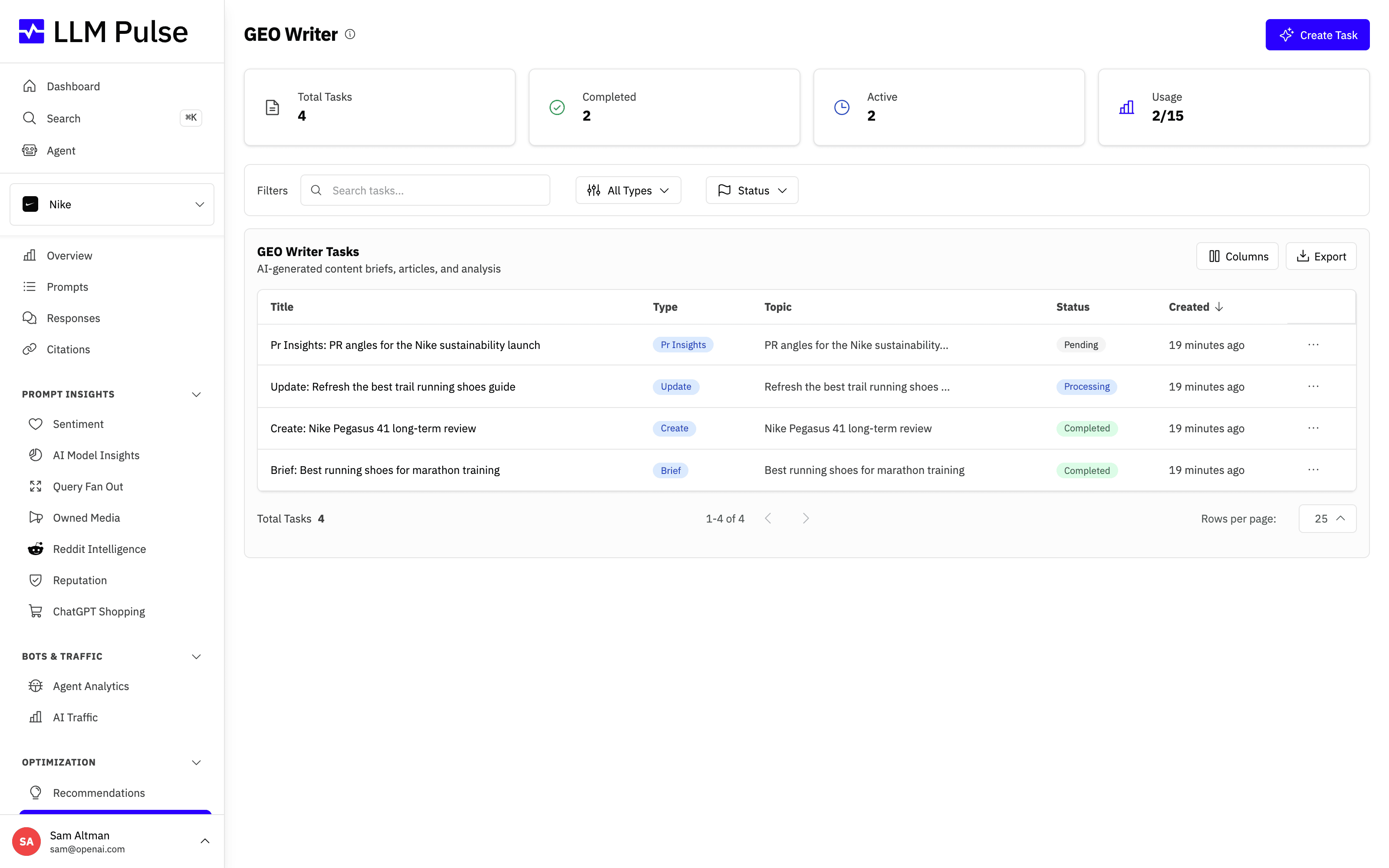
You configure each task, pick the data it should ground itself in, and the tool returns a ready-to-use brief or article you can publish or refine.
What it does
- Content Brief: Generate a comprehensive brief with target keywords, structure, and SEO recommendations
- Create Article: Produce a full article with title, meta description, key points, and body content
- Update Content: Get recommendations for improving existing content based on AI visibility data
- PR Insights: Analyze media and PR opportunities based on how AI discusses your industry
- Custom Analysis: Ask the AI questions about your project using its prompt, citation, and competitor data
Set up your Brand Book
GEO Writer uses the Brand Book to keep Create Article and Update Content tasks aligned with your business. Open it from GEO Writer or Preferences > Project Settings > Brand Book, then review its seven fields: Industry, Business model, Company description, Primary products or services, Target audience, Brand voice, and Goals.
If information is missing, click Suggest with AI. It researches your brand's website and proposes values for all seven fields, once per project per day. Suggestions are never saved automatically: click Use for the ones you want, then save your changes.
What each task is based on
- Brand Book: every task writes in your brand's voice for your audience. If Company description, Target audience or Brand voice is empty, the new-task form warns you first, so you can fill them in or use Suggest with AI.
- Default instructions: the project's Default Instructions for New Tasks apply to every task. Instructions you add to a task go alongside them and win where the two disagree.
- AI answers and cited pages: GEO Writer reads recent answers to your prompts, including whether your brand was mentioned and at what position, and the pages those answers cited. Your own pages count as content to build on, not as competition.
- From a recommendation: Create This Content on a recommendation starts a task aimed at the tracked prompts that recommendation is based on, using their answers and cited pages.
- Update Content: if you enter a page URL without pasting its text, GEO Writer uses its latest copy of that page, which exists when AI answers have cited it.
- Articles include an FAQ section and use tables and lists where they help. Copy HTML keeps both.
How to use it
- Navigate to GEO Writer in the sidebar (under Optimization)
- Click New Task and choose a task type
- Configure the task: in Use Specific Prompt mode, select one tracked prompt for context; add instructions and choose the output language
- Two modes: AI-Powered Generation (uses your project data) or Use Specific Prompt (focused on one prompt's data)
- Wait for generation (typically 1-3 minutes)
- Review the output in Markdown, HTML (for WordPress), or PDF format
Edit the output
Once a task is completed, click Edit content in the task header to change the text without regenerating it. Every block of the output (title, introduction, sections, key points, recommendations) becomes an editable field, grouped the same way as the page.
- Only existing text can be changed. Sections and list items cannot be added or removed; regenerate the task if you need a different structure
- Save writes only the blocks you changed. The task page, the PDF export, the Copy Markdown and Copy HTML buttons and the API all read the edited version
- The task details show who edited it and when. Revert to AI version discards every manual edit and restores the generated output
- Regenerating a task replaces manual edits with a fresh generation, so export or copy the edited version first if you want to keep it
Team members need the GEO Writer edit permission to edit or revert. Through the API, PATCH /intelligence_tasks/:id and POST /intelligence_tasks/:id/revert do the same, and the MCP tools update_intelligence_task_content and revert_intelligence_task_content are available to AI assistants.
Tips & notes
- Monthly GEO Writer task limits vary by plan: 3 on Starter, 5 on Growth, 15 on Scale, 25 on Scale+, and 50 on Scale++. Higher plan tiers have their own limits.
- Output formats: Markdown, HTML (for WordPress), PDF
- Tasks include recommendations prioritized by high, medium, and low impact
- Available via API for programmatic content generation and editing (Scale plans and above)
- Also accessible through MCP for AI assistant integrations









