Read what AI really says about your brand
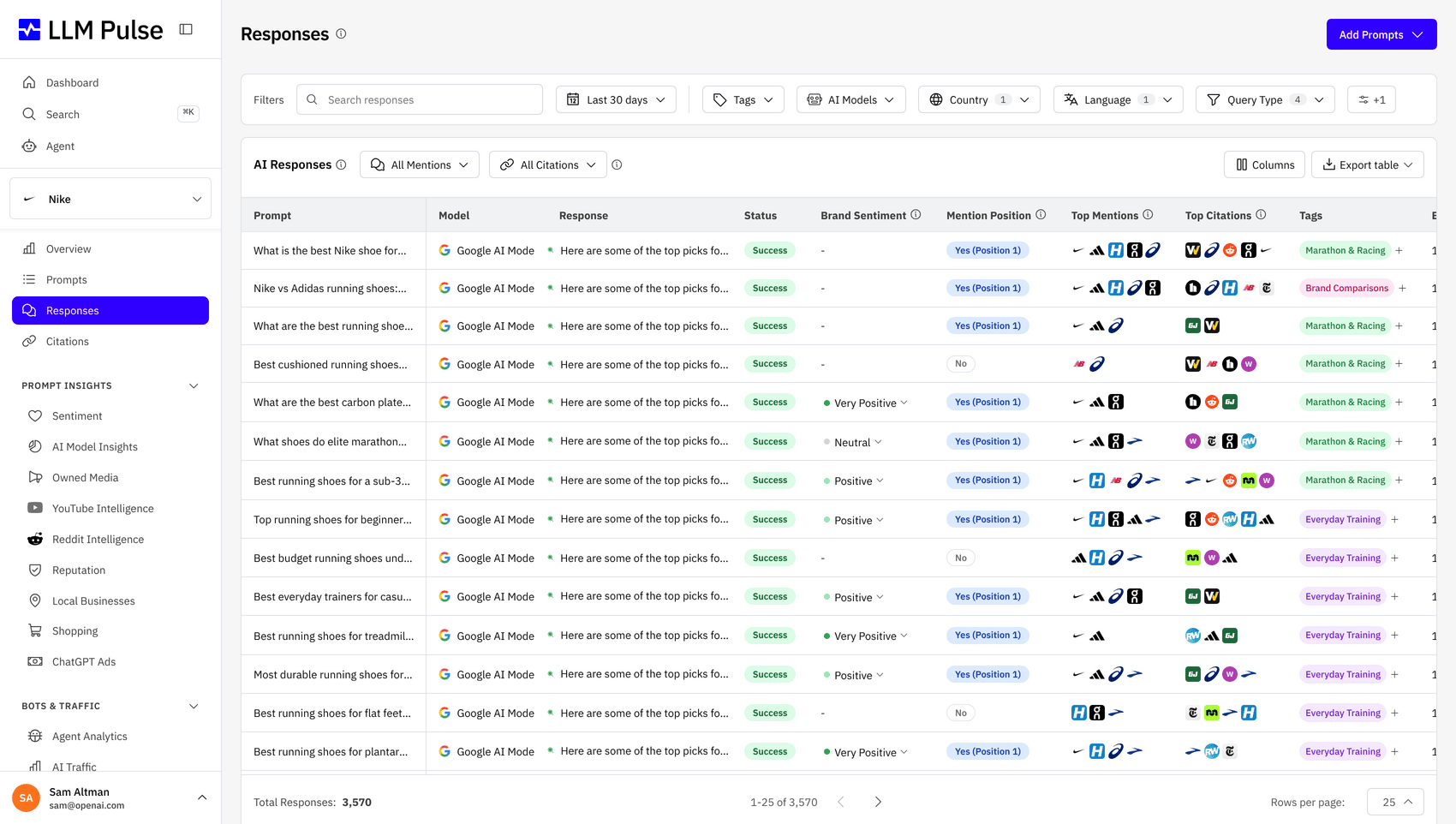
The LLM Responses Explorer lets you read every full AI answer captured for your tracked prompts, with brand mentions highlighted, citations inline, and sentiment scored per response.
Features
Go beyond the score, read the actual answers
Mention rate and AI visibility score tell you the number. The LLM Responses Explorer tells you why.
Read Every AI Response
Open any prompt and read exactly what ChatGPT, Perplexity, Gemini, Google AI Overviews, and AI Mode answered, word for word.
Compare Models Side by Side
See how each AI model responded to the same prompt in the same week. Spot where you win, where you lag, and where the models disagree.
Inspect Every Citation
Every source the AI cited is listed next to the response, with the exact URL, anchor text, and the snippet the model picked up.
Brand Mentions, Highlighted
Your brand and tracked competitors are highlighted directly in the response text, so you can scan dozens of answers in seconds.
Sentiment at the Response Level
Each AI response is scored from very negative to very positive, so you can see exactly which answers are hurting your reputation.
Track Responses Over Time
Every weekly run is stored, so you can compare what the same model said about you last week, last month, and last quarter.
Read what the AI really said
From a single prompt to the full answer in three clicks, no exports required.
-
1
Pick a Prompt
Open any prompt you track and see every AI response captured for it across all the models you have enabled.
-
2
Compare Across Models
Switch between ChatGPT, Perplexity, Gemini, AI Overviews, and AI Mode for the same prompt and date to see how the answers diverge.
-
3
Inspect Citations and Mentions
Every brand mention is highlighted in the response text, and every citation is listed with its URL and anchor. One click jumps to the cited source.
-
4
Filter and Act
Filter responses by sentiment, model, country, or language. Tag the ones that need a content or PR response and export the rest.
What teams do with the LLM Responses Explorer
How teams use the LLM Responses Explorer to turn raw answers into action.
Diagnose Visibility Drops
When your AI visibility score moves, open the responses for the affected prompts and see exactly what the model changed its mind about.
Find Citation Sources to Earn
Spot the third-party pages AI models cite for your category, then prioritise outreach, PR, and content updates that get you into those sources.
Catch Reputation Issues Early
Filter by negative sentiment to surface AI answers that describe your brand badly, weeks before the same narrative shows up in search.
Benchmark Against Competitors
Read the same prompt response across models and compare exactly how each one positions your brand against the competitors you track.
Euroinnova
"LLM Pulse has allowed us to better organize our work and prioritize the actions that matter most. It gives us much greater clarity when implementing new ideas, and it makes reporting far easier, with metrics that were previously complex and difficult to obtain. Today it is part of how we plan and measure our visibility in AI search."

Sandra Vargas
LinkedInFrequently Asked Questions
Everything you need to know about reading and analysing the actual AI responses captured by LLM Pulse.










Read every AI answer about your brand
Stop guessing why your AI visibility moved. Read the responses, find the citations, and act on what the models are really saying.
Trusted by 7,000+ users worldwide