Configuración de la cuenta
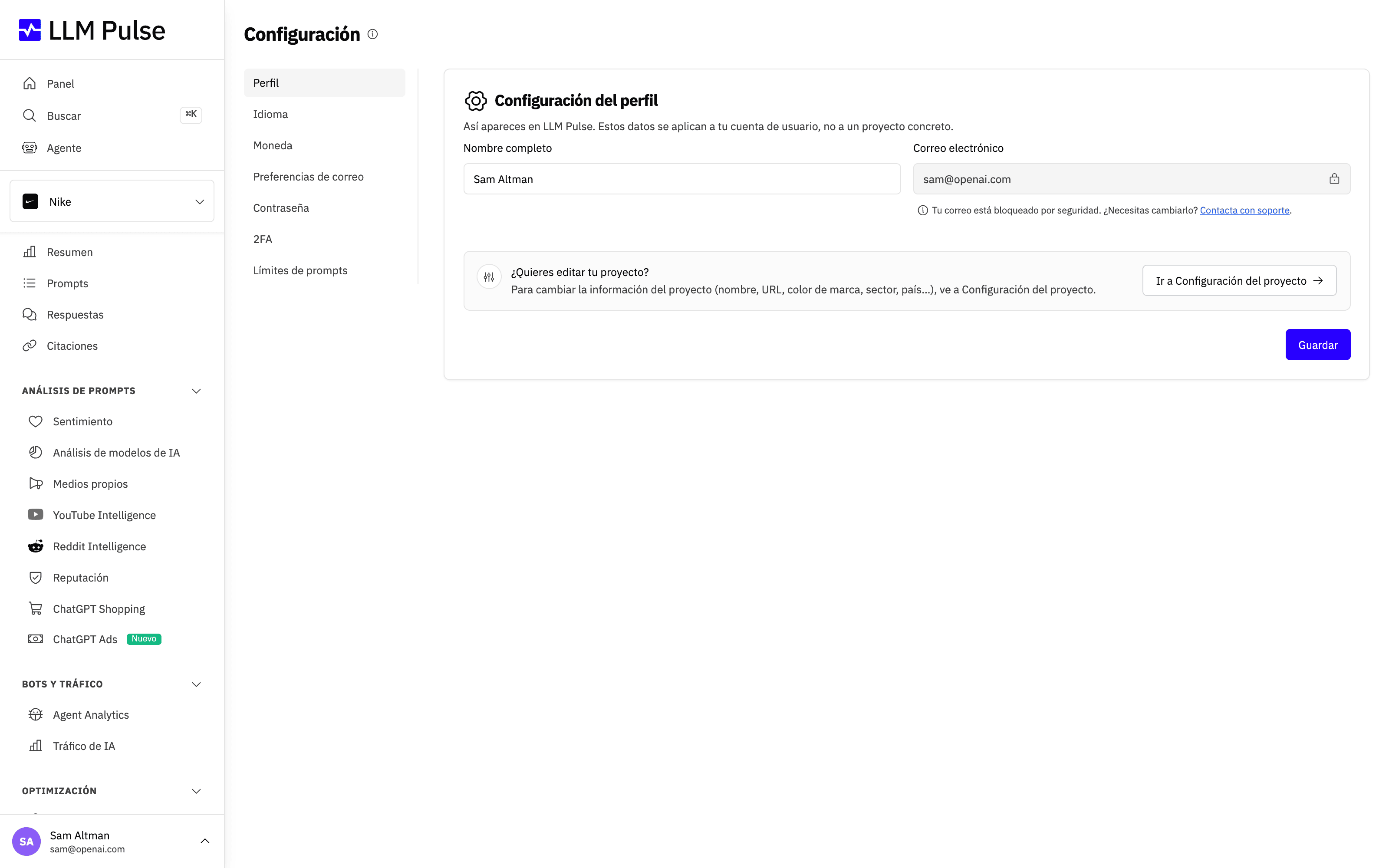
La configuración de la cuenta te permite gestionar tu perfil personal, la seguridad y las preferencias de visualización. Accede desde el menú del perfil, en la parte inferior izquierda de la barra lateral.
Contraer la barra lateral
En la versión de escritorio, usa el botón de la barra lateral para alternar entre la vista completa y una barra compacta de iconos. La barra lateral está desplegada de forma predeterminada. Cuando la barra lateral está desplegada en un equipo con puntero, el botón aparece al pasar el cursor por la cabecera o al llegar al control con el teclado. Una vez contraída, el botón permanece visible para que puedas volver a desplegarla fácilmente. También permanece visible en dispositivos que no permiten pasar el cursor. En la vista compacta, todos los destinos siguen disponibles como iconos; pasa el cursor por encima de uno o selecciónalo con el teclado para ver su nombre.
LLM Pulse guarda tu elección en el almacenamiento local del navegador, por lo que se mantiene al cambiar de página y después de cerrar y volver a abrir el navegador. La elección solo se aplica a ese navegador. El menú lateral en móvil funciona como antes y no utiliza el estado contraído del escritorio.
Qué hace
- Actualizar tu nombre completo (tu correo electrónico de la cuenta aparece bloqueado; contacta con soporte para cambiarlo)
- Elegir el idioma de la interfaz del producto
- Gestionar tus preferencias de correo electrónico: darte de baja de categorías de correo y elegir qué proyectos te envían sus informes
- Elegir la moneda de visualización para los precios de los planes y las facturas
- Cambiar tu contraseña
- Activar la autenticación de dos factores
Cómo usarla
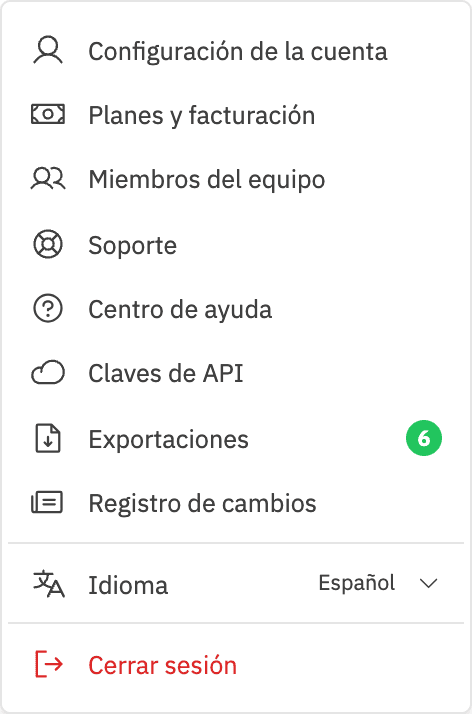
- Haz clic en tu nombre/avatar, en la parte inferior izquierda de la barra lateral
- Haz clic en Configuración de la cuenta
- Edita los campos que quieras cambiar
- Haz clic en Guardar cambios
Idioma de la interfaz
La pestaña Idioma controla la navegación, los controles del producto y los mensajes que se muestran a tu usuario. No cambia los mercados del proyecto, los idiomas de los prompts ni el contenido generado. El contenido que aún no se ha localizado vuelve a mostrarse en inglés.
El sitio web público de LLM Pulse también tiene un selector de idioma compacto justo antes de Iniciar sesión. Si no has iniciado sesión, la elección se guarda en ese navegador. Si ya has iniciado sesión, elegir un idioma allí actualiza la misma preferencia personal que se muestra en Configuración de la cuenta. Puede aparecer una sugerencia basada en el idioma del navegador junto al selector público, pero nunca cambia tu preferencia automáticamente.
Documentos legales
Abre la pestaña «Documentos legales» para consultar «Política de privacidad», «Política de cookies», «Términos del servicio», «Política de reembolso», «Anexo de tratamiento de datos», «Subencargados del tratamiento», «Seguridad» y «Aviso legal». Cada enlace abre el documento público vigente.
Preferencias de correo electrónico
La pestaña Preferencias de correo electrónico controla todos los correos que te envía LLM Pulse:
- Interruptores de categorías: consejos de incorporación, informes y resúmenes, avisos de exportaciones, novedades del producto, Feedback + Reviews, la newsletter y marketing. Feedback + Reviews pregunta, en una escala de 0 a 10, qué grado de satisfacción tienes con LLM Pulse y se envía como máximo una vez cada seis meses. Quienes dan una puntuación de 8 o más también pueden elegir dejar una reseña pública. Desactiva una categoría para dejar de recibir esos correos en tu usuario.
- La newsletter y marketing son dos elecciones independientes: la newsletter es nuestro correo periódico sobre búsqueda con IA, y los correos de marketing son anuncios de producto, sugerencias para mejorar tu plan y ofertas ocasionales. Darte de baja de una categoría no afecta a la otra. Las dos están vinculadas a tu dirección de correo electrónico, así que una elección que hayas hecho antes de tener una cuenta sigue aplicándose aquí.
- Correos de informes por proyecto: elige qué proyectos te envían el resumen semanal de visibilidad, el resumen de sentimiento negativo y el informe de reputación. Son los mismos interruptores que encuentras en la configuración de cada proyecto, reunidos en un solo lugar.
- Los correos de cuenta y facturación siempre están activados: los problemas de pago, los cambios de plan, los recibos, los avisos de límites de uso y las notificaciones de seguridad no se pueden desactivar porque mantienen tu cuenta en funcionamiento.
Todos los correos incluyen también un enlace para darte de baja al final, que detiene su categoría con un solo clic, y un enlace de vuelta a esta pestaña.
Consejos y notas
- El correo electrónico de tu cuenta no se puede cambiar desde esta página; abre un ticket de soporte si necesitas actualizarlo
- Las preferencias de correo electrónico solo se aplican a tu usuario; cada miembro del equipo gestiona las suyas
- La baja está vinculada a tu dirección de correo electrónico, así que, si te diste de baja antes de crear una cuenta, la elección sigue aplicándose cuando te registres
- El color de tu avatar se asigna automáticamente y no se puede cambiar