Planes y facturación
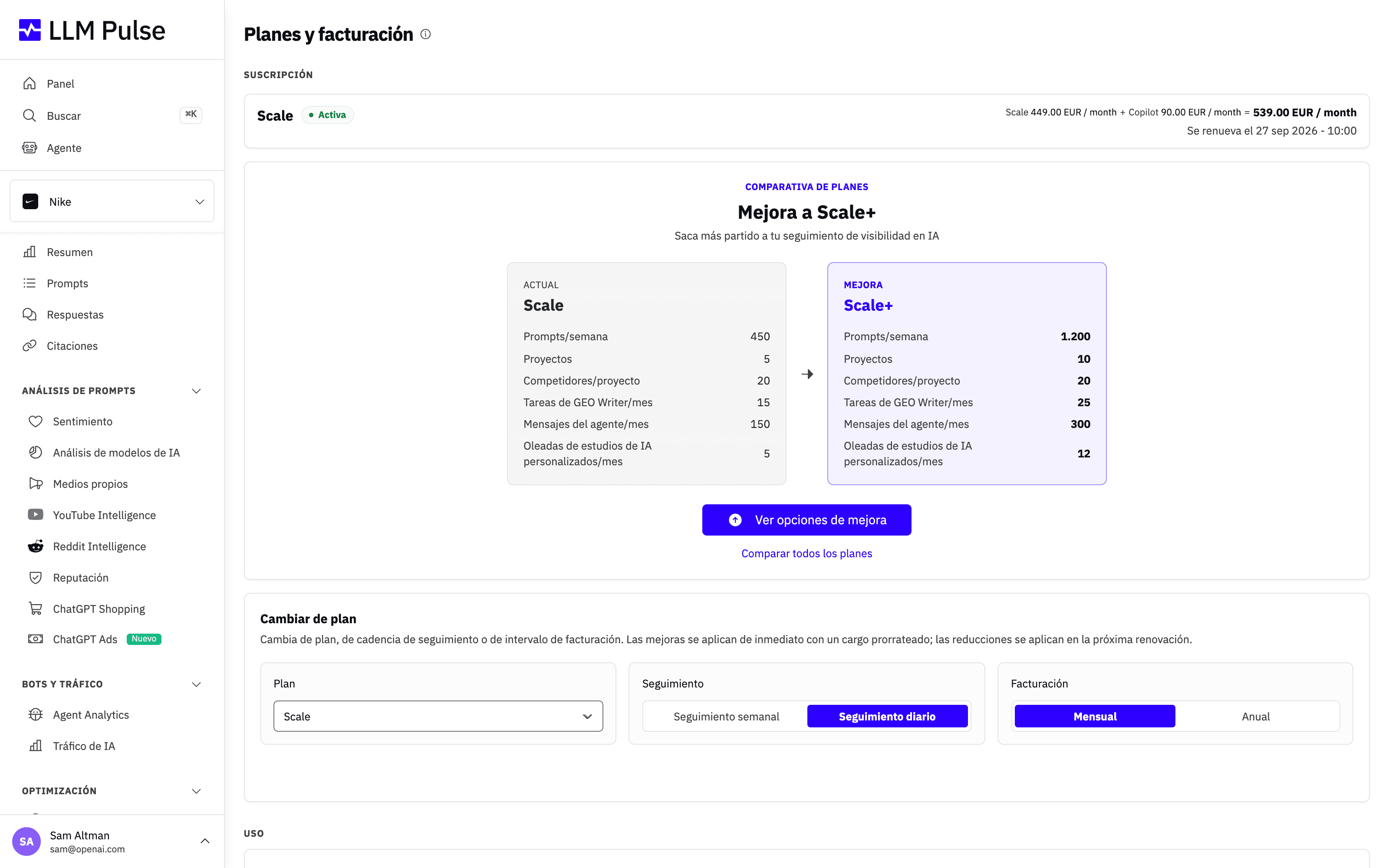
Planes y facturación reúne en una sola página tu plan, uso, modelos de IA, facturas y controles de pago.
Abrir Planes y facturación
- Haz clic en tu nombre/avatar, en la parte inferior izquierda de la barra lateral.
- Haz clic en Planes y facturación.
Los propietarios de la cuenta y los miembros a los que se haya concedido acceso a Facturación y planes pueden abrir esta página. Los administradores de la cuenta no reciben acceso a la facturación automáticamente.
Revisar tu suscripción y uso
La parte superior de la página muestra tu plan actual, el estado de la suscripción, el intervalo de facturación y la fecha de la próxima renovación. La sección Uso muestra cuánto estás usando de cada asignación de tu cuenta, incluidos prompts, proyectos, miembros del equipo, mensajes de LLM Pulse Agent, tareas de GEO Writer, estudios de IA personalizados y ejecuciones de modelos de IA.
La comparativa de planes muestra la asignación total tanto del plan actual como del siguiente plan recomendado para prompts, proyectos, competidores, tareas de GEO Writer, mensajes del agente y oleadas de estudios de IA personalizados. Estos son los límites de cada plan, mostrados uno junto al otro, no cantidades adicionales que se sumen al plan actual. También enumera todos los planes superiores disponibles para tu cuenta. El selector de planes te permite elegir cualquier opción disponible para tu cuenta, sin tener que subir de nivel uno por uno.
Si tu límite de prompts o proyectos incluye capacidad adicional, abre la información contextual junto al límite para ver cómo se divide entre la asignación del plan, las concesiones de la cuenta y los complementos comprados.
Si has cancelado la renovación pero aún te queda tiempo pagado, la página mantiene la suscripción marcada como Activa y añade la etiqueta Renovación cancelada. Un aviso más destacado muestra la fecha exacta en que finalizará tu acceso. La comparativa de planes muestra Gestionar la renovación, que abre Stripe directamente. Los cambios de plan y las compras de modelos mediante autoservicio vuelven a estar disponibles después de que reactives la renovación.
Cambiar de plan, seguimiento o intervalo de facturación
Las suscripciones de autoservicio de pago tienen una sección Cambiar de plan. Elige:
- Cualquier plan disponible para tu cuenta
- Un seguimiento semanal o diario
- Una facturación mensual o anual
Después de hacer tu selección, haz clic en Revisar cambio. Una ventana de confirmación explica cuándo se aplicará el cambio y cuánto pagarás. Desglosa el plan base, cada modelo de IA de pago con su nombre y precio, la capacidad adicional de prompts o proyectos, los descuentos, el subtotal, los impuestos aplicables y el total en la renovación. En los cambios inmediatos, también muestra por separado el cargo de la nueva suscripción y cualquier crédito prorrateado por el tiempo no utilizado con el precio anterior. Después, muestra el subtotal, los impuestos y el total a pagar hoy. Si el importe del impuesto es cero, no se muestra la línea de impuestos. La confirmación final solo se habilita cuando Stripe devuelve la vista previa del precio.
Los cambios que aumentan tu suscripción se aplican de inmediato. Esto incluye pasar a un plan superior, cambiar del seguimiento semanal al diario o pasar de la facturación mensual a la anual. La vista previa muestra el cargo prorrateado estimado de hoy y el nuevo total de renovación.
Los cambios que reducen el plan o la cadencia de seguimiento esperan hasta la próxima renovación. Esto incluye pasar a un plan inferior o cambiar del seguimiento diario al semanal. Si una selección combina un aumento con una de estas reducciones, todo el cambio espera hasta la renovación. Mantienes tu plan, cadencia, capacidad y precio actuales hasta la fecha indicada.
Cambiar de la facturación anual a la mensual se puede hacer mediante autoservicio. Si tu factura anual actual ya está pagada, el cambio se programará para tu próxima renovación. Mantendrás la facturación anual hasta la fecha indicada y el periodo anual ya pagado no se reembolsará.
Si tu factura de renovación anual está abierta y pendiente de pago, la revisión explica que se anulará y se sustituirá por otra. Cuando confirmes, Stripe anulará esa factura e intentará realizar el cargo mensual que aparece en la vista previa. Si tu banco solicita 3D Secure, completa la autenticación en la página segura de la factura.
Algunas cuentas todavía necesitan la ayuda de soporte, como las que tienen facturas parcialmente pagadas o cobradas manualmente, conceptos de suscripción personalizados o cambios programados fuera de LLM Pulse. La aplicación mostrará Contactar con soporte en lugar de aplicar el cambio cuando no pueda gestionar la cuenta de forma segura.
La aplicación detendrá un cambio que te dejaría con más prompts o proyectos de los que admite la nueva asignación. Elimina antes suficientes prompts o proyectos, o elige un plan con una asignación mayor.
El importe que confirmas es el importe que te cobramos. La confirmación queda ligada a las cifras exactas que has revisado, así que si se renueva tu periodo de facturación, cambia un precio o un descuento, o dejas la confirmación abierta durante más de quince minutos, rechazamos el cambio y no te cobramos nada. Vuelve a abrir Revisar cambio y confirma las nuevas cifras.
Cambios programados
Solo se puede programar un cambio de suscripción a la vez. Mientras haya un cambio pendiente, la página muestra qué cambiará y la fecha en que tendrá efecto. Los controles del plan y los complementos permanecen bloqueados hasta entonces.
Usa Cancelar cambio programado en el aviso si quieres conservar tu plan y precio actuales o hacer otro cambio. Si el aviso indica que el cambio se creó fuera de la aplicación y no muestra un botón para cancelarlo, abre un ticket de soporte.
Si tienes un pago pendiente
Mientras haya una factura pendiente de pago en tu suscripción, o mientras tu suscripción esté en pausa, los cambios de plan y la compra de complementos quedan bloqueados. La página de facturación muestra un aviso con la acción que los desbloquea: pagar la factura pendiente o reanudar la suscripción. Cambiar antes el plan reescribiría el importe que todavía estamos cobrando, y por eso importa el orden.
La excepción es pasar un plan anual a facturación mensual. Si tu factura de renovación anual está abierta y sin pagar, ese cambio sigue disponible, porque sustituye esa factura.
Si el primer pago de tu suscripción no se completó, tu suscripción nunca llegó a empezar. Mientras esa factura todavía se pueda pagar, la página de facturación muestra un aviso con el enlace para pagarla. Cuando caduque, el selector de planes reaparece y puedes volver a comprar sin más.
Pruebas y seguimiento diario
Los nuevos clientes que cumplen los requisitos pueden iniciar una prueba gratuita de 14 días con Starter, Growth o Scale semanal. Una prueba anterior u otra restricción de elegibilidad puede hacer que uno de estos planes empiece siendo de pago. Los planes Scale+ y Scale++ semanales empiezan siendo de pago. Todos los planes diarios también empiezan siendo de pago y no incluyen prueba gratuita.
Durante una prueba, puedes pasar a cualquier plan de autoservicio superior desde Cambiar de plan, con facturación mensual o anual. La revisión muestra el importe total a pagar hoy. Al confirmar, tu prueba termina de inmediato, empieza el plan de pago y Stripe realiza el cargo en tu método de pago guardado. Tu cadencia de seguimiento se mantiene igual. Si habías programado un cambio a facturación mensual, el cambio a un plan superior lo sustituye.
Durante una prueba anual, también puedes mantener tu plan actual y cambiar únicamente el intervalo de facturación a mensual. La facturación mensual comenzará cuando termine la prueba, por lo que este cambio del intervalo no pone fin a la prueba antes de tiempo. Los planes inferiores, los cambios en la cadencia de seguimiento y los complementos de pago no están disponibles durante la prueba. Si necesitas hacer uno de esos cambios, abre un ticket de soporte. No canceles la suscripción ni vuelvas a suscribirte solo para cambiar de plan.
Precios
Estos son los precios mensuales antes del IVA u otros impuestos aplicables:
| Plan | Seguimiento semanal | Seguimiento diario | Prompts |
|---|---|---|---|
| Starter | EUR49 | EUR79 | 50 |
| Growth | EUR99 | EUR149 | 150 |
| Scale | EUR299 | EUR449 | 450 |
| Scale+ | EUR599 | EUR899 | 1.200 |
| Scale++ | EUR1.199 | EUR1.899 | 2.400 |
La facturación anual cuesta diez veces el precio mensual, lo que equivale a dos meses gratis. La página muestra el precio exacto antes de que confirmes. Los planes Enterprise tienen precios personalizados.
Después de que se haya completado correctamente el segundo pago mensual de tu suscripción, podemos enviarte un único recordatorio sobre la facturación anual. Las pruebas gratuitas, las facturas de importe cero, los prorrateos y las compras de complementos no cuentan. El correo no cambia tu plan y puedes seguir con la facturación mensual sin hacer nada.
Los pagos anuales mediante transferencia bancaria están disponibles en los planes Scale y superiores. Contacta con el equipo para tramitarlo.
Seguimiento configurado por nuestro equipo
Si nuestro equipo ha configurado tu seguimiento con una frecuencia diaria o superior, la página muestra esa frecuencia y no puedes cambiarla desde aquí. La frecuencia concedida se mantiene al cambiar de plan o intervalo de facturación. Contacta con soporte para cambiarla.
Cuentas pagadas mediante factura
Las cuentas marcadas como Factura / Pagada deben contactar con soporte para realizar compras, cambiar de plan, cancelar la suscripción o gestionar la facturación. Las compras de autoservicio y el portal de facturación de Stripe no están disponibles, aunque la cuenta haya pagado antes a través de Stripe. Este estado no cancela automáticamente una suscripción existente en Stripe ni su renovación. Los controles que se describen a continuación corresponden a las suscripciones de autoservicio.
Pagos, facturas y cancelación
La sección Facturación y pagos muestra tu método de pago guardado y las tres facturas más recientes. Puedes descargar el PDF de una factura y añadir hasta 10 correos de finanzas o contabilidad para recibir las futuras facturas pagadas.
Gestionar suscripción abre el portal de facturación seguro para los métodos de pago, los datos de facturación, el historial completo de facturas y la cancelación. Los cambios de plan y de complementos se gestionan en LLM Pulse, no en el portal de facturación.
Si una compra de plan o complemento necesita una confirmación de pago adicional (3D Secure), la página Planes y facturación muestra un aviso de pago pendiente que indica exactamente qué compra está a la espera y el importe, con un botón Completar el pago que vuelve a abrir la página de pago segura. La tarjeta del modelo de IA afectado también muestra Pago pendiente en lugar del botón de compra. El cambio no se aplica y no se cobra nada hasta que el pago se completa correctamente. Si no lo completas a tiempo, el cambio pendiente caduca por sí solo, no se cobra nada y puedes simplemente repetir la compra.
La cancelación se hace efectiva al final del período de facturación actual. Mantienes el acceso hasta entonces. La página muestra Activa y Renovación cancelada a la vez, destaca la fecha de finalización e incluye el botón Gestionar la renovación. Durante este período, las tarjetas de modelos de autoservicio indican Reactivar para añadir; solo los modelos que realmente necesitan un presupuesto siguen mostrando Hablar con ventas. El equipo de soporte puede indicarte cómo acceder a estos controles, pero no puede cancelar la suscripción en tu nombre.
Para obtener más información, consulta:
- Comprar prompts o proyectos adicionales
- Añadir más modelos de IA
- Gestionar métodos de pago y facturas
- ¿Debo monitorizar la visibilidad a diario, semanalmente o mensualmente?
¿Necesitas más de lo que ofrece Scale++? Reserva una llamada con el equipo.