Trabajar con varios proyectos, marcas y ubicaciones
LLM Pulse admite varios proyectos en una misma cuenta. Cada proyecto representa una marca o un sitio web que quieres monitorizar.
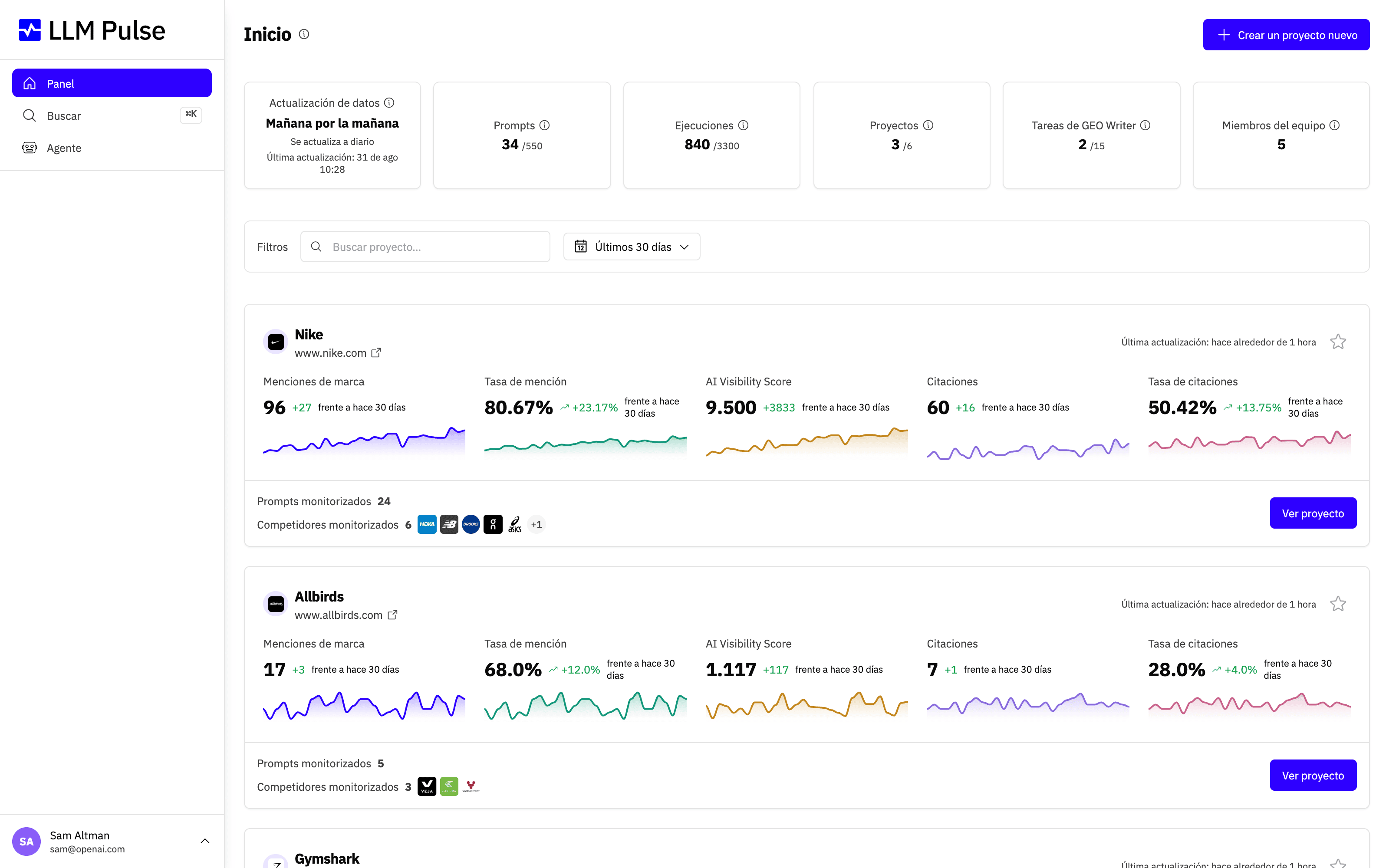
El panel te ofrece una vista única de todos tus proyectos, para que puedas comparar la visibilidad en IA y las tendencias sin cambiar de contexto.
Qué hace
- El selector de proyectos de la barra lateral te permite cambiar de proyecto activo al instante
- Los favoritos fijan los proyectos importantes en la parte superior de la lista
- La búsqueda te ayuda a encontrar proyectos rápidamente cuando tienes muchos
- Todos los análisis, filtros y ajustes se aplican al proyecto activo
Cómo se usa
- Haz clic en el nombre del proyecto en la parte superior de la barra lateral para abrir el selector
- Haz clic en cualquier proyecto para cambiar a él; todas las páginas se actualizarán para mostrar los datos de ese proyecto
- Haz clic en el icono de estrella de un proyecto para añadirlo a favoritos (se fija en la parte superior)
- Usa el cuadro de búsqueda cuando tengas más de 6 proyectos
- Los filtros (modelo, intervalo de fechas y etiquetas) se mantienen entre páginas cuando navegas dentro del mismo proyecto
Enlaces a un prompt, una respuesta o un informe en concreto
La página de un prompt, de una respuesta de IA o de un informe de Optimización GEO tiene su propia dirección web, así que puedes guardarla en tus marcadores o enviársela a alguien de tu equipo.
- Un enlace que termina en
?project_id=seguido del número de un proyecto se abre en ese proyecto, aunque tengas otro activo. Los enlaces que devuelven la API REST y la conexión MCP siempre lo incluyen. - El enlace solo cambia al proyecto indicado si ya puedes abrirlo. Los miembros del equipo solo pueden entrar en los proyectos a los que se les ha dado acceso; quien no tenga acceso se queda en su proyecto actual y ve un aviso de que no se ha encontrado la página.
- Sin el número de proyecto, un enlace a una página de otro proyecto muestra el mismo aviso de que no se ha encontrado la página. Cambia primero de proyecto y luego vuelve a abrir el enlace.
- En un panel integrado, los enlaces nunca cambian el proyecto activo.
Compartir la vista que tienes en pantalla
La barra de direcciones siempre refleja la vista completa: el proyecto, el intervalo de fechas, los filtros, la búsqueda, la ordenación y la página de resultados. Copia la URL y envíasela a alguien de tu equipo: verá exactamente lo mismo que tú.
- El enlace incluye tu intervalo de fechas, aunque nunca lo hayas cambiado. Quien lo abra verá ese intervalo, y pasará a ser su intervalo predeterminado, igual que si lo hubiera elegido.
- En Resumen y en Análisis de modelos de IA, el enlace también incluye el filtro Tipo de marca y los competidores que hayas seleccionado.
- Si pegas una lista en el filtro en bloque de Citaciones, también se incluye en el enlace, salvo que sea demasiado larga para caber en una dirección web.
- Las cifras coinciden siempre que tu cuenta siga monitorizando los mismos modelos de IA. Si se añaden o se quitan modelos después de copiar el enlace, los totales se calculan con los modelos actuales.
- El enlace solo abre el proyecto si quien lo recibe ya tiene acceso a él.
Consejos y notas
- El número de proyectos depende de tu plan (Starter: 1, Growth: 2, Scale: 5 y más en los planes superiores); puedes comprar espacios de proyecto adicionales desde menú del perfil > Planes y facturación > Uso
- Cada proyecto tiene sus propios prompts, competidores, etiquetas y ajustes
- Un proyecto monitoriza una marca y un dominio. No se puede añadir un segundo dominio propio al proyecto: las páginas de cualquier otro dominio se tratan como fuentes de terceros. Si tu marca gestiona un segundo sitio (un micrositio de producto o un dominio regional), crea un proyecto separado o añádelo como competidor en el proyecto principal; así tendrá sus propias citaciones, gráficos y filtros. Tus canales sociales y perfiles de aplicaciones se cubren por separado mediante Medios propios. Las rutas regionales del mismo dominio no requieren otro proyecto. Usa la regla de URL con prefijo de ruta de la marca solo cuando deba contar como propio un directorio concreto, como
/es-es. - Puedes dar acceso a proyectos concretos o a todos los proyectos a los miembros del equipo
- El panel muestra una tarjeta de resumen para cada proyecto de tu cuenta
- Puedes transferir la propiedad de un proyecto a otro usuario (función de administrador)