Análisis de sentimiento: cómo la IA describe tu marca de forma positiva
El análisis de sentimiento clasifica cómo los modelos de IA hablan de tu marca, de forma positiva o negativa. El analizador usa el nombre principal de la marca y los nombres de coincidencia configurados para tu proyecto o competidor. La página muestra la cobertura de la clasificación para que puedas comparar las menciones detectadas con los resultados de sentimiento completados. Disponible en los planes Growth y superiores.
Con el análisis de sentimiento, puedes:
- Ver si ChatGPT, Perplexity y Gemini describen tu marca de forma positiva, negativa o neutral
- Monitorizar tu Puntuación de Sentimiento Neto frente a los competidores a lo largo del tiempo
- Detectar los temas y prompts donde el sentimiento de la IA se vuelve negativo, para saber qué debes abordar
- Medir cómo cambia el sentimiento tras un lanzamiento, una campaña o una corrección de reputación
El panel de sentimiento reúne estas señales en un solo lugar: la distribución del sentimiento, cómo cambia la cuota de sentimiento a lo largo del tiempo, un gráfico donut de un vistazo y un ranking de Puntuación de Sentimiento Neto que te sitúa junto a tus competidores.
La pestaña Overview, que aparece a continuación, es donde puedes leerlo todo de una vez.
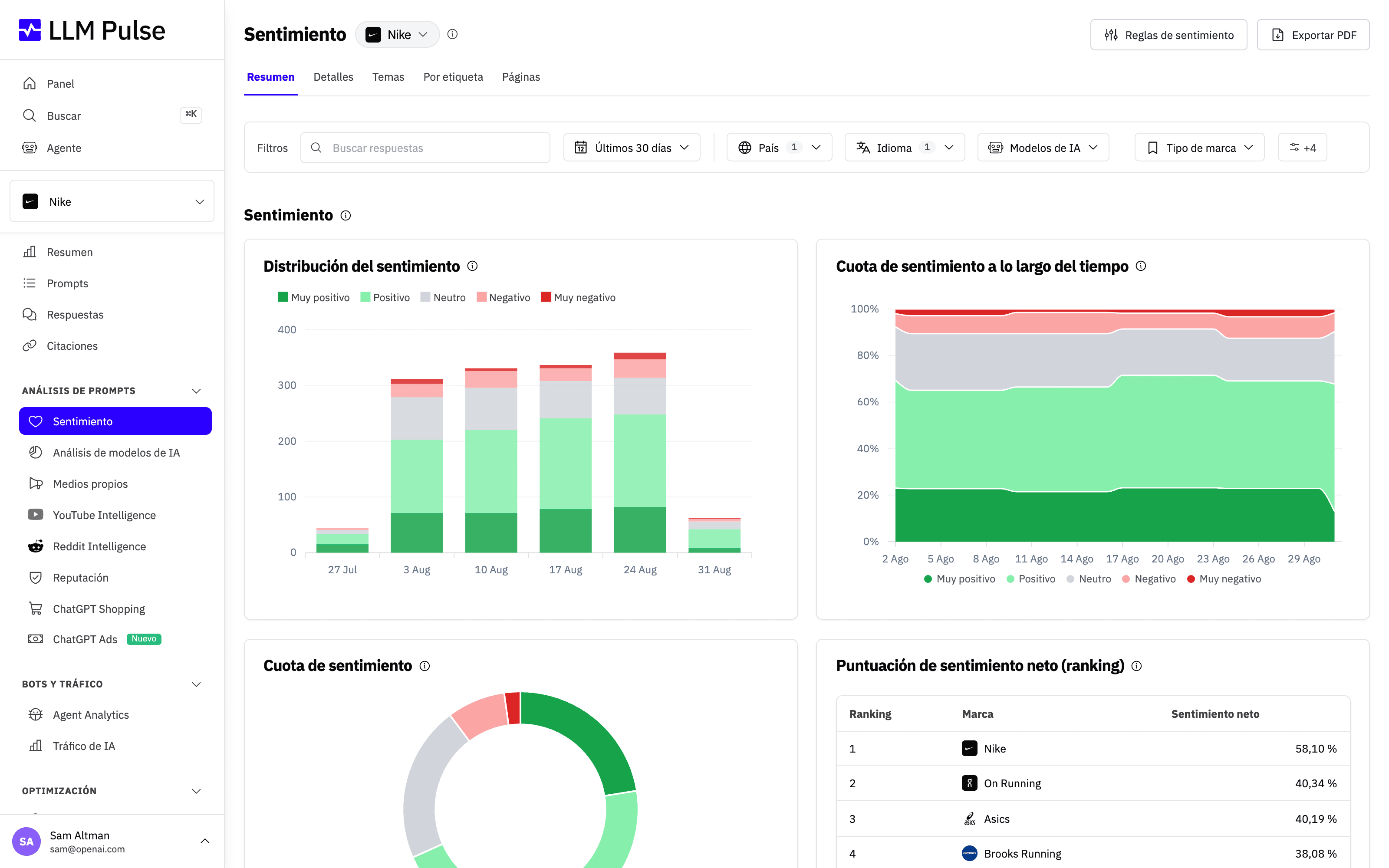
Qué hace
- Clasifica las menciones detectadas como muy positivas, positivas, neutrales, negativas o muy negativas
- Muestra cuántas menciones detectadas tienen una clasificación de sentimiento
- Calcula una Puntuación de Sentimiento Neto que va de -100% (todo negativo) a +100% (todo positivo)
- Identifica temas de sentimiento: los asuntos que la IA comenta sobre tu marca (se muestran como un treemap)
- Compara el sentimiento entre tu marca y todos los competidores
- Ofrece 5 pestañas de análisis: Overview (gráficos + rankings), Details (registros individuales), Topics (treemap), By Tag (desglose por etiqueta), Pages (sentimiento del contenido de las páginas citadas, que muestra las negativas por defecto)
- Muestra tres tendencias debajo de la tabla de Pages: citaciones negativas, URL negativas únicas y URL negativas citadas por primera vez en todo el historial del proyecto. Las gráficas siguen la cadencia de seguimiento de la cuenta, por lo que los totales semanales y mensuales abarcan todo el intervalo correspondiente, en lugar de aparecer como picos de un solo día.
- La tabla de cada pestaña se puede exportar a CSV o XLSX con el botón Exportar tabla, respetando los filtros activos
- Crea un informe PDF con la marca del cliente y los filtros actuales, incluidos la instantánea de sentimiento, la tendencia, la comparativa con los competidores, la cobertura de la clasificación, los temas, las etiquetas y los hallazgos detallados
Cómo usarlo
- Abre Análisis de prompts > Sentimiento en la barra lateral
- Selecciona una marca en el desplegable: All Brands para una vista agregada, tu marca o un competidor concreto
- Usa los filtros de país, idioma, sentimiento y etiqueta para acotar los datos. Cada filtro acepta varios valores. Los valores de un mismo filtro se combinan con OR, mientras que los filtros distintos se combinan con AND.
- Usa la pestaña Overview para ver los gráficos que muestran las tendencias de sentimiento a lo largo del tiempo
- Cambia a Topics para ver un treemap de lo que la IA dice sobre la marca seleccionada
- Usa By Tag para comparar el sentimiento entre distintos grupos de prompts
- Usa Details para consultar los registros de sentimiento individuales, con comentarios y etiquetas de tema
- Usa Pages para revisar el sentimiento de las páginas citadas y las tendencias de citaciones negativas y de URL negativas en el intervalo de fechas seleccionado
- Selecciona Descargar informe (PDF) en el encabezado de la página para crear un informe que puedas compartir. LLM Pulse lo genera en segundo plano y lo añade a Exportaciones, en el menú del perfil.
Añade contexto específico de tu marca
Hay palabras que pueden sonar positivas o neutrales pero aun así dañar a una marca concreta. Por ejemplo, una persona puede no querer que las respuestas de IA la presenten como una exdiputada o exdiputado. Puedes añadir una regla que trate esa descripción como negativa, incluso cuando la respuesta usa un lenguaje neutral.
Abre Configuración del proyecto > Reglas de sentimiento o usa el botón Reglas de sentimiento, en la parte superior de la página de Sentiment. Puedes guardar hasta 5 reglas de texto sin formato, con un máximo de 200 caracteres cada una. Mantén cada regla centrada en una situación concreta e indica el sentimiento que esperas.
Estas reglas solo anulan las pautas generales de puntuación cuando se aplican a tu propia marca. No cambian la detección de menciones ni el sentimiento de los competidores. Una regla guardada se aplica a los análisis nuevos y a los que se vuelven a ejecutar; no reescribe los resultados existentes automáticamente.
Consejos y notas
- Disponible en los planes Growth y superiores
- Las tendencias de Pages usan las fechas de las citaciones, no las fechas de análisis de las páginas. Siguen la cadencia de seguimiento que tenía la cuenta en cada fecha, incluidos los datos históricos semanales previos al cambio al seguimiento diario.
- Una URL negativa nueva solo se contabiliza si su primera citación en todo el historial del proyecto se encuentra dentro del periodo seleccionado. Cada URL solo puede considerarse nueva una vez.
- Correo semanal de sentimiento negativo: actívalo en la configuración de tu proyecto para recibir una alerta que cubre tanto las respuestas negativas de la IA de los últimos 7 días como las páginas citadas cuyo contenido critica tu marca. Una página se incluye cuando un modelo de IA la citó durante esa semana, de modo que la lista refleja exactamente a qué apuntan los modelos en ese momento.
- El procesamiento del sentimiento puede tardar hasta 24 horas después de la ejecución del prompt (usa la OpenAI Batch API)
- Los nombres de coincidencia se usan tanto para el análisis de sentimiento como para la detección de menciones
- Las reglas de sentimiento personalizadas pueden ajustar cómo interpreta el contexto empresarial de tu propia marca el análisis nuevo y el que se vuelve a ejecutar
- Las exportaciones en CSV, XLSX y PDF conservan las selecciones activas de país, idioma, sentimiento y etiqueta
- Los porcentajes de sentimiento y la Puntuación de Sentimiento Neto usan solo menciones clasificadas
- Una mención detectada puede no aparecer en los totales de sentimiento mientras el análisis se está procesando o si no hay ninguna clasificación disponible
- Puntuación de Sentimiento Neto = (positivas + muy positivas - negativas - muy negativas) / menciones clasificadas
- Cada registro de sentimiento incluye un comentario que explica el razonamiento de la IA
- El análisis de sentimiento cubre tu marca Y todos los competidores monitorizados