Suite de optimización GEO
La Suite de optimización GEO es un conjunto de 10 herramientas diseñadas para ayudarte a optimizar tu sitio web para los buscadores con IA. Cada herramienta analiza un aspecto diferente de la preparación de tu sitio para la IA.
Con la Suite de optimización GEO puedes:
- Puntuar la preparación de todo tu dominio para los agentes de IA, teniendo en cuenta los archivos de descubrimiento, los formatos de contenido, las reglas de acceso y las interfaces de agentes
- Generar y validar tus archivos llms.txt y robots.txt para que los rastreadores de IA puedan encontrar y usar tu contenido
- Comprobar si los bots de IA pueden rastrear y renderizar realmente tus páginas principales
- Auditar el marcado de esquema y la estructura del contenido para comprobar su preparación para la IA
- Corregir las carencias técnicas que impiden que los modelos de IA citen tu sitio
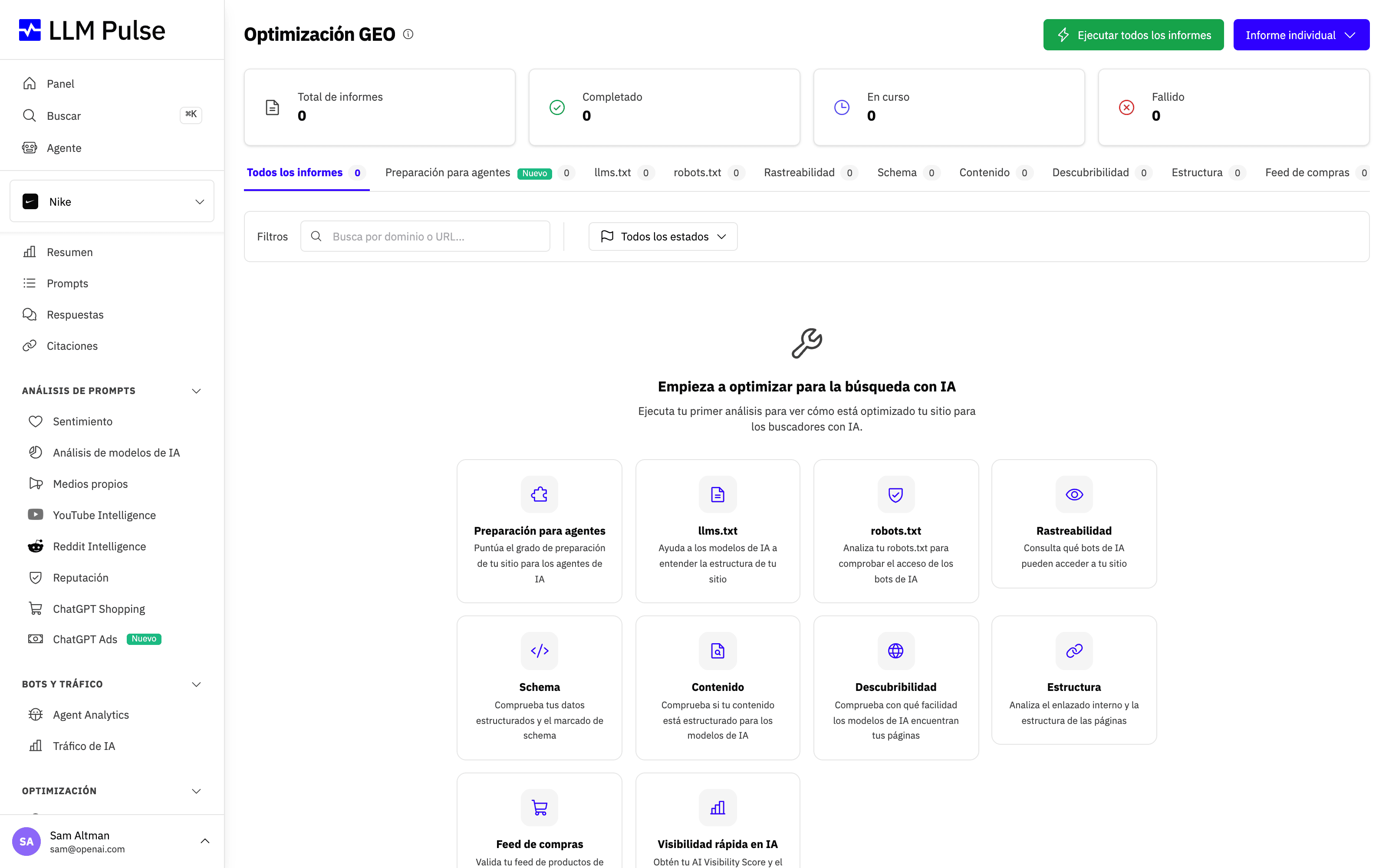
Puedes cambiar de herramienta con la navegación por pestañas de la parte superior de la página Optimización GEO. Cada pestaña siguiente cubre un tipo de análisis.
Informe de preparación para agentes
Puntúa tu dominio en las cuatro dimensiones que determinan si un agente de IA puede encontrar, leer y actuar en tu sitio. Ejecuta unas veinte solicitudes de solo lectura contra la raíz de tu sitio, por lo que termina en menos de un minuto y nunca rastrea tus páginas.
- Descubrimiento: robots.txt, mapa del sitio XML, llms.txt y llms-full.txt y encabezados HTTP Link.
- Contenido legible por máquinas: negociación de contenido Markdown, mediante una solicitud
Accept: text/markdown, una variante de URL Markdown, JSON-LD y autodetección de feeds. - Acceso y permisos: reglas de robots.txt por rastreador, la directiva Content Signals y una obtención en directo enviada con un agente de usuario de rastreador real. También buscamos un directorio Web Bot Auth, pero solo lo informamos y nunca lo puntuamos: los operadores de rastreadores publican ese archivo para anunciar sus claves de firma, por lo que un sitio web normal no tiene motivos para servirlo.
- Interfaces de agentes: tarjeta del servidor MCP, índice de habilidades de agentes, catálogo de API, documento OpenAPI, descubrimiento OAuth, tarjeta de agente A2A y catálogo Agentic Resource Discovery.
Se analiza también un quinto grupo, el comercio de agentes (x402, Agentic Commerce Protocol, Universal Commerce Protocol y AP2), pero se deja deliberadamente fuera de la puntuación porque esos estándares todavía están cambiando.
Si falla el Rastreo en vivo, el informe no presenta una puntuación numérica alta como si fuera un resultado saludable. El círculo de la puntuación pasa a rojo, aparece una etiqueta Acceso sin confirmar debajo y un aviso junto a la puntuación incluye el estado HTTP. El número sigue visible porque resume todas las comprobaciones, mientras que el acceso del rastreador sigue sin confirmarse.
Ten en cuenta estos puntos al leer el informe:
- La comprobación del rastreador en directo prueba el agente de usuario, no la IP. Enviamos un agente de usuario de rastreador real desde nuestra propia red. Un bloqueo significa que se rechazó la cadena del agente de usuario. Un sitio que verifica los rastreadores mediante el rango de IP o la firma de la solicitud puede seguir bloqueándonos mientras permite el rastreador real. Considera un fallo como una señal para revisar tus reglas de perímetro, no como una prueba de que existe una configuración incorrecta.
- Una puntuación baja de interfaces es normal hoy. Las tarjetas de servidores MCP y los catálogos de API son recientes, y la mayoría de sitios no publica ninguno. La dimensión tiene un peso que hace que los elementos básicos sigan teniendo una influencia importante en la puntuación.
- La tarjeta del servidor MCP no es un archivo conocido. La buscamos mediante tu catálogo Agentic Resource Discovery en
/.well-known/ai-catalog.json, que es donde la especificación indica que debe anunciarse una tarjeta. Varias guías indican que se publique en/.well-known/mcp/server-card.json, pero la especificación descarta esa ubicación. Si encontramos allí una tarjeta, te avisamos para que la muevas en lugar de darte por válido ese elemento.
Dentro del panel, el informe añade un panel Declarado frente a observado que un informe público no puede mostrar: coloca lo que declara tu robots.txt junto a lo que realmente hizo tu perímetro con agentes reales durante los últimos 30 días, usando tus datos de Agent Analytics. Señala dos desajustes: un rastreador que bloqueas pero sigue rastreando, y un rastreador al que permites el acceso cuyas solicitudes devuelven errores en su mayoría.
La misma comprobación está disponible para cualquier persona sin cuenta como el Comprobador gratuito de preparación para agentes.
Informe rápido de visibilidad en IA
Genera un informe de visibilidad bajo demanda para cualquier dominio y muestra cómo aparece en distintos modelos de IA. Es una instantánea única, no el seguimiento semanal que proporcionan los prompts de tu proyecto, por eso se llama «rápido».
El mismo informe está disponible para cualquier persona sin cuenta como el Informe gratuito de visibilidad en IA. Dentro del panel se llama Informe rápido de visibilidad en IA, se ejecuta con el proyecto que tienes abierto y se puede exportar a PDF.
Generador de llms.txt
Crea un archivo llms.txt para tu sitio web, un documento Markdown que ayuda a los modelos de IA a entender eficazmente el contenido oficial de tu sitio.
Elige el idioma de los archivos en el campo Idioma de salida al crear el informe (en el formulario de Ejecutar todos los informes se llama Idioma del llms.txt). Dentro del panel viene preseleccionado con el idioma de tu proyecto, y el generador público usa el idioma del propio sitio web, detectado automáticamente. El informe completado muestra el idioma en el que se han escrito los archivos.
Puedes revisar y editar los archivos generados antes de publicarlos. En un informe completado, Editar contenido abre un cuadro de texto por archivo (llms.txt y llms-full.txt). Después de Guardar cambios, la página del informe, las dos descargas y la exportación a PDF usan tu versión, y el informe indica cuándo se ha editado. Restaurar archivos generados recupera la versión generada de los dos archivos, y Volver a ejecutar crea un informe nuevo sin tus cambios. Para editar necesitas el mismo permiso que para ejecutar los informes de Optimización GEO.
De dónde procede el contenido del llms.txt
El Generador de llms.txt crea los dos archivos solo a partir de páginas de tu propio dominio y de sus subdominios (por ejemplo, www., docs. o blog.). Una búsqueda limitada a tu sitio encuentra esas páginas, y un modelo de IA escribe los archivos basándose en lo que dicen. Las páginas de otros sitios web quedan fuera, incluidas las de organizaciones asociadas o vinculadas que tengan su propio dominio, y los archivos nunca enlazan a ellas. Para cubrir otro dominio, ejecuta un informe aparte para él.
Como los archivos los escribe una IA, el informe, su PDF y el editor muestran un aviso que te pide que revises cada dato y cada enlace antes de publicarlos. Los informes creados antes de este cambio muestran un aviso distinto: sus archivos se generaron a partir de una búsqueda web que podía incluir otros sitios web. Vuelve a ejecutar un informe así para regenerar sus archivos a partir de tu propio sitio.
Si la búsqueda no encuentra ninguna página de tu sitio, el informe falla y te pide que compruebes que el sitio está en línea y es accesible para los buscadores. Si tu sitio redirige a otro dominio, ejecuta el informe para ese dominio.
Comprobador de robots.txt
Analiza tu archivo robots.txt para comprobar si los rastreadores de IA, como GPTBot, ClaudeBot y GoogleOther, tienen permiso o están bloqueados.
El informe también enumera todas las líneas Content-Signal que encuentra, con su alcance: todo el sitio, o solo la ruta con la que empieza la línea (por ejemplo, Content-Signal: /blog/ ai-train=no, la forma que contentsignals.org muestra para páginas concretas). El veredicto de permitido o bloqueado sigue rigiéndose por el estándar de robots.txt, que ignora las líneas que no define, así que una línea Content-Signal nunca se marca como error de sintaxis ni cambia si un rastreador tiene permiso o está bloqueado.
Comprobador de rastreabilidad GEO
Compara el HTML estático con el contenido renderizado por JavaScript para identificar qué pueden ver realmente los rastreadores de IA en tus páginas.
Las ventanas de consentimiento de cookies se excluyen automáticamente de esta comparación. Plataformas de consentimiento como Cookiebot u OneTrust inyectan su banner y la declaración de cookies con JavaScript, lo que puede añadir miles de palabras de texto estándar a la página renderizada y haría que la puntuación de paridad de contenido pareciera mucho peor de lo que es. Cuando se detecta un banner de consentimiento, el informe muestra una nota con el número de palabras excluidas.
La comprobación en el navegador sigue ejecutándose cuando se bloquea la solicitud del rastreador estático. Si el navegador automatizado también falla, es posible que un método alternativo complete el informe. En ambos casos, el informe muestra un aviso para que sepas qué resultado se ha utilizado y cuándo la comparación puede ser menos precisa.
Cómo se llaman las secciones del informe
El informe se organiza en torno a una obtención estática frente a un renderizado completo en el navegador, pero las secciones que aparecen en pantalla reciben el nombre de aquello que comparan, no de las dos obtenciones:
- Cómo ven esta página los motores de IA: un veredicto por motor, que indica si ve todo el contenido, una parte, poco o nada, o si está indexado con los fragmentos bloqueados. Solo el renderizador de Google ejecuta JavaScript.
- Comparación de contenido: Palabras estáticas (lo que ven los bots de IA), Palabras renderizadas (lo que ven los navegadores) y Paridad de contenido, la proporción de tu contenido visible para los bots de IA.
- Comparación de metaetiquetas y Datos estructurados (JSON-LD): dos columnas, Estático (rastreador) y Renderizado (navegador), para que puedas ver qué etiquetas y esquemas solo existen después de ejecutar JavaScript.
- Directivas de indexación e IA, Tamaño de la respuesta HTML inicial, Enlaces, Imágenes, Detalles técnicos y Recomendaciones.
Cómo saber si un firewall está bloqueando el rastreo
Si tu sitio está detrás de Cloudflare u otra protección contra bots y quieres confirmar si nos está bloqueando, busca el aviso ámbar «Solicitud del rastreador estático bloqueada». Aparece cuando la solicitud estática devuelve un código de estado HTTP que indica un bloqueo. El banner actual «Protección antibots detectada» aparece cuando una obtención devuelve una página de desafío en lugar de tu contenido real. Un aviso azul «Informe completado con un método alternativo» significa que el informe se ha completado, pero que la comparación renderizada puede ser menos precisa.
La puntuación de rastreabilidad GEO no es un número de «porcentaje bloqueado». Una puntuación del 80 % no significa que esté bloqueado el 20 % de tu sitio. La puntuación también baja por el contenido que solo aparece después de JavaScript, las metaetiquetas ausentes o que no coinciden, los enlaces y el esquema. Lee los resultados debajo de la puntuación para ver qué comprobación falla.
Para validar un cambio de firewall realizado por tu equipo de TI:
- Abre Preferencias > Configuración del proyecto > Información general y activa Identificación del rastreador. Las cuentas estándar muestran
LLMPulseBot/1.0; los portales de marca blanca completa muestran el identificador neutroAnalyticsCrawler/1.0. - Pide a tu equipo de TI que incluya en la lista de permitidos ese agente de usuario exacto. Incluir solo GPTBot no es suficiente, porque el paso de renderizado usa un navegador sin interfaz.
- Vuelve a ejecutar el informe de rastreabilidad en la misma URL y compáralo con el anterior: el banner contra bots debería haber desaparecido y las Palabras estáticas deberían coincidir con tu contenido real.
Analizador de esquema y datos estructurados
Comprueba el marcado de tus datos estructurados para optimización con IA y valida los tipos de schema.org, los datos de producto y el marcado de preguntas frecuentes.
Herencia de tipos de esquema
Los tipos de esquema heredan las reglas de validación de sus tipos padre en Schema.org. Por ejemplo, WebApplication se puntúa conforme a los requisitos de SoftwareApplication, aunque en el informe sigue apareciendo bajo el tipo declarado.
Recomendaciones basadas en evidencias
Las recomendaciones se basan en los errores detectados, las propiedades declaradas, las relaciones entre entidades y las señales visibles de la página. El analizador no sugiere tipos adicionales únicamente para aumentar el recuento. Cuando el texto visible solo apunta a un posible tipo de página, el informe te pide que lo revises y explica que no es necesario realizar ningún cambio si ese tipo no describe la página. Un único tipo relevante y compatible proporciona una cobertura completa de GEO-critical; añadir tipos no relacionados no mejora esa categoría.
Las señales opcionales Speakable y sameAs solo se muestran cuando se detectan y no influyen en la puntuación general.
Comprobador de preparación del contenido
Analiza si tu contenido está estructurado y formateado de una forma que los modelos de IA puedan citar fácilmente.
Informe de descubribilidad y autoridad
Evalúa las señales de autoridad de tu dominio y su descubribilidad en las plataformas de búsqueda con IA.
Informe de estructura del sitio
Analiza la estructura de enlaces internos y la arquitectura de tu sitio para la rastreabilidad de IA.
Comprobador de feeds de ChatGPT Shopping
Valida la compatibilidad de tu feed de productos con ChatGPT Shopping.
Cómo usarlo
- Ve a Optimización GEO en la barra lateral (dentro de Optimización)
- Selecciona una herramienta en las pestañas de navegación
- Introduce una URL o un dominio para analizar
- Revisa el informe generado, con sus puntuaciones y recomendaciones
- Descarga en PDF un informe ya completado o usa Volver a ejecutar para comprobar la misma dirección después de hacer cambios
Consejos y notas
- La Optimización GEO está disponible en todos los planes. Cada informe GEO técnico creado correctamente consume 1 unidad. Los informes que no llegan a crearse no consumen ninguna unidad. La opción «Ejecutar todos los informes» intenta crear 9 informes y solo se inicia cuando quedan al menos 9 unidades. El límite diario estándar es de 20 unidades por cuenta, compartido por todo el equipo y por todos los puntos de acceso autenticados, aunque algunas cuentas tienen asignadas más unidades
- Los informes incluyen recomendaciones prácticas específicas para cada herramienta
- Todos los informes de una URL concreta muestran el código de estado HTTP que devolvió la página. Si la página responde algo distinto de un 2xx, por ejemplo un 404, el informe no es válido y un aviso lo advierte arriba del todo: las puntuaciones describen lo que el servidor sirvió en esa dirección, normalmente una página de error. Lo habitual es que falte la barra final, así que revisa la dirección y vuelve a lanzarlo
- Una página muy grande solo se descarga hasta un límite de tamaño, 2 MB en la descarga rápida y 5 MB en las alternativas. Cuando eso ocurre, el informe avisa arriba del todo con Página analizada parcialmente, porque todo lo que se calcula sobre el documento entero, como el peso de la página, la estructura de encabezados o los bloques de schema, solo cubre la parte que se pudo leer
- Los informes solo son visibles dentro de tu proyecto, así que se abren desde la página de Optimización GEO. Si ejecutas todos los análisis de una URL a la vez, te enviamos un correo electrónico cuando todos los informes del conjunto estén listos
- Algunas herramientas, como Rastreabilidad, usan un navegador sin interfaz para renderizar y pueden tardar entre 30 y 60 segundos
- Si un sitio con una protección estricta contra bots devuelve informes imprecisos, abre Preferencias > Configuración del proyecto > Información general y activa Identificación del rastreador. Nuestros rastreadores GEO y de rastreabilidad obtendrán entonces el sitio de ese proyecto con un agente de usuario fijo y autoidentificado que tu equipo puede incluir en la lista de permitidos del firewall o de la protección contra bots, por ejemplo Cloudflare, para que los informes reflejen tu contenido real en lugar de una página de desafío. El interruptor está desactivado por defecto