Crea tu primer proyecto de visibilidad en IA
Un proyecto de LLM Pulse representa una marca o un sitio web que quieres monitorizar en buscadores con IA. El asistente de incorporación te guía por la configuración en pocos minutos.
El primer paso del asistente te pide lo esencial: el dominio de tu sitio web, el país principal que quieres monitorizar y el idioma principal de las consultas de IA.
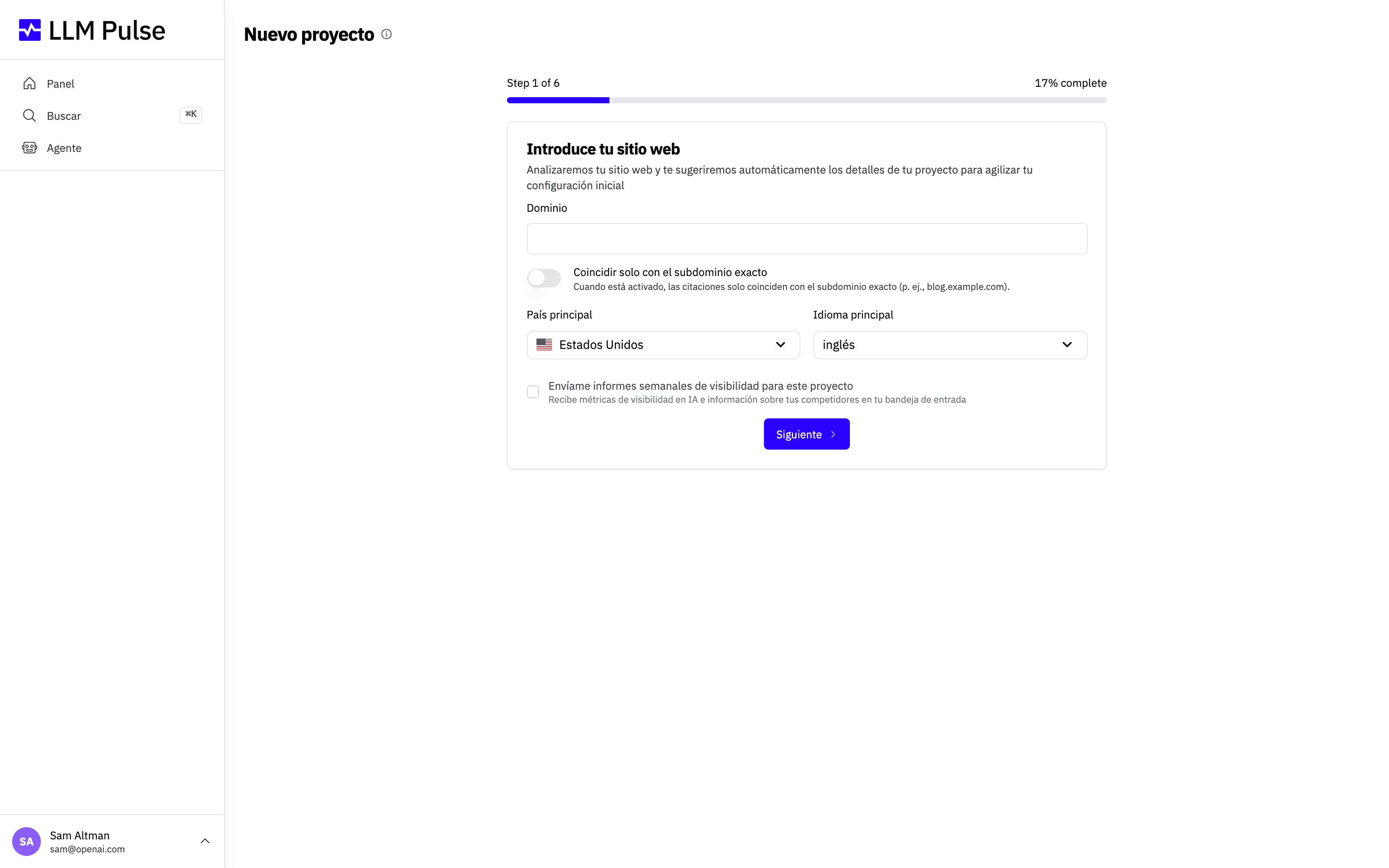
Qué hace
- Crea un proyecto de seguimiento vinculado al dominio de tu sitio web
- Configura el país y el idioma de destino para la ejecución de prompts
- Configura los nombres coincidentes de tu marca (las formas en que los modelos de IA podrían mencionar tu marca)
- Añade opcionalmente prompts y competidores iniciales durante la configuración
Cómo usarlo
- Haz clic en Create a New Project en el Dashboard o usa el selector de proyectos de la barra lateral
- Introduce la URL de tu sitio web; LLM Pulse detectará automáticamente el nombre de tu marca, el sector y la descripción
- Selecciona tu país y tu idioma principales (esto determina la configuración regional de las consultas de IA)
- Revisa y ajusta los nombres coincidentes de tu marca (las variaciones del nombre que los modelos de IA podrían utilizar)
- Añade prompts. Puedes usar las sugerencias basadas en IA o introducir tus propios prompts
- Añade opcionalmente competidores para monitorizarlos junto a tu marca
- Conecta opcionalmente tus medios propios (Growth y superiores): pega las URL del canal de YouTube, el perfil de Instagram, la página de Facebook, el perfil de TikTok y las fichas de las tiendas de aplicaciones que pertenezcan a tu marca, o sáltate este paso y añádelos más tarde en Preferencias > Configuración del proyecto > Medios propios
- Haz clic en Create Project: tus prompts se pondrán en cola y recibirán sus primeros datos en unas 24 horas
Nombre del proyecto y nombre de marca
Después de crear un proyecto, puedes mantener separadas la etiqueta interna del espacio de trabajo y la marca que monitorizas en Preferencias > Configuración del proyecto > Información general.
- Nombre del proyecto es la etiqueta interna que se muestra en el selector de proyectos, en Configuración del proyecto y en las confirmaciones de eliminación.
- Nombre de marca es la identidad que se muestra en la analítica, los informes, las exportaciones, los correos electrónicos y las sugerencias de IA. También se utiliza para la detección de menciones y el análisis de sentimiento junto con tus nombres coincidentes.
- Si dejas en blanco el nombre de marca, LLM Pulse utiliza el nombre del proyecto. Si los dos nombres son diferentes, los resultados que se muestran al cliente utilizan el nombre de marca.
- El nombre del proyecto no se añade automáticamente como nombre coincidente. Añádelo en Detección de marca (Nombres de coincidencia) solo si los modelos de IA realmente lo utilizan para referirse a tu marca.
Consejos y notas
- El número de proyectos que puedes crear depende de tu plan (Starter: 1, Growth: 2, Scale: 5, Scale+: 10, Scale++: 15)
- Puedes cambiar el país, el idioma y los nombres coincidentes más adelante en Preferencias > Configuración del proyecto > Información general
- Los prompts nuevos se incorporan en una ejecución nocturna, por lo que tus primeros resultados llegan en unas 24 horas después de crear el proyecto. Después de esa primera ejecución, los prompts se actualizan los lunes de cada semana de forma predeterminada
- La URL del proyecto se utiliza para hacer coincidir las citaciones. Asegúrate de que coincide con tu dominio real