Análisis de modelos de IA: visibilidad en ChatGPT, Gemini y Perplexity
Análisis de modelos de IA es una vista matricial que compara marcas y competidores en todos los modelos de IA que monitorizas: ChatGPT, Perplexity, Gemini, Google AI Mode y Google AI Overviews. Te ayuda a identificar qué modelos favorecen a qué marcas y dónde deben centrarse tus esfuerzos de optimización.
Con Análisis de modelos de IA, puedes:
- Ver qué modelos de IA mencionan más tu marca y cuáles te ignoran
- Comparar tu Tasa de mención, tu Tasa de citación, el sentimiento y la posición frente a los competidores, modelo a modelo
- Encontrar el modelo concreto en el que un competidor te supera en posicionamiento, para saber dónde concentrar el trabajo de GEO
- Detectar un modelo que cita tus URL pero nunca nombra tu marca, o viceversa
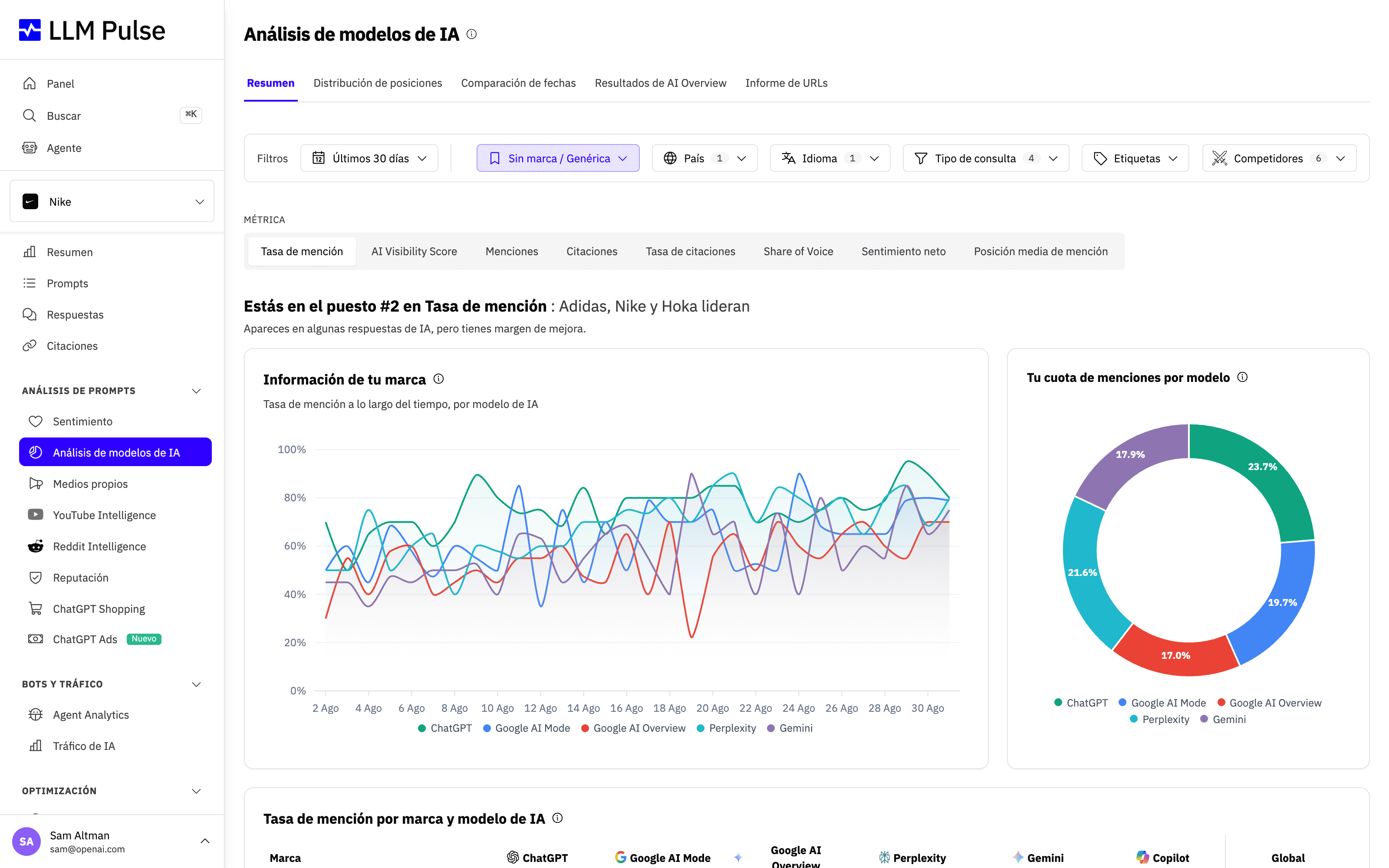
El informe combina una línea de tendencia de la tasa de mención con un desglose de la cuota de menciones, de modo que puedes ver cómo evoluciona la visibilidad de cada modelo a lo largo del tiempo y cómo se reparte esa visibilidad entre tu marca y los competidores.
Qué hace
- Muestra una tabla comparativa con las marcas como filas y los modelos de IA como columnas
- Admite 8 pestañas de análisis, cada una con una perspectiva de métrica diferente:
- Brand Visibility: Tasa de mención por modelo
- Citation Rate: con qué frecuencia devuelve cada modelo tus URL como fuentes visibles o en segundo plano
- Net Sentiment: puntuaciones de sentimiento por modelo
- AI Visibility Score: visibilidad ponderada por posición de cada modelo
- Average Mention Position: el orden medio en el que aparece tu marca entre todas las marcas nombradas en una respuesta (la Posición 1 significa que te mencionan primero; cuanto más bajo, mejor), por modelo y por competidor
- Position Distribution: con qué frecuencia apareces en la Posición 1, 2 o 3 o más, por modelo
- Date Comparison: compara dos fechas cara a cara para ver los cambios en las métricas
- AI Overview Results: el rendimiento específicamente en Google AI Overviews
- Muestra gráficos circulares que desglosan la visibilidad de cada marca por modelo de IA
- Te permite comparar dos fechas concretas para monitorizar cómo han cambiado los rankings a lo largo del tiempo
Cómo usarlo
- Abre Análisis de prompts > Análisis de modelos de IA en la barra lateral
- Usa las pestañas de métricas de la parte superior para cambiar entre las distintas vistas de comparación
- Filtra por rango de fechas, etiquetas, país o idioma
- En la pestaña Date Comparison, selecciona dos fechas para ver los cambios en las métricas cara a cara
- La tabla resalta qué modelos te dan la visibilidad más fuerte
Exportar la tabla
En la pestaña Resumen, el menú Exportar tabla, situado encima de la tabla de marcas por modelo, permite exportarla en CSV o Excel. El archivo refleja la métrica, el rango de fechas, los filtros y los competidores que tengas seleccionados: una fila por marca, una columna por modelo de IA y, además, la columna final (Global, Total o Media, según la métrica). En las métricas de porcentaje, los encabezados de columna llevan (%). Las filas que hayas ocultado en la página también se incluyen. Como las demás exportaciones, el archivo se prepara en segundo plano y después aparece en la página Exportaciones, donde podrás descargarlo durante 7 días.
Consejos y notas
- Los distintos modelos de IA pueden percibir tu marca de forma muy diferente: una posición fuerte en ChatGPT no garantiza lo mismo en Gemini
- Úsala para identificar qué modelos necesitan optimización y cuáles ya están funcionando bien
- La pestaña Resultados de AI Overview es específica de Google AI Overviews y muestra cómo aparece tu marca en ese contexto
- Distribución de posiciones muestra la distribución de tus posiciones de mención (1.ª, 2.ª, 3.ª o más): unas tasas más altas de Posición 1 indican una mayor autoridad de marca en ese modelo, y ahora también muestra, destacada, la Posición media de mención de tu marca junto a la de un competidor
- La Posición media de mención es el número que hay detrás de Distribución de posiciones: selecciónala como métrica en la pestaña Resumen para comparar tu posición media con la de los competidores en todos los modelos; también aparece en la barra de KPIs del panel de visión general (Resumen en la barra lateral). Cuanto más baja, mejor
- En la tabla de AI Visibility Score, la columna Media es la media aritmética de las columnas de modelos de IA activadas. No suma las puntuaciones de los modelos entre sí