



Last updated: August 10, 2026
ChatGPT serves hundreds of millions of weekly users. When someone asks “what’s the best project management tool?” or “which CRM should I use for a small business?”, the answer they get shapes their buying decision, often before they ever open a search engine.
Table of Contents
The question is: does your brand show up in those answers?
If not, you’re invisible to a fast-growing channel. This guide covers exactly how to get your brand mentioned in ChatGPT: with 10 practical strategies you can start using today.
How ChatGPT decides what to recommend
You need to understand how ChatGPT actually picks what to recommend. It’s not random, and it’s not a black box once you know the basics.
Training data plus web search. ChatGPT’s base knowledge comes from training data. For questions that use ChatGPT search, it can also retrieve current web information.
It can run supporting searches. OpenAI says ChatGPT search uses OpenAI search systems, partner content, OpenAI crawlers, and third-party search providers. A question can trigger several related searches, so do not optimize around one assumed provider.
Citations come from trusted web sources. When ChatGPT includes links in its responses, those citations come from pages it found through browsing. Pages that are well-structured, authoritative, and information-rich are more likely to be cited.
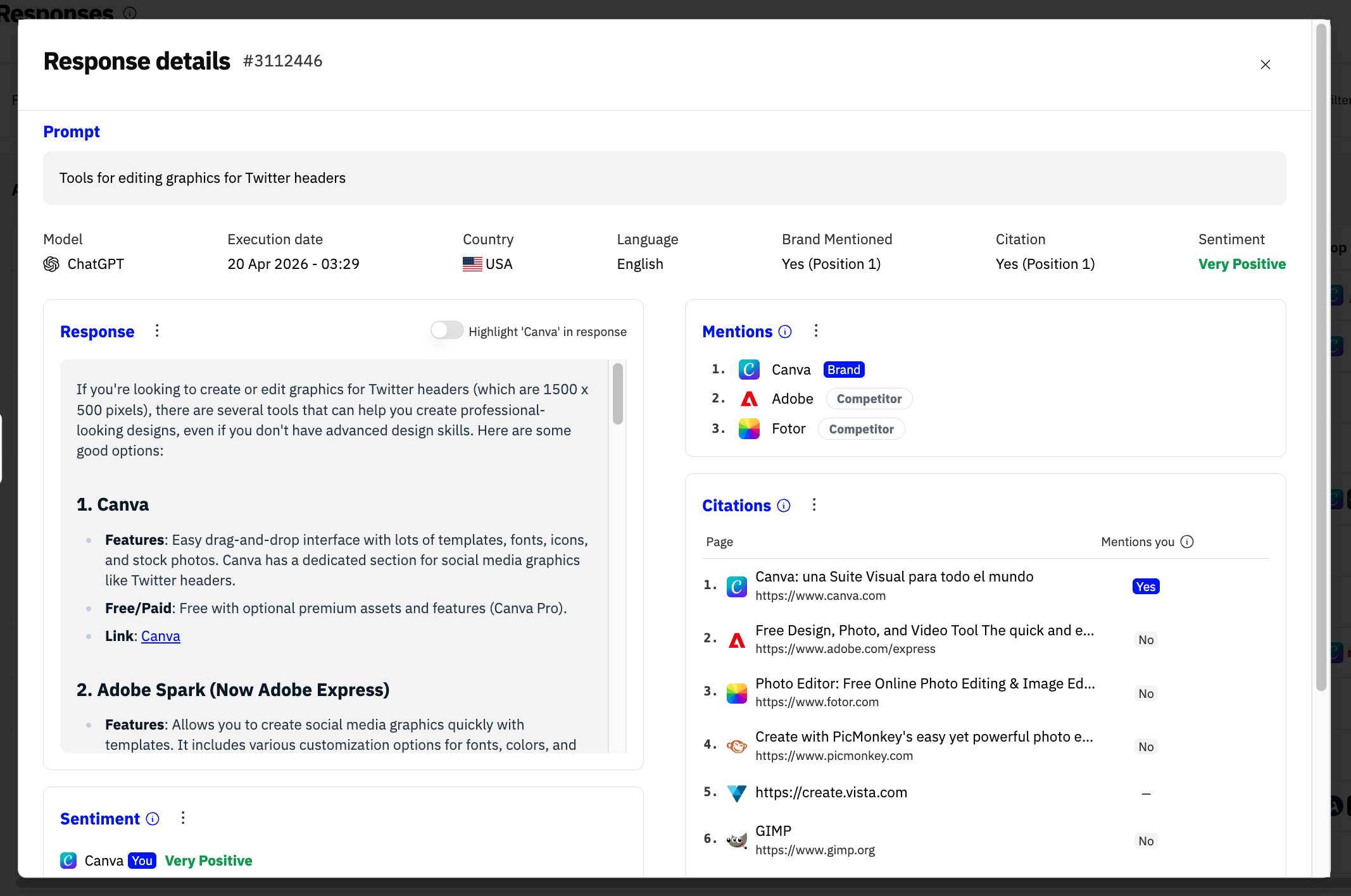
Search behavior can vary by conversation. Two users asking similar questions may trigger different background searches, which means ChatGPT’s recommendations can vary. This makes systematic monitoring essential, you can’t just check once and assume the answer stays the same.
10 strategies to rank in ChatGPT
1. Create answer-ready content
ChatGPT pulls from content that directly answers questions. Structure your pages so AI models can extract clean, useful information quickly.
- Lead with definitions. Start key sections with a clear, one-sentence definition or answer. If someone asks “what is AI visibility?”, the page that begins with “AI visibility is the measure of how often your brand appears in AI-generated responses” wins.
- Use a clear H2/H3 hierarchy. Break content into scannable sections with descriptive headings. ChatGPT parses page structure to find relevant sections.
- Add FAQ sections. Frequently asked questions map directly to how people prompt ChatGPT. A well-written FAQ section increases your chances of being the source ChatGPT pulls from.
- Keep paragraphs concise. Short, information-dense paragraphs are easier for AI models to extract and cite than long, meandering blocks of text.
2. Maintain Broad Search Visibility
OpenAI does not document one search engine as the universal source for ChatGPT search. Maintain indexability across the major search systems relevant to your audience. Submit accurate sitemaps, keep important pages crawlable, and confirm that OAI-SearchBot is not blocked. Track actual ChatGPT citations instead of treating a ranking in one search engine as a proxy.
3. Build topical authority
ChatGPT favors brands that demonstrate deep expertise in a specific topic area. One blog post won’t cut it, you need comprehensive coverage.
- Create content clusters. Build a pillar page on your main topic and link it to detailed supporting articles that cover subtopics, use cases, and edge cases.
- Cover the full funnel. From “what is X?” to “best X tools” to “how to implement X”, each piece strengthens your authority on the topic.
- Publish original research. Data, surveys, benchmarks, and case studies signal to both search engines and AI models that you’re a primary source, not a content aggregator.
4. Get mentioned on trusted platforms
ChatGPT’s training data and browsing results both pull from high-authority platforms. Being mentioned across these sources compounds your visibility.
- Reddit. Active, authentic participation in relevant subreddits matters. ChatGPT frequently cites Reddit discussions when answering “what do people recommend” style questions.
- Wikipedia. If your brand is notable enough, a Wikipedia presence carries enormous weight in AI training data.
- Industry publications and review sites. Guest posts, expert quotes, product reviews on sites like G2 or Capterra, all of these create mention signals that AI models pick up.
- GitHub and Stack Overflow. For technical products, presence on developer platforms feeds directly into AI model training data.
5. Optimize for citations
There’s a difference between being mentioned and being cited. When ChatGPT links to your page, that’s a citation, and it drives direct traffic to your site.
- Be the definitive source. Create the most comprehensive, well-organized resource on your topic. ChatGPT tends to cite pages that serve as complete references.
- Include specific data points. Statistics, pricing information, feature comparisons, concrete data gives ChatGPT a reason to cite your page as the source.
- Use clear, descriptive URLs. A URL like
/blog/chatgpt-seo-guidesignals relevance more clearly than/blog/post-12345.
6. Keep content current
Current pages are useful for time-sensitive queries, but OpenAI does not publish recency as a universal ChatGPT Search ranking rule.
- Update key pages regularly. Add new data, refresh examples, and update timestamps. A page marked “Updated March 2026” signals freshness.
- Publish on a consistent schedule. Regular publishing signals an active, maintained site, both to search engines and to AI crawlers.
- Monitor for outdated information. If your content references old pricing, discontinued features, or last year’s data, it hurts your credibility as a source.
7. Use structured data and clear formatting
AI models parse structured content more effectively than unstructured walls of text.
- Use supported schema markup. Add schema when it accurately matches visible content and qualifies for a supported search feature. Schema does not guarantee a ChatGPT citation.
- Use tables for comparisons. When comparing features, pricing, or specifications, tables are easier for AI to parse than prose.
- Add alt text to images. While ChatGPT primarily processes text, alt text contributes to how search engines index your pages, which affects what ChatGPT finds through browsing.
8. Create comparison and “Best of” content
A huge percentage of ChatGPT queries are comparative: “best X tools”, “X vs Y”, “top alternatives to Z”. Position your brand to appear in these high-intent conversations.
- Publish honest comparison pages. Compare your product to competitors with genuine pros and cons. ChatGPT uses these pages as reference when answering comparison questions.
- Create “best of” listicles in your category. If you’re in the AI visibility space, publish “Best AI Visibility Tracking Tools” and include your product alongside others.
- Cover adjacent categories. Don’t just compare within your niche, create content about related tools and workflows your audience cares about.
9. Ensure your website is crawlable by AI bots
This sounds basic, but a surprising number of companies accidentally block AI crawlers, then wonder why they don’t appear in ChatGPT.
- Check your robots.txt. Allow OAI-SearchBot on pages you want eligible for ChatGPT search summaries and citations. Treat GPTBot separately because it is used for potential model training.
- Don’t gate all your content. If your best content is behind login walls or paywalls, AI models can’t access it. Make sure your most authoritative pages are publicly accessible.
- Keep important pages fast and reliable. Crawlers and user-triggered fetchers need to retrieve the page successfully, but providers do not publish one universal timeout threshold.
10. Monitor and iterate
You can’t improve what you don’t measure. AI visibility is a new channel, and it requires its own tracking, just like you track Google rankings.
- Track your mentions across AI models. ChatGPT isn’t the only model that matters. Perplexity, Gemini, and others are all growing fast. Monitor all of them.
- Measure sentiment, not just mentions. Being mentioned negatively is worse than not being mentioned at all. Track whether AI models recommend your brand positively.
- Analyze which prompts trigger your brand. Understanding what questions lead to your brand being mentioned helps you double down on content that’s working.
- Compare against competitors. Share of voice in AI responses tells you how you stack up against competitors in this new channel.
How to check if ChatGPT mentions your brand
Once you start implementing these strategies, you need a way to measure results. Here’s how.
Manual approach: ask ChatGPT directly. You can open ChatGPT and type prompts like “what’s the best [your category] tool?” or “recommend a [your product type].” The problem? Answers vary by session, change over time, and checking manually doesn’t scale. You’d need to test dozens of prompts, across multiple models, every week.
Automated approach: use a dedicated tracking tool. LLM Pulse tracks how your brand appears across ChatGPT, Perplexity, Gemini, Google AI Mode, and Google AI Overviews on the cadence you choose. You set up the prompts that matter to your business, and LLM Pulse monitors mentions, sentiment, citations, and share of voice across all models.
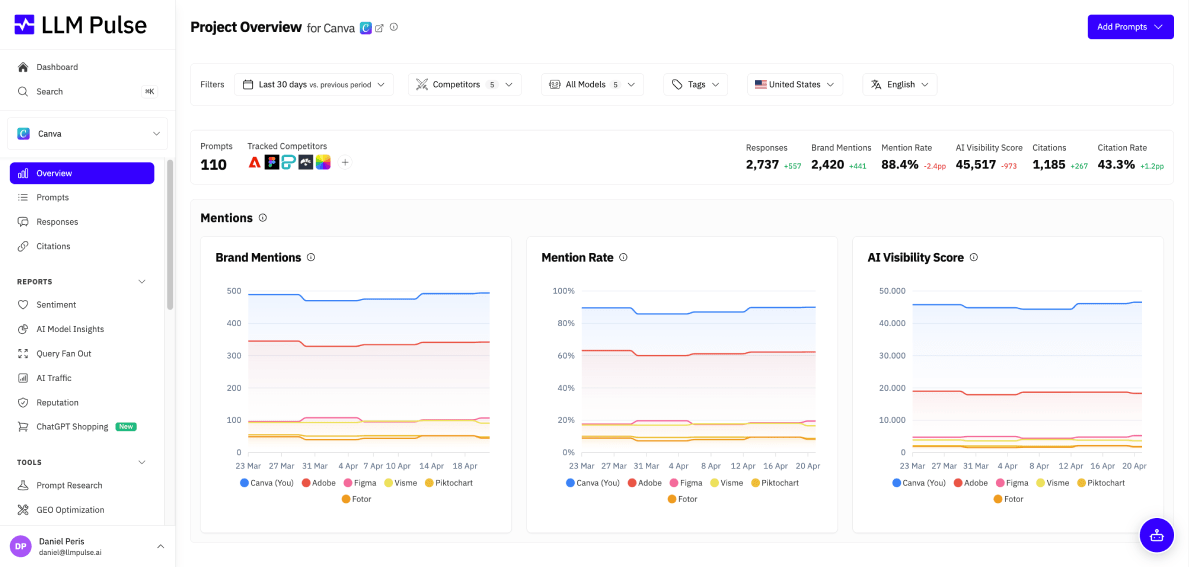
A few features that make this practical:
- Cross-model tracking. See your visibility across ChatGPT and 4+ other AI models in one dashboard, instead of checking each one manually.
- Citation tracking. Know exactly which of your pages are being cited by AI models, and which competitor pages are getting cited instead.
- Sentiment analysis. Track whether AI models describe your brand positively, neutrally, or negatively.
- Share of voice. See how your brand’s AI visibility compares to your top competitors, broken down by prompt category.
- GEO Writer. Create briefs, articles, and content updates using your project’s prompts, citations, and competitor data.
- ChatGPT Shopping & ChatGPT Entities. Track product-level mentions inside ChatGPT’s shopping answers and see how ChatGPT frames your brand as an entity, not just whether you’re named.
- GEO Testing. A/B test content changes and measure their ChatGPT visibility lift before rolling them out site-wide, so ranking tactics become experiment-driven.
- Reputation monitoring. Dedicated workflows to track and defend how ChatGPT describes your brand over time, not just how often.
- Web Analytics integration. Connect GA4 or Plausible to see the actual traffic ChatGPT drives when you do get mentioned.
- Chrome Extension (Query Detector). Captures web-search queries exposed in ChatGPT responses, so you can add useful ones to your tracked prompt set.
Think of it as your AI search visibility command center: it shows you where you stand and what to fix.
“We’re seeing more buying decisions start inside ChatGPT, before users ever reach traditional search. That changes the game. It’s no longer just about being visible on Google, it’s about understanding whether your brand shows up in AI answers, in what context, and how consistently. The problem is you can’t check that manually. Without proper tracking, you’re making decisions blind in a channel that is already influencing demand.
Common mistakes that hurt ChatGPT rankings (visibility)
Avoid these pitfalls that actively work against your AI visibility efforts.
Blocking the wrong crawler in robots.txt. Blocking OAI-SearchBot can prevent page content from appearing in ChatGPT search summaries and citations. GPTBot is a separate control for potential model training. Review each crawler by purpose and make an intentional decision.
Publishing thin content without original insights. Rewriting what already exists on the internet adds no value. ChatGPT has access to all of those sources already. Original data, unique perspectives, and first-hand experience are what make your content worth citing.
Using one search engine as a proxy for ChatGPT. OpenAI documents several search and content sources. Maintain broad search visibility, then measure ChatGPT mentions and citations directly.
Not monitoring AI visibility at all. Most companies still don’t track how they appear in AI-generated responses. By the time they realize they’re invisible in ChatGPT, competitors have already established their position. Start tracking your AI visibility now while the channel is still young.
Note: to effectively measure how your brand appears in ChatGPT, you need more than traditional SEO tools. Since responses are dynamic and vary by prompt, tracking visibility requires specialized platforms. If you want to go deeper, check out this guide to the best tools for monitoring your brand’s presence, mentions, and citations in ChatGPT.
FAQ
How long does it take to rank in ChatGPT?
There is no fixed timeline. Search discovery, crawling, indexing, retrieval relevance, and answer variability all affect when a page may appear. Monitor a stable prompt set over time instead of promising a result within a set number of weeks.
Can I pay to rank in ChatGPT?
Not for organic answer placement. Your organic visibility depends on the quality, authority, and consistency of the sources ChatGPT retrieves. Separately, OpenAI now documents ChatGPT Ads, OAI-AdsBot, conversion measurement, and advertiser APIs, so paid advertising should be treated as its own channel rather than a shortcut into organic ChatGPT recommendations.
Does ChatGPT give the same answers to everyone?
No. Responses vary based on how the question is phrased, the user’s conversation history, whether browsing is enabled, and even random variation in the model’s output. This is why monitoring a broad set of prompts over time gives you a much more accurate picture than checking a single query once.
How often does ChatGPT update its search results?
ChatGPT Search can pull real-time web results through OpenAI search systems, partner content, OpenAI crawlers, and third-party search providers. The underlying model’s training data is updated periodically, so there are still two freshness layers: what ChatGPT “knows” from training and what it can retrieve live through search.
Is ranking in ChatGPT the same as ranking in Google?
No, and this is a critical distinction. Google ranks web pages in a list. ChatGPT synthesizes information from multiple sources into a single conversational answer. You might rank #1 on Google but not appear in ChatGPT at all, or vice versa. The strategies overlap (quality content, authority, freshness), but AI visibility requires its own approach and its own tracking.
What tools can track ChatGPT mentions?
LLM Pulse tracks brand mentions, citations, and share of voice across ChatGPT, Perplexity, Gemini, Google AI Mode, and Google AI Overviews. Sentiment analysis is included. Plans start at €49/month.