




Last updated: October 5, 2026
If you are tracking your brand across AI search and LLMs, you already know the pain: every model has its own surface, the data lives in a different place, and your stakeholders just want one dashboard they can open in Looker Studio next to GA4 and Search Console.
Table of Contents
That is exactly why we built the LLM Pulse Looker Studio template, a free, ready-to-copy report that visualises your AI visibility metrics across ChatGPT, Perplexity, Gemini, Google AI Overviews, and Google AI Mode. Pair it with our free community connector and you have a live AI search dashboard that refreshes every time you open the report.
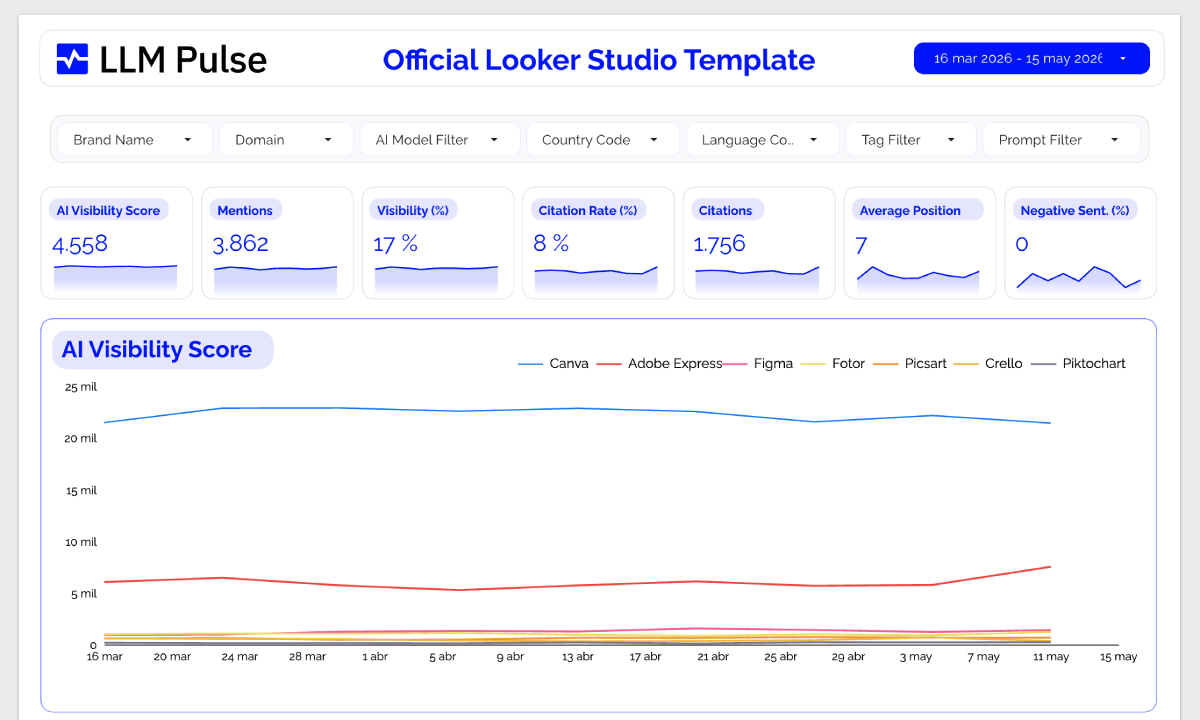
What you get with the free Looker Studio template
The template is a fully designed multi-page Looker Studio report. You copy it once, point it at your LLM Pulse data via the connector, and every chart populates automatically.
- AI visibility score over time, position-weighted across all the models you track
- Mention rate (the percentage of AI answers that mention your brand)
- Citation rate (the percentage of AI answers that link to your domain)
- Average position of visible citations in AI responses
- Share of voice against your competitors, side by side
- Sentiment breakdown (very positive, positive, neutral, negative, very negative) and a net sentiment score from -100 to +100
- Per-model splits so you can see exactly where you win and where you are invisible
- Date range selectors for 7, 30, 90, or 180 days, with daily, weekly, or monthly granularity
Every chart is pre-built, pre-styled, and ready to drop into a client deck or an internal QBR.
Get the free Looker Studio template
Step 1. Open the template here: LLM Pulse Looker Studio template
Step 2. Click Use my own data or Make a copy in the top right corner of the report. Looker Studio will prompt you to swap the demo data source for your own.
Step 3. Install the free LLM Pulse community connector here: LLM Pulse Looker Studio connector
Step 4. Paste your LLM Pulse API key, pick the project you want to visualise, tick the metrics and competitors you care about, and click Connect.
That is it. The whole flow takes about five minutes, and you do not need to write a single line of code or build a single chart.
Why a Looker Studio template (and not just a CSV export)?
CSV exports are great for one-off analyses. They are not great for the reality of modern AI search reporting, which is:
- Data changes every week as new prompt executions land
- Stakeholders want a single link they can refresh, not a file dropped in Slack
- Agencies need white-label, branded dashboards per client
- Teams already live in Looker Studio for SEO, paid, and analytics reporting
A live Looker Studio template solves all four. It is the closest thing to a single AI search command center you can pin to a TV in the office.
What “free” means here
We get this question a lot, so let us be precise:
- The template is free. You copy it from the link above at no cost.
- The connector is free. It is a public Google Apps Script community connector, no separate license required.
- Looker Studio is free. Google does not charge for the standard Looker Studio product used here.
- The data behind it comes from your LLM Pulse account. You need an active LLM Pulse subscription with API access to populate the template with your own brand data. See current LLM Pulse pricing for plan details.
If you only need a quick look at AI visibility for a handful of prompts, LLM Pulse plus the template is enough to produce a client-ready dashboard in an afternoon.
Metrics available in the template
Every metric the connector exposes is wired into the template out of the box, but you can also build custom charts on top of the same data source.
| Metric | What it measures | Aggregation |
|---|---|---|
| Mentions | Number of AI answers that mention your brand | SUM |
| Citations | Number of AI answers that link to your domain | SUM |
| Mention rate | Share of AI answers that mention your brand | AVG (0 to 1 scale) |
| Citation rate | Share of AI answers that cite your URL | AVG (0 to 1 scale) |
| Average position | Average visible citation position (lower is better) | AVG |
| AI visibility score | Position-weighted visibility (the headline KPI) | AVG |
| Responses | Total prompt executions tracked | SUM |
| Sentiment (5 buckets) | Very positive, positive, neutral, negative, very negative | AVG (0 to 1 scale) |
| Net sentiment | Net sentiment score from -100 to +100 | AVG |
Available dimensions: date, actor type (your brand vs. competitor), actor name, actor domain, and actor ID. You can slice every metric by any of these.
If you’d like to learn more about GEO / AI Search KPIs, we have a comprehensive article covering them in depth.
Filters built into the connector
The connector exposes the same filters you would expect from a serious AI visibility tool, configurable per data source:
- Tag filter, useful for tracking specific prompt collections or themes
- Prompt filter, to drill into a single query and watch it move week to week
- AI model filter, to isolate ChatGPT, Perplexity, Gemini, AI Overviews, or AI Mode
- Country and language filters, for international brands tracking visibility across geographies
- Competitor selector, with auto-include-all if you leave it blank
One template, multiple data sources: agencies often duplicate the connector once per client and stack them in the same report.
Common Looker Studio reporting use cases
1. Weekly AI visibility scorecard
Drop the AI Visibility Score time-series chart on the first page, add your top three competitors as comparison lines, and you have an executive-ready weekly snapshot of how your brand is trending inside AI search.
2. Per-model breakdown
Filter the same data source by AI model to spot patterns. A brand might dominate Perplexity citations, lag behind on ChatGPT mentions, and be completely absent from Google AI Overviews. The per-model split makes those gaps obvious.
3. Sentiment monitoring
Pull the net sentiment score and the five sentiment buckets into a single panel. This is the fastest way to spot when AI models start describing your brand in negative terms, which is a leading indicator for reputation issues weeks before they show up anywhere else.
4. Share of voice vs. competitors
Stack your mentions against your tracked competitors over time. The connector auto-includes every competitor in the project if you do not pick specific ones, which is ideal for share-of-voice charts.
5. Blending with Google Analytics and Search Console
Looker Studio lets you blend the LLM Pulse data source with GA4, Search Console, or any other connector on the date field. This is how you correlate AI visibility shifts with referral traffic from AI assistants and organic clicks from Google.
White-label and agency reporting
This template is one of the reasons agencies adopt LLM Pulse for AI search reporting. The Looker Studio integration lets you brand client reports. Full LLM Pulse white-label access is arranged separately. You can:
- Duplicate the template once per client and brand it with their colours and logo
- Share view-only links with stakeholders who do not need a LLM Pulse seat
- Combine LLM Pulse data with the rest of the client’s reporting in a single Looker Studio dashboard
- Use unlimited seats so the whole agency team can work on the same projects
Because the connector authenticates per API key, you can keep one Looker Studio template and switch which client’s data flows into it by changing the data source configuration. No duplicated charts to maintain.
Troubleshooting the free template
“Unable to fetch data”
The API key you pasted is invalid, expired, or belongs to an account without API access. Verify that the key starts with llmpulse_ and check your current plan on the pricing page.
Charts show gaps
Gaps usually mean there were no prompt executions on those days. Weekly plans produce weekly data points, while daily plans produce fresh data every day. Match the chart granularity to the cadence of the LLM Pulse plan feeding the report.
Mention rate looks like 0.45 instead of 45%
That is correct. Looker Studio’s PERCENT fields use a 0 to 1 scale internally, then format the value with a % symbol on the chart. A value of 0.45 is displayed as 45% on any chart configured for percentage formatting.
Competitor data missing
If you selected specific competitors and they do not appear, they may simply have no mentions in the date range you picked. Try widening the range to 90 or 180 days. If you left the competitor list empty, all competitors in the project are auto-included.
Beyond Looker Studio: other ways to plug in
The Looker Studio template is the fastest path, but it is one of several ways to get LLM Pulse data into your reporting stack:
- REST API: full programmatic access with timeseries, summary, share of voice, and dimension endpoints
- MCP integration: query LLM Pulse data directly from Claude, ChatGPT, and other MCP-aware AI clients
- CSV and Excel exports: one-click downloads from every report in the app
- Webhooks: trigger supported downstream events such as new mentions, citations, negative sentiment, and completed executions
Most teams end up using a combination: the Looker Studio template for stakeholder reporting, MCP for ad-hoc analysis inside their AI assistant, and the API for custom data warehouse pipelines.
Summary
If you have been searching for a free Looker Studio template (or Data Studio template, the old name) to track AI search and LLM visibility, the LLM Pulse template is the most complete one out there. It is free, it works in five minutes, and it gives you the same metrics that brands and agencies are using to defend their visibility across ChatGPT, Perplexity, Gemini, and Google’s AI features.
Grab the free Looker Studio template here, install the free LLM Pulse connector here, and see current LLM Pulse pricing if you want to populate it with your own data.
FAQ
Is the Looker Studio template really free?
Yes. The template and connector are free. You need an active LLM Pulse account with API access to provide your data. See current LLM Pulse pricing for plan details.
Does this work with Google Data Studio?
Looker Studio is the new name for Google Data Studio. It is the same product, so any guide referring to a “Data Studio template” applies here as well. The template opens inside Looker Studio.
Which AI models does the template track?
By default, every model your LLM Pulse project tracks: ChatGPT, Perplexity, Gemini, Google AI Overviews, and Google AI Mode. Paid accounts can add Claude, Copilot, Grok, DeepSeek, Naver AI Briefing, Baidu AI and Meta AI themselves. Alexa for Shopping is available as a self-serve paid add-on. Further models are available through Talk to sales.
Can I customise the template?
Yes. Once you copy it, it is your own report. Add charts, change colours, drop in your logo, blend with other data sources, build calculated fields, anything Looker Studio supports.
How often does the data refresh?
The connector fetches fresh data each time Looker Studio loads the report. The underlying data updates on your plan’s cadence, weekly or daily, so new points appear after each scheduled run.
Can I use the template for multiple clients?
Yes, and this is exactly how agencies use it. Duplicate the template per client, configure a new data source with that client’s API key, and white-label the report with their branding.
What is the difference between the connector and the REST API?
The connector is purpose-built for Looker Studio dashboards, with a UI configuration flow. The REST API is for code, scripts, and custom integrations. They share the same data but expose it differently. Most teams use both.
Do I need technical skills to set this up?
No. The whole flow is: click the template link, click the connector link, paste your API key, pick a project, click Connect. No code, no SQL, no spreadsheets.